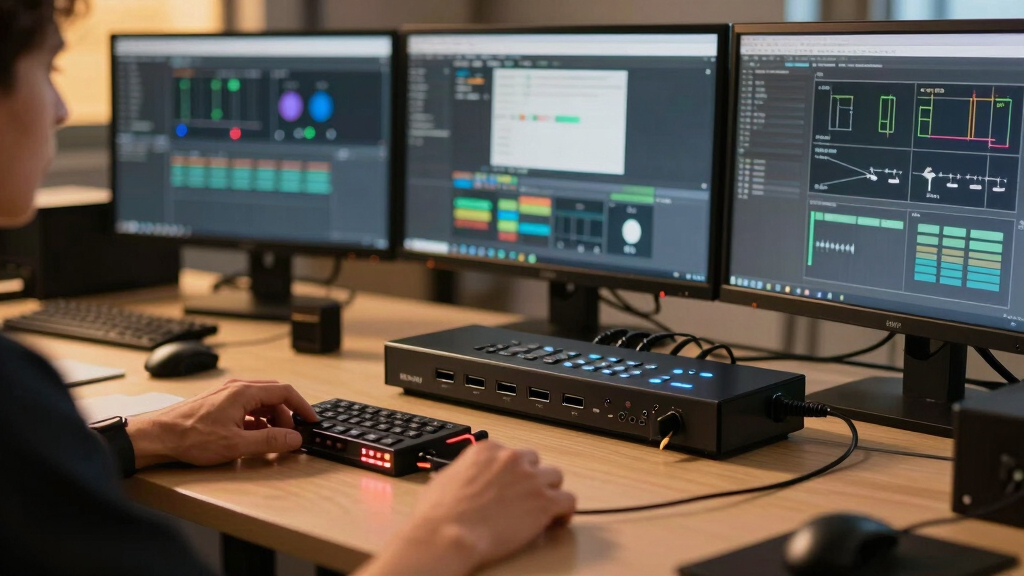
For multi-system studios managing several computers and displays, choosing the right HDMI KVM switch can streamline workflow and reduce clutter. The UGREEN HDMI KVM Switch 2 Monitors stands out as the best overall for its reliable dual-monitor support and extensive connectivity. The 8K KVM Switch with 3 Monitors is a top pick for those needing ultra-high resolutions and multiple displays, while the MT-VIKI 8 Port KVM offers expansive rack-mount capability for larger setups. These options reflect common tradeoffs: higher performance often comes with increased complexity or cost. Continue reading for a detailed breakdown of each model to help you find the best fit for your studio.
Key Takeaways
- Top-tier models support multi-monitor configurations with high refresh rates, essential for professional video editing and 3D work.
- Connectivity options like USB 3.0 and DisplayPort significantly enhance compatibility with modern peripherals and high resolutions.
- Build quality and rack-mount features matter for larger studios, but they often increase the price and setup complexity.
- Support for extended and duplicate display modes varies; choosing the right depends on whether you prioritize productivity or presentation.
- While many switches support 4K and even 8K resolutions, ensure your hardware and cables match these capabilities for optimal performance.





More Details on Our Top Picks
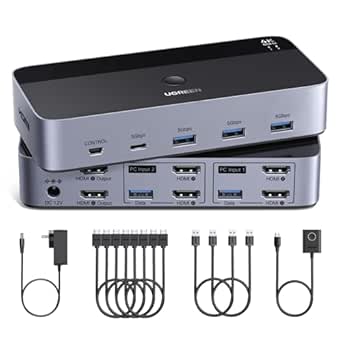
UGREEN HDMI KVM Switch 2 Monitors 2 Computers 4K@60Hz, with 4 USB 3.0 Ports for 2 Computers Sharing 2 Monitors Keyboard Mouse Printer with 4 HDMI Cables, 2 USB Cables, Power Adapter and Controller
This UGREEN model stands out for supporting dual-monitor setups with a resolution up to 4K@60Hz, making it ideal for professional multi-system environments. Compared to the MT-VIKI 8 Port KVM Switch, it offers a straightforward plug-and-play experience without rack-mount options but sacrifices some expandability and port count. Its USB 3.0 ports enable faster data transfer, which benefits users managing multiple peripherals. However, a notable tradeoff is the lack of hotkey switching or EDID management, which could limit seamless switching in complex setups. This switch suits users who need reliable dual-monitor control with high resolution and USB sharing without extensive expansion options. It’s less suitable for those requiring more than two monitors or rack-mount configurations.
Pros:- Supports 4K@60Hz resolution for crisp visuals
- Includes four USB 3.0 ports for fast peripheral sharing
- Plug-and-play with no driver installation
Cons:- No hotkey switching or EDID emulation
- Limited to two monitors only, not expandable
Best for: Professionals needing a simple, high-resolution dual-monitor KVM with multiple USB device sharing.
Not ideal for: Users requiring more than two monitors or rack-mountable enterprise-grade solutions.
- Supports Resolution:4K@60Hz
- USB Ports:4 USB 3.0
- Number of Monitors:2
- Number of Computers:2
- Material:Plastic/Metal
- Operation Mode:Plug-and-play
Bottom line: This pick is perfect for users wanting high-res dual-monitor control with easy setup and USB sharing in a professional or home office environment.
This 8K-capable KVM switch excels in supporting three monitors, with resolutions up to 8K@60Hz and 4K@120Hz, making it suitable for high-end graphics work or immersive gaming setups. Compared to the MT-VIKI 8 Port KVM Switch, it offers more extensive multi-monitor support, including DisplayPort options, but requires compatible hardware supporting multi-display output and high-quality cables for optimal performance. Its dual connection for HDMI and DisplayPort allows flexible configurations, although the complexity of setup and higher cost may deter casual users. It’s best for professionals working with high-resolution content or multi-monitor workflows, but less ideal for those with simpler single or dual-monitor needs.
Pros:- Supports resolutions up to 8K@60Hz and 4K@120Hz
- Includes both HDMI and DisplayPort inputs for versatile setup
- Supports extended and duplicate display modes
Cons:- Requires compatible high-end graphics cards and cables
- Complex setup and higher price point
Best for: Graphic designers, video editors, and gamers requiring triple-monitor support at 8K or 4K high refresh rates.
Not ideal for: Users with basic single or dual monitor setups or limited hardware support for multi-display output.
- Supports Resolution:8K@60Hz / 4K@120Hz
- Inputs:2 DisplayPort, 1 HDMI
- USB Ports:4 USB 3.0
- Number of Monitors:3
- Operation Mode:Extended/Duplicate
- Material:Metal
Bottom line: This switch is ideal for demanding professionals or enthusiasts needing ultra high-resolution multi-display control with flexible input options.
MT-VIKI 8 Port KVM Switch HDMI, 4K@30Hz 1U Rack Mount KVM Switch w/IR Remote & Wire-Desktop Controller & 8 HDMI KVM Cables & Rack Ears & Power Adapter
This 8-port rack-mount KVM from MT-VIKI offers a robust solution for managing multiple computers in server rooms or data centers, with support for 4K@30Hz resolution. Compared to the UGREEN 2 Monitor Switch, it provides more ports and rack-mountability, though at a slightly lower maximum resolution and refresh rate. The inclusion of an IR remote and desktop controller enhances usability in high-density setups, but the 30Hz refresh rate limits its suitability for fast-paced gaming or high-refresh-rate workflows. This device is tailored for IT professionals needing a durable, rack-mount solution for multi-system control, making it less suited for casual or home users.
Pros:- Rack-mountable 1U design for professional setups
- Supports 4K@30Hz for high-quality visuals
- Includes IR remote and desktop controller for easy switching
Cons:- Limited to 30Hz refresh rate at 4K
- Requires rack mount space and infrastructure
Best for: Data centers, server rooms, or IT professionals needing multi-computer control in a rack-mountable form factor.
Not ideal for: Home users or gamers seeking higher refresh rates or dual-monitor support.
- Supports Resolution:4K@30Hz
- Ports:8 HDMI
- Mounting:1U Rack
- Remote Control:IR + Desktop Controller
- Operation Mode:Manual
- Material:Metal
Bottom line: This switch is perfect for professional multi-system management in rack environments, though it’s less suited for high-refresh-rate or gaming applications.
The Jancane 2-port KVM switch offers a compact and straightforward solution for controlling two computers with one monitor at 4K@60Hz. Its small footprint makes it ideal for limited desk space, and the included cables simplify setup. Compared with the UGREEN Dual Monitor Switch, it supports only one monitor but provides a simple, driver-free experience suitable for home or small office use. Its main tradeoff is the limited number of ports and monitors, making it less suitable for multi-monitor or enterprise environments. This switch makes sense for users needing high-resolution control of two systems in a space-constrained environment.
Pros:- Supports UHD 4K@60Hz resolution
- Compact size with easy setup
- Includes cables for quick installation
Cons:- Limited to 2 computers and one monitor
- No multi-monitor support or advanced features
Best for: Home users or small offices needing a compact, high-resolution dual-system switch.
Not ideal for: Professionals requiring multi-monitor support or extensive USB port expansion.
- Supports Resolution:4K@60Hz
- USB Ports:2 USB 3.0
- Monitors Supported:1
- Number of Computers:2
- Operation Mode:Manual
- Material:Polycarbonate
Bottom line: This switch is ideal for space-conscious users needing reliable 4K control of two computers with minimal fuss.
This 4-port KVM switch from GREATHTEK effectively manages four computers with two monitors at 4K@60Hz, making it suitable for complex multi-system setups. It supports adaptive EDID, ensuring compatibility across different displays, and offers button switching for quick control. Compared to the UGREEN 2 Monitor Switch, it provides more ports and support for multiple systems, but sacrifices some flexibility in monitor configurations, as it only supports two monitors in extended or mirrored modes. Its durable metal construction makes it suitable for professional environments, though the higher port count comes with increased cost. This product suits users needing to control several systems with high-resolution outputs and multiple USB peripherals.
Pros:- Supports 4K@60Hz resolution for crisp visuals
- Manages four computers with two monitors
- Includes multiple USB 3.0 ports and cables
Cons:- Limited to dual monitor output modes
- Button switching may be less flexible than hotkeys
Best for: Environments requiring management of multiple systems with dual monitors and USB peripherals, such as control rooms or small server farms.
Not ideal for: Casual users or those with single or dual monitor setups only, due to its complexity and port density.
- Supports Resolution:4K@60Hz
- Ports:4 HDMI, 3 USB 3.0
- Monitors:2
- Number of Computers:4
- Operation Mode:Button
- Material:Metal
Bottom line: This switch is excellent for multi-system control with high-res output and multiple peripherals in professional setups.
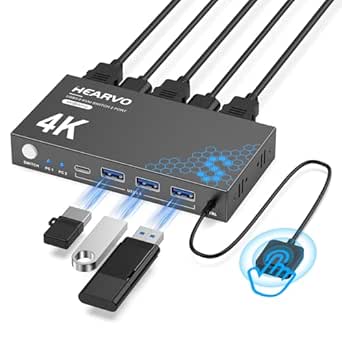
Hearvo USB 3.0 HDMI KVM Switch 1 Monitor 2 Computers, 8K@60Hz KVM Switches for 2 Computers Sharing Monitor Keyboard Mouse Hard Drives Printer,with EDID Adaptive,2*USB Cable and Controller -S7229H
This Hearvo model stands out for seamlessly controlling two computers with a single monitor at 8K@60Hz, surpassing many competitors like the UGREEN 8K@60Hz HDMI KVM Switch which supports only up to 4K. Its adaptive EDID ensures stable image transmission, and the inclusion of both USB-A and USB-C ports enhances peripheral sharing. The wired remote switch adds convenience, especially in cluttered setups. However, it requires three HDMI cables and no power supply, which could be a drawback for users with complex configurations. Compared with the Dual Monitor KVM Switch HDMI Two Port 4K, this model supports higher resolution and more flexible device recognition, making it ideal for demanding multi-system workflows. The main tradeoff is the need for multiple high-quality HDMI cables and the absence of a dedicated power supply, which may complicate installation in some environments.
Pros:- Supports ultra-high 8K@60Hz resolution for detailed visuals
- Adaptive EDID for stable, seamless display transmission
- Includes both USB-A and USB-C ports for broad peripheral compatibility
- Remote wired control for convenience in cluttered environments
Cons:- Requires three HDMI cables and no included power supply, increasing setup complexity
- Higher price point due to advanced features
Best for: Professionals in high-resolution multi-system studios needing reliable 8K performance and versatile peripheral sharing.
Not ideal for: Casual users or those with limited space who only require basic 4K support or simpler setups.
- Resolution Support:8K@60Hz
- HDMI Version:HDMI 2.1
- USB Ports:4 (3x USB-A, 1x USB-C)
- Display Compatibility:HDCP 2.3
- Cable Requirements:3 HDMI, 2 USB
- Switching Method:Wired remote and push button
Bottom line: This switch suits users demanding top-tier resolution and flexible device management in complex studio setups.
Hearvo USB 3.0 HDMI KVM Switch 1 Monitors 2 Computers, 4K@60Hz KVM Switches for 2 Computers Sharing Monitor Keyboard Mouse Hard Drives Printer, with EDID Adaptive, 2USB Cable and Controller -S7232H
This Hearvo model makes the list as a highly affordable option that still supports 4K@60Hz, comparable in performance to the UGREEN 8K@60Hz HDMI KVM Switch. Its adaptive EDID feature promotes stable display output, and the inclusion of a wired remote allows for easy switching across two computers. It offers broad OS compatibility, including Windows, Mac, and Linux, and four USB 3.0 ports for peripherals. Still, it lacks 8K support and does not come with a power supply, which might limit its use in high-end applications. Compared with the Dual Monitor HDMI KVM Switch which supports dual monitors, this single-monitor device is better suited for users with space constraints or less demanding resolutions. The main tradeoff involves not supporting higher resolutions like 8K, making it less ideal for cutting-edge studios but excellent for most 4K workflows at a lower price point.
Pros:- Supports 4K@60Hz resolution for crisp visuals
- Adaptive EDID ensures stable image quality
- Includes a wired remote control for easy switching
- Broad OS compatibility and multiple USB ports
Cons:- Limited to 4K resolution, not suitable for 8K workflows
- No power supply included, potentially limiting device stability with high-power peripherals
Best for: Smaller studios or professionals seeking reliable 4K performance on a budget without sacrificing compatibility.
Not ideal for: High-end studios requiring 8K support or multi-monitor configurations beyond single display.
- Resolution Support:4K@60Hz
- HDMI Version:HDMI 2.0
- USB Ports:4 (3x USB-A, 1x USB-C)
- Compatibility:Windows, Mac, Linux
- Switching Method:Wired remote and push button
- EDID Support:Adaptive
Bottom line: Ideal for budget-conscious users needing dependable 4K support in a straightforward setup.
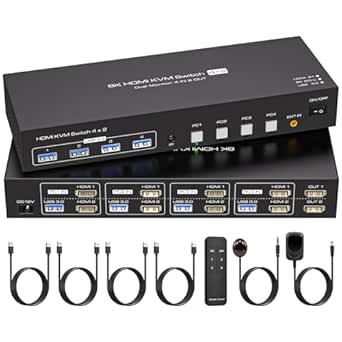
This ATLAHET 4-port dual monitor KVM switch is tailored for advanced multi-monitor setups, supporting up to 8K@60Hz and 4K@120Hz, surpassing many single-monitor switches like the UGREEN 8K@60Hz HDMI KVM. Its dual-monitor support enables extended or duplicated displays across four PCs, ideal for design, monitoring, or multi-tasking environments. The built-in EDID emulation ensures quick recognition and stable display parameters. It’s compatible with major systems and includes four USB 3.0 ports for peripherals, plus a 12V power supply for stable operation. However, its complexity and size may make it less suitable for small or simple setups, and it requires specific hardware configurations like dual graphics cards for dual monitors. Compared with single monitor models, this switch excels in environments needing multiple displays and high resolution, though it involves a more intricate setup process. The main tradeoff is its larger footprint and higher power needs, making it less portable for casual use.
Pros:- Supports up to 8K@60Hz and 4K@120Hz for high-fidelity visuals
- Dual monitor support for extended or duplicated displays
- Built-in EDID for quick recognition and stable display
- Includes four USB 3.0 ports and external power supply
Cons:- Requires specific hardware setup with dual graphics cards
- Larger size and higher power consumption may limit portability
- More complex installation process
Best for: Design studios, security monitoring, or research labs requiring multiple high-resolution displays and multi-PC control.
Not ideal for: Home users or small studios with limited space or simpler single-monitor needs.
- Resolution Support:8K@60Hz, 4K@120Hz
- Monitor Support:Dual HDMI outputs
- USB Ports:4 (USB 3.0)
- Power Supply:12V external
- Switching Method:Panel buttons
- System Compatibility:Windows, Mac, Linux
Bottom line: This switch is best suited for high-end multi-monitor environments demanding maximum resolution and multi-PC control.
4 Port Dual Monitor HDMI KVM Switch 4 Computers 2 Monitors 8K 60Hz 4K 120Hz KVM Switches for Four PC Share Four USB 3.0 Devices Support Copy and Extend Mode 23CM Longth
This ATLAHET 4-port dual monitor KVM switch excels in environments where multiple PCs need to control two monitors at high resolutions, supporting up to 8K@60Hz and 4K@120Hz—outperforming many single-monitor switches like the Hearvo 8K@60Hz. Its dual monitor support with extended and duplicate modes provides flexibility for multitasking or synchronized displays, ideal for professional or surveillance setups. The device includes four USB 3.0 ports and an external power adapter, ensuring stable operation with high-power peripherals. Its plug-and-play design and compatibility with Windows, Mac, and Linux make it versatile. However, it requires specific hardware configurations, such as dual HDMI outputs and external power, which could complicate installation in limited spaces. Compared to simpler single-monitor models, this switch offers unmatched multi-monitor capability at the cost of increased complexity and size. It’s perfect for demanding multi-PC multi-monitor setups but less suitable for casual or portable environments.
Pros:- Supports up to 8K@60Hz and 4K@120Hz for detailed visuals
- Dual monitor support for flexible display modes
- Includes external power for stable operation with high-power USB devices
- Supports extended and duplicate modes
Cons:- Requires compatible hardware with dual HDMI outputs
- Larger size and more complex setup compared to single monitor switches
- Dependence on external power supply
Best for: Tech professionals, security operators, or multi-taskers needing multiple high-resolution displays and seamless control of four PCs.
Not ideal for: Casual users or those with minimal space who only require single-monitor support or lower resolutions.
- Resolution Support:8K@60Hz, 4K@120Hz
- Monitor Outputs:2 HDMI
- USB Ports:4 (USB 3.0)
- Power Supply:12V external
- Display Modes:Copy and Extend
- Compatibility:Windows, Mac, Linux
Bottom line: This switch is ideal for multi-monitor, multi-PC environments demanding maximum resolution and display flexibility.
The UGREEN 8K@60Hz HDMI KVM switch offers a comprehensive package with four HDMI and USB cables, making it highly suitable for complex multi-PC setups that demand high resolution. Its aluminum build enhances durability, and supporting 8K@60Hz aligns it with top-tier professional standards, outperforming many switches like the Hearvo 8K@60Hz which does not include a full cable set. The device supports extended and duplicate modes, with a simple button control, ideal for office or studio environments where multiple high-end systems operate simultaneously. However, its size and the need for an external power connection may limit portability and ease of setup. Compared to models without bundled cables, this offers better value for plug-and-play high-resolution control, especially for users who want a ready-to-use package. The main tradeoff is its bulk and dependency on external power for stable operation.
Pros:- Supports ultra-high 8K@60Hz resolution for detailed visuals
- Includes four HDMI and USB cables for immediate setup
- Aluminum durable housing for extended use
- Supports extended and duplicate display modes
Cons:- Bulkier size and requires external power supply
- Price may be higher due to bundled accessories
- Complex setup for users unfamiliar with multi-PC configurations
Best for: Professionals managing multiple high-resolution computers needing a ready-to-use, durable, and comprehensive control solution.
Not ideal for: Casual users or small studios with limited space or lower resolution needs, where a simpler switch would suffice.
- Resolution Support:8K@60Hz
- HDMI Ports:4
- USB Ports:4
- Included Cables:4 HDMI, 4 USB
- Material:Aluminum
- Switching Method:Button
Bottom line: This switch is best suited for high-end multi-PC environments that require robust, high-resolution switching with ready-to-use accessories.
This UGREEN KVM switch stands out for supporting ultra-high resolutions up to 8K@60Hz across three monitors, making it ideal for content creators and professionals needing crisp visuals. Unlike the simpler 2-monitor models like the UGREEN HDMI KVM Switch, this unit handles triple displays, but that comes with more complex setup requirements. Its support for HDMI 2.1 and DisplayPort 1.4 ensures compatibility with high-end graphics cards and displays, offering a significant advantage for demanding workflows. However, the need for each computer to support triple monitor output and the requirement for multiple cables can complicate installation, especially for less tech-savvy users. The switch supports HDR10+, VRR, and G-Sync, optimizing visual quality and eliminating tearing during fast-paced activities. The inclusion of a desktop controller facilitates external switching, keeping the workspace tidy. Its compatibility with Windows, macOS, and Linux broadens usability, but the high-end features make it better suited to specialized professional environments. This pick makes the most sense for users with high-resolution multi-monitor setups who prioritize performance and flexibility over simplicity.
Pros:- Supports ultra-high resolutions up to 8K@60Hz for demanding visual workflows
- Handles triple monitor setups with dedicated DisplayPort and HDMI ports
- Includes a desktop controller for convenient external switching
- Supports HDR10+, VRR, and G-Sync for optimal visual quality
Cons:- Requires each computer to support triple monitor output, limiting compatibility
- Installation is complex due to multiple cables and setup prerequisites
- Higher cost compared to simpler dual-monitor switches
Best for: Content creators, video editors, and IT professionals working with triple 8K or high-refresh-rate displays.
Not ideal for: Casual users or smaller studios that only need dual 4K displays, as the setup complexity and high cost are unnecessary for simpler needs.
- Resolution Support:8K@60Hz, 4K@240Hz
- Ports:2x DisplayPort 1.4, 1x HDMI 2.1
- USB Ports:4 USB 3.0
- Supported Systems:Windows, MacOS, Linux
- Switching Methods:Button, Desktop Controller
- Cable Length:Within 2 meters for 8K
Bottom line: This KVM switch is best suited for high-end, multi-monitor environments where maximum resolution and advanced features justify the setup complexity.

How We Picked
To determine the best HDMI KVM switches for multi-system studios, I evaluated each product based on performance, compatibility, build quality, and ease of setup. Priority was given to support for multiple high-resolution monitors, USB device compatibility, and reliable switching mechanisms. Cost-effectiveness was also considered, especially for studio environments where multiple units may be needed. Products were ranked to reflect their suitability for professional multi-system workflows, balancing advanced features with user-friendly design. This approach ensures recommendations serve both demanding users and those seeking straightforward solutions.Factors to Consider When Choosing Best HDMI KVM Switches For Multi-system Studios
Selecting the right HDMI KVM switch for your multi-system studio requires understanding key features that impact workflow, compatibility, and scalability. Beyond basic port counts, consider how the switch handles high resolutions, refresh rates, and multiple monitors. Ease of installation and management are equally important, especially in larger setups. Evaluating these factors helps prevent bottlenecks and ensures your studio remains flexible as technology evolves. Here are critical considerations to guide your choice.Resolution and Refresh Rate Support
High-resolution support, such as 4K or 8K, is essential for professional video work, but ensure the switch can handle your specific needs. Refresh rates matter too; 60Hz is standard, but higher rates like 120Hz or 240Hz are necessary for gaming or high-frame-rate editing. Selecting a switch that matches or exceeds your hardware capabilities prevents bottlenecks and ensures smooth visuals across all connected devices.
Number of Monitors and Ports
Determine your current and future needs for monitor counts. Some switches support dual displays, while others facilitate triple or even quadruple setups. Consider USB ports and whether they support USB 3.0 or higher for fast data transfer. Balancing port count with ease of switching and manageability is key to avoiding clutter and confusion during operation.
Ease of Use and Switching Method
Switching should be seamless, especially in busy studio environments. Look for models with hardware buttons, remote controls, or keyboard hotkeys that suit your workflow. User-friendly interfaces save time and reduce errors, particularly when transitioning between multiple systems frequently. Also, consider whether the switch supports automatic EDID management to maintain display consistency.
Build Quality and Expandability
In professional settings, durability matters. Metal enclosures and rack-mount compatibility can withstand the rigors of studio use. Think about future expansion—whether the switch can handle additional computers or monitors as your setup grows. Investing in a robust, scalable unit prevents frequent replacements and supports long-term workflow stability.
Compatibility and Additional Features
Ensure the switch supports all your peripherals, including printers, external drives, and audio systems if needed. Compatibility with various operating systems and hardware standards (HDMI, DisplayPort) broadens usability. Features like EDID management, hot-plugging, and firmware updates add flexibility and help maintain performance as your studio’s technology evolves.
Frequently Asked Questions
Can I use a KVM switch with different resolutions on each monitor?
Yes, many HDMI KVM switches support different resolutions on each monitor, but compatibility depends on the model and its EDID management capabilities. Supports extended displays typically require specific features like EDID auto-detection to prevent resolution mismatches. Always verify that the switch can handle varying resolutions if your workflow involves different display setups.
Will a KVM switch handle high refresh rates like 120Hz or 240Hz?
Handling high refresh rates depends on the switch’s bandwidth and HDMI version support. Switches supporting HDMI 2.1 or at least HDMI 2.0 are more likely to support 120Hz or higher at 4K. Check the specifications carefully, as lower-bandwidth switches may only support 60Hz or 4K at reduced refresh rates, which could affect performance in gaming or high-speed editing.
Is it better to choose a KVM switch with remote control or hardware buttons?
Remote controls offer convenience, especially when switching between multiple systems frequently, but hardware buttons are often more reliable and faster for quick toggling. Your choice depends on workflow; studio environments with fixed setups may prefer durable hardware buttons, while dynamic environments benefit from remote controls for flexibility.
Do I need special cables or adapters for high-resolution support?
Yes, to fully utilize 4K or 8K resolutions at high refresh rates, you need certified high-speed HDMI or DisplayPort cables. Using cables that do not meet the required specifications can result in signal degradation, flickering, or resolution limitations. Always match your cables to the device’s specifications for consistent performance.
Can I connect peripherals like printers and external drives through a KVM switch?
Many KVM switches include USB ports that support peripherals like printers, external drives, and audio devices. However, this varies by model; some switches only handle keyboard and mouse. Confirm that the switch provides sufficient USB ports and supports the device types you rely on, especially if you need seamless peripheral sharing across multiple systems.