
Finding the best USB-C monitor for MacBook creators involves balancing performance, portability, and price. The LG 27UP850K-W stands out as the overall top pick thanks to its 4K resolution and versatile stand, making it ideal for detailed creative work. For those prioritizing portability, the InnoView Portable Monitor offers a compact solution with good resolution, while the ASUS VA24ECPSN provides a solid desktop option with color accuracy and adjustability. The main challenge for buyers is choosing between a highly portable device and one with premium features suitable for intensive editing or design. Keep reading for a detailed breakdown to help you find the best fit for your needs.
Key Takeaways
- The top picks balance between portability and high-resolution performance, with the LG 4K model leading for detailed work.
- Many portable monitors sacrifice some color accuracy or refresh rate, making them better for casual use or on-the-go editing.
- Built-in speakers and adjustable stands are common features that enhance usability for creative workflows.
- Connectivity options, especially USB-C with power delivery, are critical for seamless MacBook integration.
- Price varies significantly, with premium models offering better color and build quality, while budget options focus on basic functionality.



More Details on Our Top Picks
KYY Portable Monitor 15.6inch 1080P FHD USB-C, HDMI Computer Display HDR IPS Gaming Monitor w/Premium Smart Cover & Screen Protector, Speakers, for Laptop PC MAC Phone PS4 Xbox Switch
This KYY portable monitor stands out for its ultra-slim profile, competitive price, and broad compatibility, making it a practical second screen for MacBook owners on the go. Compared to larger or more feature-rich options like the Upperizon 16-inch 2K, it sacrifices some resolution but compensates with easy connection via two full-function USB-C ports and a Mini-HDMI. Its HDR support and eye-care technology deliver satisfying visual quality for multimedia tasks, although the 60Hz refresh rate limits its appeal for fast-paced gaming or high-end creative workflows. The included smart cover doubles as a stand, offering multiple viewing angles, and the built-in speakers add convenience. The tradeoff? The resolution and refresh rate are modest, and its brightness of 300 nits may fall short outdoors. This pick makes the most sense for MacBook users who prioritize portability, affordability, and straightforward connectivity for casual productivity and entertainment.
Pros:- Exceptional portability at only 1.7 pounds and 0.35 inches thick
- Versatile compatibility with USB-C, HDMI, and built-in speakers
- Includes a durable smart cover that doubles as a stand
Cons:- Limited resolution of 1080p may not satisfy high-res content creators
- 60Hz refresh rate restricts smooth gaming or video editing experiences
Best for: MacBook creators who need a lightweight, plug-and-play secondary display for travel and casual use.
Not ideal for: Professional video editors or gamers requiring high resolution and 144Hz refresh rates for demanding tasks.
- Screen Size:15.6 inches
- Resolution:1920×1080
- Refresh Rate:60Hz
- Display Technology:IPS LCD
- Brightness:300 nits
- Viewing Angle:178°
Bottom line: Ideal for MacBook users seeking a portable, affordable secondary display for light multimedia and productivity tasks.
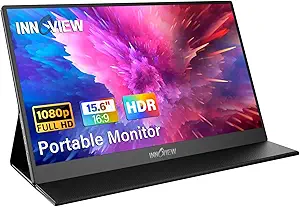
InnoView Portable Monitor, 15.6 Inch FHD 1080P HDMI USB C Second External Monitor for Laptop, Desktop, MacBook, Phones, Tablet, PS5/4, Xbox, Switch, Built-in Speaker with Protective Case
This InnoView 15.6-inch monitor offers impressive value with a full-featured setup, excellent picture quality, and a sturdy protective case, making it suitable for MacBook owners who travel frequently. Unlike the KYY model, it provides a slightly higher contrast ratio of 1200:1 and a built-in speaker, adding convenience for multimedia use. Its plug-and-play nature with USB-C and HDMI makes it easy to connect without drivers—ideal for quick setups. The 1080p resolution and HDR support ensure vibrant visuals, yet the 60Hz refresh rate and 250 nits brightness may limit its appeal for fast gaming or outdoor use. The VESA mounting option adds flexibility for desktop setups, and the included case enhances portability. The tradeoff? Slightly heavier at 2.7 pounds and less premium build than higher-end models. This monitor makes the most sense for MacBook users prioritizing affordability and portability for everyday tasks.
Pros:- Affordable price point with solid performance
- Plug-and-play connectivity with USB-C and HDMI
- VESA mount compatibility and includes a protective case
Cons:- Limited to 1080p resolution, not suitable for high-detail editing
- Brightness of 250 nits may struggle outdoors or in bright environments
Best for: MacBook creators and remote workers seeking a budget-friendly, portable second screen with good multimedia capabilities.
Not ideal for: Professional gamers or video editors needing high refresh rates and high brightness for demanding workflows.
- Screen Size:15.6 inches
- Resolution:1920×1080
- Refresh Rate:60Hz
- Display Technology:IPS LCD
- Brightness:250 nits
- Viewing Angle:178°
Bottom line: Great for MacBook owners who need a reliable, portable display for everyday multimedia and work tasks at a budget-friendly price.
Upperizon Portable Monitor 16 inch 2K QHD 2560X1600 145% sRGB 144 Hz HDR HDMI USB-C Travel Monitor for Laptop MacBook PC Surface PS5 Xbox, External Display with Kickstand & Speakers, VESA Compatible
This Upperizon 16-inch portable monitor excels in color accuracy, high refresh rate, and durability, making it a standout for MacBook creators who need a premium portable display. Its 2K resolution and 144Hz refresh rate surpass the capabilities of the lower-resolution options like the KYY and InnoView, offering smoother visuals for gaming and creative workflows. The wide color gamut (145% sRGB) and HDR support ensure vibrant, accurate images—ideal for photo editing and content creation. Its sturdy aluminum chassis and VESA compatibility add to its professional appeal, while the built-in kickstand provides flexible positioning. The main tradeoff is its weight of about 1.6 pounds, slightly more than some ultra-light models, and its higher price reflects the premium features. This monitor makes perfect sense for MacBook users needing a portable, high-performance display for both work and play.
Pros:- Excellent 2K resolution with 144Hz refresh rate
- Vivid color with 145% sRGB and HDR support
- Premium aluminum build with VESA mount and kickstand
Cons:- Slightly heavier at approximately 1.6 lbs
- Higher price point may be prohibitive for casual users
Best for: MacBook creators and gamers demanding a portable, color-accurate display with high refresh rate performance.
Not ideal for: Travelers on a tight budget or those prioritizing ultra-lightweight setups over high-end features.
- Screen Size:16 inches
- Resolution:2560×1600
- Refresh Rate:144Hz
- Display Technology:IPS LCD
- Brightness:400 nits
- Color Gamut:145% sRGB
Bottom line: Perfect for MacBook users seeking a portable, high-quality display with smooth visuals and vibrant color accuracy for professional or gaming use.
cocopar Portable Monitor 15.6 Inch 4K UHD 60Hz 145% sRGB Travel Monitor with Speaker HDMI USB-C Second Screen for Laptop MacBook Surface PC Xbox PS4/5, VESA Mountable, with Kickstand
This cocopar 4K UHD portable monitor delivers stunning visuals and vibrant colors, making it ideal for MacBook creators who require high resolution on the go. Its 15.6-inch display offers 4K resolution and a 145% sRGB color gamut, surpassing the resolution of lower-end models like the InnoView and Upperizon, and providing crisp detail for photo editing, video work, or detailed design. The ultra-lightweight metal chassis (just 1.54 pounds) and slim profile make it a portable choice, while the dual USB-C ports and HDMI support quick, plug-and-play connectivity. The built-in dual speakers and VESA mount options enhance usability in varied setups. The main tradeoff is the 60Hz refresh rate, which isn’t suitable for fast-paced gaming, and the need for Thunderbolt 3/4 support for seamless plug-and-play. This monitor is perfect for creators who want a portable, high-res display with accurate color reproduction.
Pros:- Stunning 4K resolution with accurate color (145% sRGB)
- Ultra-slim, lightweight design with durable metal chassis
- VESA mountable with dual USB-C and HDMI connectivity
Cons:- Limited to 60Hz refresh rate, less ideal for gaming
- Requires Thunderbolt or DP Alt Mode for seamless plug-and-play
Best for: MacBook creators and professionals needing high-resolution, color-accurate portability for detailed work or streaming.
Not ideal for: Gamers requiring high refresh rates or outdoor use in bright environments due to its 4K resolution and reflective matte screen.
- Screen Size:15.6 inches
- Resolution:3840×2160 (4K UHD)
- Refresh Rate:60Hz
- Display Technology:IPS LCD
- Brightness:1500:1 contrast
- Color Gamut:145% sRGB
Bottom line: Excellent for MacBook users seeking a portable, high-resolution display with precise color for professional work and streaming, not gaming.
ASUS 23.8” 1080P Docking Monitor (VA24ECPSN) – Full HD, IPS, 75Hz, Adaptive-Sync, Speakers, Eye Care, Low Blue Light, Flicker Free, USB-C, RJ45, HDMI, Frameless, Height Adjustment, VESA Wall Mountable
This ASUS monitor stands out for its extensive connectivity options, including USB-C with 65W charging, HDMI, DisplayPort, and RJ45, making it a versatile docking station for MacBook users who need a single-cable setup. Its IPS panel with 75Hz refresh rate and Adaptive-Sync technology ensures smooth, crisp visuals—ideal for creative work and multimedia. Compared with the LG 27UP850K, it offers more flexible ergonomic adjustments and built-in Ethernet, though it sacrifices some color accuracy and resolution. The frameless design and VESA compatibility make it suitable for a sleek, customizable workspace, but it’s limited to Full HD resolution, which may be less ideal for detailed editing. This pick makes the most sense for professionals who value connectivity and ergonomic flexibility over 4K detail.
Pros:- Extensive connectivity including RJ45 Ethernet and USB-C with 65W charging
- Ergonomic adjustments: tilt, swivel, pivot, height
- IPS panel with wide viewing angles and Flicker-Free eye care technology
Cons:- Limited to 1080p resolution, less suitable for detailed editing
- 75Hz refresh rate is not ideal for fast-paced gaming or high-end video editing
Best for: MacBook creators needing a versatile docking monitor with excellent connectivity and ergonomic features.
Not ideal for: High-resolution photo or video editors who require 4K or higher for detailed editing work.
- Display Size:23.8 inches
- Resolution:1920 x 1080
- Refresh Rate:75Hz
- Panel Type:IPS
- Connectivity:HDMI, USB-C, DisplayPort, RJ45
- Adjustments:Tilt, swivel, pivot, height
Bottom line: This monitor is perfect for MacBook users who prioritize connectivity, ergonomics, and a clean design over ultra-high resolution.
MacBook Pro Docking Station Dual Monitor MacBook Pro HDMI Adapter, 9 in 1 USB C Adapters for MacBook Pro Air Mac HDMI Dock Dongle Dual USB C to Dual HDMI Ethernet 3USB SD/TF100W PD
This 9-in-1 USB-C docking station excels at expanding MacBook Pro or Air into a multi-monitor setup, supporting dual HDMI outputs up to 4K@30Hz and a range of other ports including Ethernet, SD/TF card readers, and 100W Power Delivery. It’s a great choice for creative professionals who need multiple screens and fast data transfer, especially compared to the LG 27UP850K, which is a dedicated monitor rather than a dock. The compact, aluminum design complements Mac aesthetics, but it’s limited to dual HDMI at 30Hz when both are used simultaneously, which may not be smooth enough for fast motion work. The dock’s plug-and-play setup simplifies connecting multiple peripherals, though it’s less suitable for those needing 4K@60Hz dual outputs. This product makes sense for users demanding extensive port options and multi-display setups for productivity and creative tasks.
Pros:- Supports dual HDMI at 4K@30Hz with extend or mirror modes
- Includes 100W Power Delivery for charging MacBook
- Multiple ports: SD/TF, Ethernet, USB 3.0, USB-C
Cons:- Dual HDMI at 30Hz may be insufficient for fast motion editing or gaming
- Limited to HDMI 1.4 spec, capping the refresh rate at 30Hz for dual outputs
Best for: MacBook creators who need a reliable, multi-port hub to run dual monitors and peripherals simultaneously.
Not ideal for: Those requiring high-refresh-rate dual 4K displays for gaming or high-end video editing.
- Ports:HDMI, USB-C, USB 3.0, SD/TF, Ethernet
- Power Delivery:100W
- Video Output:Dual HDMI up to 4K@30Hz
- Compatibility:MacBook Pro/Air 2018-2021
- Design:Aluminum, compact
Bottom line: This dock is ideal for MacBook users needing multiple ports and dual monitors at 1080p or 4K30Hz for productivity and creative workflows.
LG 27UP850K-W 27-inch Ultrafine 4K UHD (3840 x 2160) IPS Computer Monitor, 60Hz, 5ms, DisplayHDR 400, Built-in Speaker, HDMI, DisplayPort, USB Type-C 90W PD, Tilt/Height/Pivot Adjustable Stand, White
This LG 27UP850K offers a stunning 4K resolution with wide color gamut and HDR 400 support, making it a top choice for creative MacBook users who require high resolution and accurate colors. Its USB-C port with 90W power delivery simplifies cable management, while the adjustable stand provides ergonomic flexibility. Compared with the ASUS VA24ECPSN, this monitor delivers much higher resolution and color fidelity, ideal for detailed editing. However, its 60Hz refresh rate isn’t suited for fast-paced gaming or video editing involving high motion. The built-in speakers and versatile port selection add convenience, but it’s more expensive and larger, which might be less suitable for small desk setups. This monitor is best for professionals focused on visual quality and color accuracy, especially for photo/video editing and design work.
Pros:- 4K UHD resolution with wide color gamut and HDR 400
- USB-C with 90W Power Delivery for simplified connectivity and charging
- Ergonomic stand with tilt, height, and pivot adjustments
Cons:- Limited to 60Hz refresh rate, not ideal for fast gaming or high-motion editing
- Higher price point and size may be impractical for small desks
Best for: Creative MacBook users who need 4K resolution, color accuracy, and ergonomic flexibility for editing and multimedia work.
Not ideal for: Gamers or video editors needing high refresh rates and smoother motion for fast action sequences.
- Display Size:27 inches
- Resolution:3840 x 2160
- HDR:DisplayHDR 400
- Refresh Rate:60Hz
- Connectivity:USB-C, HDMI, DisplayPort
- Stand Adjustments:Tilt, height, pivot
Bottom line: This monitor is perfect for MacBook users prioritizing high resolution, accurate colors, and ergonomic comfort for creative tasks.
Dell S2722DC Monitor – 27-inch WQHD (2560×1440) 75Hz 4Ms Display, AMD FreeSync, Built in Speaker, USB Type-C Connectivity, Height/Pivot/Swivel/Tilt Adjust – Platinum Silver
The Dell S2722DC offers a solid 1440p resolution with a fast 75Hz refresh rate and a sleek design, making it a practical choice for MacBook creators who want high-quality visuals with versatile adjustability. Its USB-C port with 65W charging and full ergonomic options—height, tilt, swivel, pivot—are comparable to the ASUS VA24ECPSN but with a higher resolution suited for multitasking and editing. Compared to the LG 27UP850K, it’s more affordable and smaller, though it doesn’t offer 4K or HDR. The monitor’s IPS panel with 99% sRGB coverage supports accurate color reproduction for creative workflows. Still, its 75Hz refresh rate, while good for most productivity tasks, isn’t ideal for fast motion work. This makes it suited for general creative work, media consumption, and multitasking.
Pros:- WQHD resolution (2560×1440) with 75Hz refresh rate
- USB-C with 65W power delivery and versatile ergonomic stand
- Excellent color accuracy with 99% sRGB coverage
Cons:- Limited to 75Hz, less ideal for high-motion video editing or gaming
- No HDR support, less suitable for HDR content creation
Best for: MacBook creators who need a high-quality, adjustable monitor with good color accuracy and WQHD resolution.
Not ideal for: Pro video editors or high-end photographers requiring 4K resolution and HDR support.
- Display Size:27 inches
- Resolution:2560 x 1440
- Refresh Rate:75Hz
- Panel Type:IPS
- Connectivity:USB-C, HDMI, DisplayPort
- Adjustments:Height, tilt, swivel, pivot
Bottom line: This monitor fits MacBook creators seeking a balance of resolution, color accuracy, and ergonomic flexibility at an affordable price.
INNOCN 27″ 4K USB-C Monitor for Laptop MacBook/Mac mini – 16:9 IPS 3840 x 2160 Display, HDR400, DeltaE<2, DisplayPort, HDMI PC Monitor, 1.07B+ Colors, Built-in Speakers, Adjustable Stand, Black
This INNOCN 27-inch 4K monitor delivers sharp, vibrant images with a professional-grade 3840×2160 resolution, making it ideal for MacBook users focused on detail and color accuracy. Its HDR400 support and DeltaE<2 ensure color fidelity and contrast, comparable to the LG 27UP850K but with a focus on color precision. The monitor’s USB-C with 65W Power Delivery simplifies cable management, and its ergonomic stand allows for versatile adjustments. Unlike the ASUS VA24ECPSN, which is more affordable but lower in resolution, this model prioritizes visual fidelity for editing and design. The IPS panel with 100% sRGB and wide viewing angles make it suitable for professional creative work, though its 60Hz refresh rate isn’t geared for gaming or high-motion editing. This monitor is tailored for those who need top-tier color and 4K clarity for Mac workflows.
Pros:- 4K UHD resolution with HDR400 and DeltaE<2 for color precision
- USB-C with 65W Power Delivery for seamless connection and charging
- Adjustable stand with pivot, tilt, and height adjustments
Cons:- Limited to 60Hz refresh rate, not suited for fast motion editing or gaming
- Higher price point compared to non-4K alternatives
Best for: MacBook creators engaged in photo/video editing and color-sensitive work requiring 4K clarity and high color accuracy.
Not ideal for: Users seeking high refresh rates for gaming or fast-paced editing, as it’s limited to 60Hz.
- Display Size:27 inches
- Resolution:3840 x 2160
- HDR:HDR400
- Color Gamut:100% sRGB
- Refresh Rate:60Hz
- Connectivity:USB-C, HDMI, DisplayPort
Bottom line: This monitor is perfect for MacBook users prioritizing professional-grade color accuracy and 4K detail for editing and creative projects.
MNN Portable Monitor 15.6inch FHD 1080P USB C HDMI Gaming Ultra-Slim IPS Display w/Smart Cover & Speakers,HDR Plug&Play, External Monitor for Laptop PC Phone Mac
This monitor stands out for its full HD resolution and advanced IPS panel, which deliver accurate colors and wide viewing angles—crucial for editing and creative work on MacBooks. Compared with the KYY Portable Monitor, it offers similar size but emphasizes eye-care features, like flicker-free and blue light reduction, making it more suitable for long work sessions. Its dual USB-C ports simplify connectivity by allowing power and display over a single cable, but this feature depends on your device supporting Thunderbolt 3.0 or USB 3.1, which could limit compatibility. The smart cover doubles as a stand and offers excellent protection, though it adds a bit of bulk compared to ultra-slim models like the InnoView. This pick makes the most sense for MacBook owners who need portability combined with decent color accuracy for both work and entertainment. However, it lacks a higher resolution option, which might matter for detailed editing or professional workflows.
Pros:- Lightweight and ultra-slim for easy travel
- Full-featured dual USB-C ports for simplified connectivity
- IPS panel with 178° viewing angles and accurate colors
- Built-in HDR mode enhances contrast and color depth
Cons:- Limited resolution at 1080p, not ideal for detailed editing
- Dependent on device support for Thunderbolt 3.0/USB 3.1 for full features
- No integrated speakers or USB-A ports
Best for: MacBook creators who prioritize portability and good color rendering for on-the-go editing and casual review sessions.
Not ideal for: Pro artists or designers requiring 4K resolution and color calibration for detailed work, as this monitor maxes out at 1080p.
- Display Size:15.6 inches
- Resolution:1920 x 1080 (Full HD)
- Panel Type:IPS
- Viewing Angles:178°
- Ports:2x USB-C (full feature)
- HDR Support:Yes
- Built-in Speakers:Yes
- Weight:Around 1.2 lbs
- Stand/Case:Smart PU Leather Cover
Bottom line: A versatile portable monitor perfect for MacBook users who need mobility and decent color quality for everyday tasks and light creative work.

How We Picked
The monitors in this roundup were evaluated based on a combination of performance, build quality, and value. Priority was given to USB-C connectivity with power delivery, color accuracy, resolution, and screen size suitable for creative tasks. We also considered portability for mobile creators, as well as features like adjustable stands, VESA compatibility, and integrated speakers. Devices were ranked by how well they meet the needs of MacBook creators, balancing high-end features with affordability. This approach ensures that each product offers a clear advantage for specific user profiles, from casual hobbyists to professional designers.Factors to Consider When Choosing Best USB-C Monitors For MacBook Creators
Choosing the right USB-C monitor for MacBook creators involves understanding your specific workflow needs and environment. Beyond basic specs, factors like color accuracy, portability, and connectivity impact how well a monitor supports your creative projects. Making the wrong tradeoff—such as prioritizing portability over color fidelity—can hinder your productivity or project quality. This guide highlights key considerations to help you make an informed decision tailored to your creative style and setup.Resolution and Screen Size
Higher resolution screens, like 4K, provide sharper images and more workspace for detailed editing, which is especially beneficial for photo and video creators. However, larger screens also demand more desk space and can be more expensive. Balancing size and resolution depends on your typical use case; for instance, a 27-inch 4K monitor offers ample screen real estate without overwhelming a standard desk. Be cautious of overly small screens with high resolution, as they can still be difficult to view comfortably over extended periods.
Color Accuracy and HDR
For MacBook creators, accurate colors are vital, especially for tasks like photo editing, design, and video production. Look for monitors with coverage of sRGB, AdobeRGB, or DCI-P3 color spaces, and consider models with factory calibration. HDR support adds dynamic contrast, which benefits creative workflows involving video. Skipping color calibration or choosing a display with poor color coverage can result in mismatched colors, requiring further calibration or leading to subpar output quality.
Portability and Size
If you frequently work on-the-go, portable monitors with USB-C and lightweight designs are appealing. However, these often compromise on resolution or color fidelity. For stationary setups, larger, more feature-rich monitors offer better ergonomics and image quality. Consider how often you’ll move your monitor; a portable device might seem convenient but could limit your creative precision, whereas a larger, desktop monitor enhances productivity but reduces mobility.
Connectivity and Power Delivery
Seamless integration with your MacBook relies on USB-C with sufficient power delivery—ideally 60W or more—so your laptop charges while connected. Multiple ports like HDMI, DisplayPort, and USB hubs add versatility. Be wary of monitors that only support basic USB-C without power delivery or have limited port options, as they can complicate your workflow or necessitate additional adapters.
Adjustability and Ergonomics
For long creative sessions, adjustable stands or VESA compatibility help customize your workspace. Features like tilt, height adjustment, and pivot support prevent strain and improve comfort. Budget monitors may lack these options, which can lead to discomfort over time. Prioritize ergonomic features if you spend many hours editing or designing, but remember that premium adjustable stands can add to the overall cost.
Frequently Asked Questions
Can I use a USB-C monitor with my MacBook without additional adapters?
Yes, most modern USB-C monitors support direct connection to MacBooks, especially models with Power Delivery and DisplayPort or HDMI over USB-C. However, it’s important to verify that the monitor’s USB-C port supports both video output and charging. Some budget models may only support video, requiring additional adapters or hubs for peripherals. When selecting a monitor, check the specifications to ensure it meets your connectivity needs without extra accessories.
Is 4K resolution necessary for MacBook creators?
While 4K resolution offers sharper images and more workspace, it’s not strictly necessary for all creators. If your work involves detailed photo editing or video grading, 4K can make a noticeable difference. However, for general use or web work, a 1440p or 1080p display may suffice and be more affordable. Consider your workflow’s demands and whether the extra detail improves your productivity or just adds cost.
How important is color accuracy on a portable monitor?
Color accuracy is often less critical on portable monitors used for casual browsing or note-taking, but it becomes a key factor if you’re editing photos, videos, or designs. Portable models typically sacrifice some color fidelity for size and weight savings. If you plan to do serious creative work on the go, look for portable monitors with decent color coverage and calibration options, or consider dedicated editing devices for high-fidelity work.
Should I prioritize a larger screen or higher resolution for my MacBook setup?
Choosing between size and resolution depends on your workspace and work style. A larger screen provides more physical space for multitasking and detailed work, but if you already have ample desk space, a 4K resolution on a smaller monitor can maximize clarity without taking up extra room. For mobile creators, a smaller, high-resolution monitor offers portability with decent detail. Balance your space constraints with your need for visual clarity and workspace flexibility.
Are built-in speakers worth considering when choosing a monitor?
Built-in speakers add convenience, especially if you want a clutter-free desk or need quick audio output. However, their sound quality is often basic, making them suitable for notifications or casual media rather than professional audio work. If audio quality is important for your creative process, investing in external speakers or headphones is advisable. Use built-in speakers as a secondary option or for minimal audio needs.
Conclusion
For MacBook creators seeking the best overall experience, the LG 27UP850K-W offers a versatile mix of 4K clarity, color accuracy, and ergonomic features, making it ideal for professional workflows. Budget-conscious users or those just starting out will find the cocopar 15.6-inch 4K or cocopar 15.6-inch 1080P compelling for portable use. Creative professionals demanding color precision and high resolution should consider the INNOCN 27″ 4K USB-C Monitor or LG 27UP850K-W, which combine premium specs with MacBook compatibility. For those prioritizing portability, lightweight models like the Upperizon 16-inch 2K stand out, while desktop users focused on ergonomics will appreciate adjustable options like the ASUS VA24ECPSN. Your ideal choice depends on your specific needs—whether it’s mobility, precision, or value.