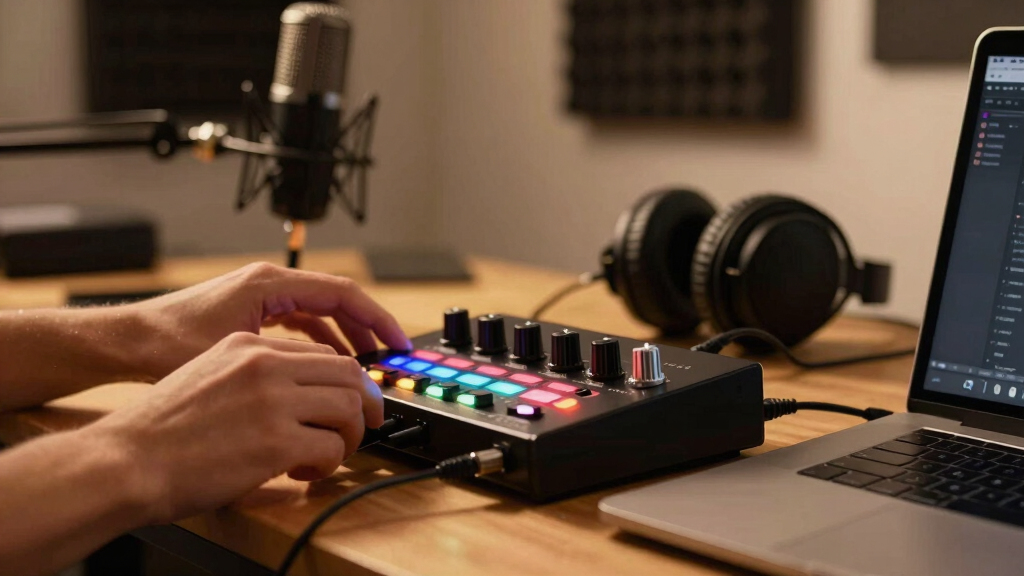

Choosing the best audio interface for content creation involves balancing ease of use, sound quality, and versatility. The Focusrite Scarlett 4i4 stands out as the overall best, offering high-fidelity recording and comprehensive software. For those on a budget, the M-AUDIO M-Track Solo delivers solid features without breaking the bank, while the RØDE RØDECaster Pro II excels for dedicated podcasters needing all-in-one solutions. The main tradeoffs involve weighing audio quality against features and price, as some models prioritize simplicity while others include advanced capabilities. Continue reading for a detailed breakdown of which interface suits your specific content creation needs.
Key Takeaways
- Top-tier models like the Focusrite Scarlett 4i4 offer professional-grade sound, justifying higher prices for serious content creators.
- Budget options such as the M-AUDIO M-Track Solo provide great value but may lack advanced features or higher-end connectivity.
- All-in-one solutions like the RØDE RØDECaster Pro II simplify setups, ideal for streamers and podcasters who want everything integrated.
- Build quality and software compatibility are critical; investing in a durable, well-supported device pays off long-term.
- Many models include bundled software, but ensure it aligns with your preferred DAWs and workflow needs.


More Details on Our Top Picks
M-AUDIO M-Track Duo HD Audio Interface, M100 Condenser Microphone and HDH41 Studio Monitoring Headphones for Recording, Producers, Content Creators and Podcasters
This combo pack from M-Audio offers a comprehensive setup that’s ideal for content creators who want a hassle-free experience. The 2-in/2-out USB-C interface provides high-resolution 24-bit/192kHz audio, ensuring professional-quality recordings. The inclusion of a pro-grade M100 condenser microphone and HDH41 studio headphones makes this a ready-to-go package for podcasts, streaming, or simple music production. Compared to smaller interfaces like the Focusrite Scarlett Solo, this set offers more versatile connectivity and software bundle, but the tradeoff is slightly bulkier and more expensive. Its zero-latency monitoring and switchable phantom power support a range of microphones and instruments, making it suitable for both beginners and semi-pros. The rugged enclosure and compact design also enhance portability, perfect for on-the-go content creators. However, the included software bundle, while extensive, may be more than some casual users need, and the interface’s feature set could be seen as overkill for only simple voiceovers. Best suited for those who want a complete, plug-and-play recording setup with minimal fuss.
Pros:- All-in-one package with microphone, headphones, and interface
- High-resolution 24-bit/192kHz audio quality
- Zero-latency monitoring and phantom power support
- Seamless compatibility with Mac, PC, iOS, and Android
Cons:- Relatively bulkier than standalone interfaces like the Focusrite Scarlett Solo
- Software bundle may be more than necessary for simple tasks
- Price is higher than basic interfaces if only recording vocals
Best for: Content creators, podcasters, and beginner producers seeking a versatile, all-in-one package.
Not ideal for: Advanced musicians or producers who need multi-track recording with extensive routing options.
- Connectivity Technology:USB-C with Direct/USB monitor switch
- Audio Resolution:24-bit/192kHz
- Inputs:2 combo (XLR/Line), Phantom Power
- Outputs:2 balanced TRS, Headphone out
- Included Microphone:M100 condenser mic
- Supported Devices:Mac, PC, iOS, Android
Bottom line: This complete bundle makes the most sense for content creators who want a ready-to-use, high-quality recording setup without additional purchases.
Synido USB C Audio Interface for Recording Music, Streaming, Podcasting with XLR, Line Input, 24bit/48kHz, 48V Phantom Power, 2-channel, Silver
The Synido 2×2 audio interface offers a compact and lightweight solution for content creators focused on streaming, podcasting, or basic music recordings. It supports 24-bit/48kHz resolution, which is sufficient for most streaming and voiceover needs, and features independent monitoring modes—Stereo, Mix, and USB—allowing flexible control over audio routing. Compared with the Focusrite Scarlett Solo, Synido’s multi-mode monitoring provides more versatility, especially for live broadcasting or post-production. The built-in 48V phantom power and compatibility with various mics and instruments make it accessible for different setups. Its small footprint and plug-and-play design suit mobile content creators or those with limited desk space. The cons include a lower maximum sample rate, which might be a limitation for high-fidelity music production, and fewer advanced features for multi-track recording. Overall, it’s an excellent choice for streamers and podcasters on a budget who still want decent sound quality. Best suited for beginners needing an easy, portable interface for streaming or voice recordings.
Pros:- Affordable price and compact design
- Supports multiple monitoring modes for flexible routing
- Supports 48V phantom power for condenser mics
- Compatible with various devices including smartphones
Cons:- Limited to 24-bit/48kHz, not ideal for high-end music production
- No advanced routing or multi-track capabilities
- Build quality is basic compared to premium interfaces
Best for: Streamers, podcasters, and beginner content creators needing straightforward, portable audio capture.
Not ideal for: Musicians or producers seeking high-resolution audio for mixing or multi-track recording.
- Supported Software:Any DAW compatible with Windows/Mac/iOS/Android
- Channels:2 (XLR and Line inputs)
- Sample Rate:24-bit/48kHz
- Connectivity:USB-C
- Phantom Power:48V
- Dimensions:14 x 11.5 x 4.5 cm
- Weight:0.41 kg
Bottom line: This interface is perfect for entry-level streamers and podcasters who want decent audio quality in a portable, easy-to-use package.
Arturia MiniFuse 1 – Compact USB Audio Interface with Creative Software for Recording, Production, Podcasting, Guitar – Black
The Arturia MiniFuse 1 is a sleek, durable, and highly portable audio interface designed for content creators on the move. It supports up to 192kHz/24-bit audio resolution, ensuring high-quality recordings whether you’re capturing vocals, guitars, or synths. Compared with the Focusrite Scarlett Solo, the MiniFuse 1 offers robust build quality with a metal chassis and a simple plug-and-play setup. Its compact size makes it easily fit into a gig bag or backpack, ideal for travel, live streaming, or quick sessions outside the studio. The interface features a single combo input with direct monitoring, and the included software bundle (Ableton Live Lite, Analog Lab Intro, Auto-Tune, and more) provides excellent value for content creators looking to start producing immediately. The main tradeoff is the lack of multiple inputs for multi-instrument recording, which makes it less suitable for complex music production. Overall, this makes a perfect companion for solo content creators and musicians who need quality on the go. Best suited for solo musicians, vocalists, and podcasters who prioritize portability and build quality.
Pros:- High-resolution 192kHz/24-bit audio quality
- Compact, durable metal chassis for portability
- Includes a solid software bundle for immediate use
- Simple setup with plug-and-play USB-C connection
Cons:- Limited to one input, not ideal for multi-instrument recording
- Lacks extensive routing or multiple outputs
- Higher price point compared to basic interfaces
Best for: Travelers, solo musicians, and content creators needing high-quality recordings in a portable format.
Not ideal for: Producers or multi-instrument recording artists requiring multiple inputs and routing options.
- Supported Devices:Mac, PC, iOS
- Maximum Sample Rate:192kHz
- Inputs:1 combo (XLR/Line) with direct monitoring
- Outputs:1 stereo out
- Connectivity:USB-C
- Build Quality:Metal chassis
Bottom line: This interface is a perfect travel companion for solo artists and content creators who need reliable high-quality recording in a compact form.
Focusrite Scarlett Solo 3rd Gen USB Audio Interface for Guitarists, Vocalists, Podcasters or Producers to record and playback studio quality sound
The Focusrite Scarlett Solo 3rd Gen remains a favorite among content creators who prioritize studio-quality sound in a simple form factor. It features high-performance pre-amps with ‘Air’ mode that add brightness and clarity, making vocals and acoustic instruments stand out. Compared to the M-Audio M-Track Solo, the Scarlett Solo offers a more refined preamp design and better noise performance, but with a slightly higher price. Its 24-bit/192kHz conversion ensures professional audio fidelity, and the single XLR/Line combo input is perfect for solo recordings or podcasts. The low-latency monitoring and gain halos make adjusting levels straightforward. The package includes Pro Tools | First and Ableton Live Lite, providing an excellent software start for content creators. The main limitation is its single input, which may restrict multi-source recording. Overall, it’s ideal for voice, guitar, and simple production workflows. Best for solo musicians, vocalists, and podcasters seeking high-fidelity recordings.
Pros:- Bright ‘Air’ mode for vocals and acoustic instruments
- Excellent preamp quality with low noise
- Includes professional DAW software bundles
- Simple, sturdy design for desktop use
Cons:- Limited to one input, not suited for multi-mic setups
- No MIDI or multiple outputs for complex routing
- Higher price compared to entry-level interfaces
Best for: Solo content creators, musicians, and podcasters requiring high-quality recordings with minimal setup.
Not ideal for: Producers or bands needing multiple inputs and extensive routing options.
- Supported Devices:Mac, PC, iOS
- Maximum Sample Rate:192kHz
- Inputs:1 combo (XLR/Line) with Air mode
- Outputs:1 stereo out
- Connectivity:USB-C
- Build Quality:Sturdy plastic chassis
Bottom line: This interface is perfect for solo musicians and podcasters demanding studio-quality sound in a straightforward package.
M-AUDIO M-Track Solo USB Audio Interface for Recording, Streaming and Podcasting with XLR, Line and DI Inputs, Plus a Software Suite Included
The M-Audio M-Track Solo offers a balanced combination of simplicity and versatility, making it suitable for a wide range of content creators. Its 48kHz/24-bit resolution delivers clear, crisp sound for podcasts, streaming, and basic recording. The interface features a combo XLR/Line input with phantom power and a dedicated instrument input, allowing for flexible setups with microphones and instruments. Compared to the Focusrite Scarlett Solo, the M-Track Solo provides more input options in a similar compact design, but some users might prefer the Scarlett’s preamp clarity. The monitoring options include RCA and headphone outputs, supporting direct and zero-latency monitoring. The included software bundle (including MPC Beats and other tools) adds value, especially for beginners. Its main tradeoff is the somewhat basic build and fewer advanced routing features, but it remains an excellent choice for versatile content creation. Best suited for streamers, podcasters, and beginner musicians needing multiple inputs.
Pros:- Multiple input types including phantom-powered XLR and dedicated instrument input
- Solid 48kHz/24-bit audio quality
- Includes full software bundle for immediate production
- Compact and portable design
Cons:- Build quality is basic; less durable than premium models
- Limited to two outputs, not ideal for complex routing
- No MIDI support
Best for: Content creators who need a flexible, portable interface with multiple input options for diverse recording tasks.
Not ideal for: Advanced producers requiring extensive routing or multi-mic setups.
- Supported Devices:Mac, PC, iOS
- Maximum Sample Rate:48kHz
- Inputs:XLR with phantom, 1 Line/Instrument
- Outputs:RCA, Headphone
- Connectivity:USB
- Included Software:MPC Beats, Ableton Live Lite, others
- Build Quality:Plastic casing
Bottom line: This interface provides the flexibility of multiple input types in a portable package, perfect for versatile content creation and streaming.
FIFINE PC Audio Mixer for Recording Music, USB Interface for Streaming and Podcasting with XLR, Monitor, 48V Phantom Power, Gain Knob, for Instrument Guitar/Video Content Creation/Vocal-Ampli 1
This model stands out for combining a versatile 3-channel setup with studio-level sound reproduction in a compact form. Unlike the M-AUDIO M-Track Duo, it offers dedicated instrument and XLR inputs with real-time monitoring, making it ideal for musicians and streamers who need more control over multiple sources. The built-in phantom power and gain knob deliver professional sound, but the mixer’s design means fewer software integrations and less seamless DAW compatibility. It’s perfect for content creators who prefer hardware control and don’t require extensive software features, though those seeking a plug-and-play interface for simple podcasting might find it a bit complex. Tradeoffs include a slightly steeper learning curve compared to simpler interfaces but higher flexibility for live and multi-instrument recording.
Pros:- Multiple balanced inputs with XLR and instrument connections
- Real-time direct monitor with dedicated volume control
- 48V phantom power for condenser microphones
- Compact design suitable for limited space setups
Cons:- Limited software integration compared to digital interfaces like the M-AUDIO M-Track Duo
- Requires some familiarity with hardware mixing controls
- No bundled digital recording software
Best for: Musicians, live streamers, and multi-source content creators who want hardware control and flexibility.
Not ideal for: Beginners or podcasters seeking straightforward, software-integrated interfaces with minimal setup.
- Compatible Devices:Headphone, Instrument, Microphone, Personal Computer, Speaker
- Supported Software:Any software supporting USB audio
- Connectivity Technology:USB
- Number of Channels:3
- Maximum Sample Rate:192 KHz
- Dimensions:5.51″D x 6.3″W x 1.97″H
Bottom line: This mixer is best for creators needing hardware-based control and multiple inputs, especially musicians and streamers.
PreSonus AudioBox Go Creator Complete Studio Recording Bundle with USB Audio 96K Interface, Condenser Microphone, Professional Monitoring Headphones, and Studio One Pro DAW Software
This pick makes the most sense for beginners and those who want an integrated solution with software included. Unlike the RØDE RØDECaster Pro II, it offers a portable form factor with a straightforward interface suitable for home or mobile recording, with easy setup for vocals, guitar, and podcasts. The bundled Studio One Pro software and included condenser microphone give new creators a complete package, but its feature set is less advanced than the RØDE RØDECaster Pro II, especially in terms of live sound effects and multi-channel processing. It’s ideal for those starting out or content creators who value convenience and affordability over advanced control. Tradeoffs include limited onboard effects and processing compared to professional studio solutions but excellent value for beginners.
Pros:- Compact, portable design suitable for mobile recording
- Includes professional condenser microphone and studio headphones
- PreSonus Studio One Pro DAW software bundled
- Simple plug-and-play setup for beginners
Cons:- Limited advanced features compared to high-end interfaces like the RØDE RØDECaster Pro II
- Fewer input channels and onboard effects
- Less suited for complex multi-mic recording setups
Best for: Content creators new to recording, streaming, or podcasting who want an all-in-one solution with software included.
Not ideal for: Advanced producers or musicians needing multi-channel, high-end processing, or extensive live effects.
- Compatible Devices:Guitar, Headphone, Microphone, Laptop, Smartphone, Speaker, Tablet
- Supported Software:Studio One Pro, Ableton Live, FL Studio, Logic Pro
- Connectivity Technology:USB
- Number of Channels:2
- Maximum Sample Rate:96 KHz
- Dimensions:3.3″D x 4.25″W x 1.73″H
Bottom line: Ideal for beginners seeking a complete, portable recording setup with software for quick start.
RØDE RØDECaster Pro II All-in-One Production Solution for Podcasting, Streaming, Music Production and Content Creation,Black
This pick is tailored for high-end podcasters, streamers, and musicians who need advanced features and superior sound quality. Compared with the PreSonus AudioBox Go, it offers eight customizable SMART pads, four studio-grade combo inputs, and powerful onboard processing including the APHEX Aural Exciter and Big Bottom for studio-quality sound. Its extensive connectivity options, dual USB interfaces, and integrated Bluetooth make it highly versatile. However, its larger size and higher price point make it less ideal for those with limited space or budget. This device excels in complex setups where maximum control and top-tier audio are needed, but beginners may find it overly complicated. Tradeoffs include a more complex interface and cost, but unmatched processing power and flexibility for serious content creators.
Pros:- Eight customizable SMART pads
- Four ultra-low-noise, high-gain combo inputs
- Advanced onboard audio processing including APHEX effects
- Dual USB-C interfaces and Bluetooth connectivity
Cons:- Heavier and larger than portable models like the AudioBox Go
- Higher cost may be prohibitive for casual creators
- Complex feature set may require learning curve
Best for: Professional podcasters, streamers, and musicians requiring extensive input options and advanced onboard processing.
Not ideal for: Beginners or casual streamers who need a simple, budget-friendly setup.
- Compatible Devices:Microphone, Smartphone, Tablet, PC, Mac
- Supported Software:Multiple DAWs including Pro Tools, Logic, Ableton
- Connectivity Technology:USB-C, Bluetooth
- Number of Channels:9
- Maximum Sample Rate:192 KHz
- Dimensions:10.63″D x 12.01″W x 2.36″H
Bottom line: Best suited for professional content creators who need extensive input control and studio-grade features.
MAONO USB Audio Interface for PC: Interface with XLR Input 24-bit/192kHz Routing Software LOOPBACK ASIO Driver for Recording Music, Home-Studio, Guitar, Podcast, Streaming, DAW(PS22 Lite Black)
This model is perfect for beginner content creators, streamers, and podcasters on a budget. It offers high-resolution 24-bit/192kHz recording with a dedicated instrument input and XLR mic connection, comparable to the M-AUDIO M-Track Duo but at a lower price point. The included routing software and loopback function make it flexible for live streaming and multi-source recording, yet it lacks the extensive controls of higher-end interfaces like the RØDE RØDECaster Pro II. Its plug-and-play nature makes it accessible for newcomers, but more advanced users may find it limited in features. Tradeoffs involve fewer inputs and onboard effects but excellent value for entry-level content creation.
Pros:- High-resolution 24-bit/192kHz recording
- Dedicated instrument input with phantom power
- Includes routing software and loopback for streaming
- Compact, lightweight design
Cons:- Limited input channels and onboard controls
- No advanced effects or multi-channel processing
- Build quality may be less robust than higher-tier models
Best for: Budget-conscious beginners, streamers, and podcasters seeking a versatile, easy-to-use interface.
Not ideal for: Advanced musicians or producers needing more inputs and processing power.
- Compatible Devices:Guitar, Microphone, PC, Mac, Smartphone
- Supported Software:Routing software, DAWs
- Connectivity Technology:USB
- Number of Channels:2
- Maximum Sample Rate:192 KHz
- Dimensions:6.29″D x 5.19″W x 2″H
Bottom line: Great for beginners and streamers seeking a versatile, budget-friendly audio interface.
USB Audio Interface with 2X XLR/TRS Inputs, Phantom Power, USB-A/C Connectivity Perfect for Recording, Live Streaming, Podcasting Home Studio Use by Musicians Content Creators(OS3)
This OS3 stands out for its simplicity and space-saving design, making it ideal for content creators who need quick setup without sacrificing essential features. Compared to the Focusrite Scarlett 4i4, it provides fewer inputs and lacks high-end studio-grade converters, but its plug-and-play operation and independent gain knobs give it an edge for beginners and mobile users. The inclusion of a direct monitor switch and a basic echo effect makes it well-suited for live streaming and casual recording, especially where space is limited. However, it offers a maximum sample rate of only 48kHz, which might be a drawback for those seeking professional-grade audio fidelity. Its small footprint and straightforward controls make it perfect for podcasters and hobbyists, but less so for serious studio work or multi-instrument tracking.
Pros:- Compact and space-efficient design
- Plug-and-play with no driver installation needed
- Independent gain knobs and real-time echo effect
Cons:- Limited to 48kHz maximum sample rate, restricting high-fidelity recording
- Only two inputs, which may limit multi-instrument recording
Best for: Beginners, streamers, and mobile content creators needing a portable, easy-to-use interface.
Not ideal for: Professional musicians or producers requiring 96kHz+ recording quality and extensive I/O options.
- Inputs:2 XLR/TRS combo, 1 6.5mm instrument jack
- Sample Rate:48 KHz
- Connectivity:USB-A/C
- Phantom Power:+48V
- Size:160 × 106 × 55 mm
- Monitoring Output:L/R monitor outs, headphone out
Bottom line: This pick makes the most sense for beginners and streamers who prioritize simplicity and portability over advanced features.
Focusrite Scarlett 4i4 4th Gen USB Audio Interface, for Musicians, Songwriters, Guitarists, Content Creators — High-Fidelity, Studio Quality Recording, and All the Software You Need to Record
The Focusrite Scarlett 4i4 4th Gen stands out for its professional-quality sound, offering 120dB dynamic range and high-resolution 192kHz recording, making it suitable for serious content creators and musicians. Compared to the OS3, it provides more input options, including four line inputs and MIDI I/O, along with Focusrite’s renowned preamps for clear, detailed recordings. Its Auto Gain and Clip Safe features reduce setup time and prevent clipping, making it ideal for those who need reliable, high-quality captures without extensive technical knowledge. Though it’s larger and more expensive, its software bundle including Pro Tools and Ableton Live Lite adds value for producing polished content. This makes it better suited for creators who want studio-grade audio and more flexibility for multi-instrument or vocal work.
Pros:- Studio-quality 120dB dynamic range and 192kHz recording
- Multiple inputs including MIDI I/O and four line channels
- Auto Gain and Clip Safe for quick, reliable level setting
- Includes comprehensive software bundle
Cons:- Larger size and higher price point may be overkill for casual users
- Requires more space and setup time compared to simpler models
Best for: Musicians, songwriters, and serious content creators wanting high-fidelity audio and extensive I/O options.
Not ideal for: Beginners or casual streamers who prefer a simple, budget-friendly setup and don’t need MIDI or multiple inputs.
- Inputs:2 XLR, 2 line, MIDI I/O
- Sample Rate:192 KHz
- Dynamic Range:120dB
- Connectivity:USB-C
- Size:5.08 x 7.09 x 2.32 inches
- Included Software:Pro Tools, Ableton Live Lite
Bottom line: This interface makes the most sense for creators seeking professional sound quality and flexible I/O for complex projects.

How We Picked
To determine the best audio interfaces for content creators, I focused on key factors including sound quality, ease of setup, build durability, and value for money. Compatibility with popular content creation software and connectivity options like XLR, USB-C, or TRS inputs were also vital. I prioritized devices that strike a balance between user-friendly interfaces for beginners and advanced features for more experienced users. The rankings reflect a combination of performance, usability, and affordability, with an emphasis on how well each model serves various content creation needs—ranging from casual streaming to professional podcasting and music production.Factors to Consider When Choosing Best Audio Interfaces For Content Creators
When choosing the best audio interface for content creation, it’s important to consider several factors that impact your workflow and output quality. A well-chosen interface can streamline your recording process, improve sound clarity, and ensure compatibility with your existing gear. Understanding these key aspects helps avoid common pitfalls such as overspending on unnecessary features or selecting a device incompatible with your setup.Connectivity Options and Inputs
Ensure the interface has the right input types for your gear, whether XLR for microphones, TRS for instruments, or USB-C for modern computers. More inputs provide flexibility to expand your setup, but can also increase complexity and cost. Consider your current needs and future growth—if you plan to add more mics or instruments, look for models with multiple inputs. Avoid models with limited connectivity if you anticipate needing more advanced setups down the line.
Sound Quality and Preamp Performance
Sound clarity depends heavily on the quality of the preamps and converters built into the device. Higher-quality preamps deliver cleaner audio with less noise, which is essential for professional-sounding recordings. Budget models may suffice for casual streaming, but if your content relies on high fidelity, investing in a device with better preamps is worthwhile. Remember, good sound quality can significantly impact your audience’s experience and perception of your content.
Ease of Use and Setup
Content creators often need to start recording quickly, so a straightforward, intuitive interface can save precious time. Features like plug-and-play USB connectivity, simple controls, and clear indicator lights make setup easier. Avoid overly complex interfaces that require extensive configuration unless you have the technical expertise or specific professional needs. Consider whether the device offers dedicated software or driver support that simplifies operation across your preferred platforms.
Software Compatibility and Bundles
Many audio interfaces come bundled with recording or editing software, adding value to your purchase. Ensure the included software is compatible with your existing workflow and operating system. Some models might include DAWs, plugins, or cloud integration that can streamline content production. However, don’t buy solely based on bundled software—consider whether the features meet your actual content creation needs, and if the software is user-friendly for your skill level.
Build Quality and Durability
Since many content creators record on the go or in multiple locations, a sturdy, well-built device is important. Aluminum chassis or rugged casings help withstand transport and daily use. Cheaper plastic models may be tempting, but they often lack durability and can develop issues over time. Think about where and how you’ll use your interface, and prioritize models that can handle your environment without sacrificing performance.
Frequently Asked Questions
Do I need a high-end audio interface for casual streaming?
For casual streaming or podcasting, a mid-range or budget-friendly interface often provides sufficient sound quality. Devices like the M-AUDIO M-Track Solo or Focusrite Scarlett Solo can deliver clear audio without the cost of professional-grade models. While higher-end interfaces offer better preamps and more features, they might be unnecessary if your setup is simple and your audience’s expectations are modest. Focus on reliability and ease of use to ensure a smooth experience.
Can I use a USB microphone with an audio interface?
Yes, many content creators combine a USB microphone with an audio interface to enhance audio quality or add multiple sources. In such cases, the interface can handle additional inputs or serve as a mixer. However, if your microphone is USB-only, you typically won’t need an interface unless you want to connect multiple mics or instruments. Always verify compatibility and consider whether the added complexity improves your workflow or simply adds cost.
Is it worth paying extra for an audio interface with multiple inputs?
Paying more for additional inputs makes sense if you plan to record multiple microphones, instruments, or sources simultaneously. This flexibility allows for more complex setups, such as guest recordings or multi-instrument sessions. However, if your content is primarily solo voice or a single instrument, a simpler 1-2 input model suffices. Overinvesting in extra inputs you won’t use can lead to unnecessary expense.
How important is software support when choosing an interface?
Software support can significantly influence your overall experience, especially if you rely on specific DAWs or editing tools. Some interfaces come bundled with professional software, which can be a cost-saving benefit. Compatibility with your operating system and ease of driver installation also matter. Ultimately, a device with good software support reduces setup headaches and ensures stable operation during critical recording sessions.
Should I prioritize build quality over features?
Build quality is vital if you plan to transport your interface frequently or use it in various locations. A durable, well-constructed device will last longer and withstand the rigors of daily use. However, don’t sacrifice necessary features like adequate inputs, good preamps, or compatibility just for ruggedness. The best approach is to find a balance, selecting a model that offers durability without compromising core performance and usability.
Conclusion
For those just starting out or content creators with straightforward needs, the Focusrite Scarlett Solo offers excellent value and ease of use. Serious producers or musicians should consider the Focusrite Scarlett 4i4 for its high-quality preamps and expandability. Budget-conscious creators will find the M-AUDIO M-Track Solo a reliable choice without sacrificing core features. Content creators who prioritize all-in-one solutions, such as streamers and podcasters, will benefit most from the RØDE RØDECaster Pro II. Ultimately, your choice should align with your specific recording environment, budget, and future ambitions.