Finding the best scanners for tax season and bookkeeping means balancing speed, accuracy, and ease of use. The Epson Workforce ES-580W stands out as the top overall choice thanks to its duplex scanning and large auto feeder, perfect for high-volume tasks. For portability, the Epson WorkForce ES-50 offers a compact design that’s ideal for on-the-go scanning, though it may lack some advanced features. The main tradeoffs involve choosing between powerful, feature-rich models and lighter, more portable options that sacrifice some speed or capacity. Continue reading for a detailed breakdown of the best scanners tailored to your specific needs.
Key Takeaways
- High-capacity auto feeders significantly boost efficiency during busy tax seasons.
- Wireless connectivity often improves ease of use but can introduce setup complexity or reliability issues.
- Portability is valuable but typically comes at the expense of speed and document handling capacity.
- Flatbed scanners excel at high-resolution scans of photos or delicate documents, but are less suited for bulk processing.
- Pricing varies widely; investing in a higher-end model can reduce manual effort and errors in bookkeeping tasks.




More Details on Our Top Picks
Epson Workforce ES-580W Wireless Color Duplex Tax Receipt & Desktop Document Scanner for PC and Mac with 100-sheet Auto Feeder (ADF), Intuitive 4.3′ Touchscreen
This model stands out for its combination of speed, versatility, and wireless convenience. It digitizes up to 35 pages per minute and captures both sides in a single step, making it ideal for busy tax and bookkeeping seasons. Compared with the ScanSnap iX1300, it handles larger batches more efficiently thanks to its 100-sheet auto feeder and duplex scanning, though it comes with a higher price tag. The touchscreen interface simplifies operation, and the ability to scan directly to cloud services or USB makes it flexible for different workflows. A tradeoff is its size and cost, which might be excessive for light, infrequent use. This pick makes the most sense for professionals managing large document loads who need reliable, high-speed duplex scanning without sacrificing wireless connectivity.
Pros:- High-speed duplex scanning at 35 ppm
- 100-sheet auto feeder for large batches
- Wireless connectivity with direct cloud upload
Cons:- Larger footprint and heavier weight, less portable
- Higher price point compared to simpler models
- Complex setup for beginners
Best for: Tax professionals and small business bookkeepers handling large volumes of receipts and documents regularly.
Not ideal for: Casual users or those with minimal scanning needs, as the high price and bulk may not justify infrequent use.
- Scanner Type:Document
- Connection Type:Wireless, USB
- Resolution:600 dpi
- Sheet Capacity:100 sheets
- Speed:Up to 35 pages per minute
- Color Depth:16-bit
- Wattage:2.1 watts
- Dimensions:13.15″ D x 5″ W x 2.65″ H
- Weight:9.44 ounces
Bottom line: This scanner is best suited for busy professionals who need fast, reliable, high-capacity scanning for tax and bookkeeping tasks.
Epson WorkForce ES-50 Portable Sheet-Fed Document Scanner for PC and Mac
This pick makes the most sense for users needing reliable single-page scans on the move. It scans a page in as little as 5.5 seconds and is USB-powered, making it perfect for remote work or field use. Compared with the Brother DS-640, it offers a significantly lighter and more portable design, though it’s limited to single sheets only. Its compatibility with both Windows and Mac, along with TWAIN driver support, makes it versatile for various systems. The small form factor is a clear advantage, but it’s not suitable for batch scanning or multi-page documents, which could be a limitation during tax season. This model is ideal for freelancers, field agents, or small business owners who need quick, high-quality scans without a bulky device.
Pros:- Rapid scan speed of 5.5 seconds per page
- Ultra-lightweight and portable design
- USB powered, no external power needed
Cons:- Limited to single-page scans only
- No duplex scanning capabilities
- Small capacity may be inefficient for bulk tasks
Best for: Freelancers or small business owners who need quick, portable document scanning for receipts and single pages on the go.
Not ideal for: Users requiring high-volume batch scanning or duplex capability, as it’s designed primarily for individual pages.
- Scanner Type:Document
- Connection Type:USB
- Resolution:600 dpi
- Scan Speed:5.5 seconds per page
- Sheet Capacity:Single sheet
- Color Depth:24-bit
- Dimensions:17.25″ D x 12.12″ W x 3.4″ H
- Weight:3.1 pounds
- Wattage:2.5 watts
Bottom line: This scanner is perfect for mobile professionals who need fast, quality single-page scans without bulk capacity.
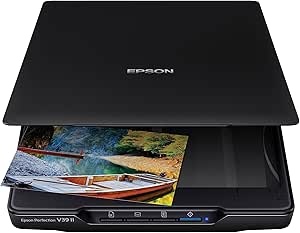
Epson – Perfection V39 II – Color Photo, Tax Receipt & Document Flatbed Scanner – 4800 dpi Optical Resolution – High-Rise, Removable Lid – Scan to Cloud – USB Power – Image Scanning – Black
This flatbed scanner excels in producing detailed, high-resolution images, making it ideal for scanning photos, artwork, and detailed documents for tax and bookkeeping records. Its 4800 dpi resolution surpasses many competitors, such as the ScanSnap iX1300, which is more suited for general document workflows. The V39 II’s ability to stitch oversized images and restore faded photos with one click adds versatility, but it’s slower for bulk document work due to its flatbed design and lower page throughput. It’s best for users who prioritize image quality over speed, like small business owners digitizing valuable receipts or photos for records. The software integration and restore features are a bonus for preserving memories or detailed visuals.
Pros:- 4800 dpi optical resolution for detailed scans
- Can stitch large images and restore faded photos
- Easy one-touch scanning with software integration
Cons:- Slower scanning speed compared to sheet-fed models
- Limited to flatbed scanning, not suitable for high-volume tasks
- Higher cost for photo-centric quality
Best for: Photographers, artists, or small business owners needing high-res scans of photos and detailed documents for tax records.
Not ideal for: High-volume batch document scanning or quick receipt digitization, as its flatbed process is slower and less suited for bulk work.
- Scanner Type:Flatbed
- Resolution:4800 dpi
- Connectivity:USB
- Image Restoration:Yes
- Photo Stitching:Yes
- Light Source Type:LED
- Dimensions:17.25″ D x 12.12″ W x 3.4″ H
- Weight:3.1 pounds
- Wattage:2.5 watts
Bottom line: This scanner is tailored for users demanding high-quality image scans and photo restoration, rather than bulk document processing.
ScanSnap iX1300 Compact Wireless or USB Double-Sided Color Document, Photo & Receipt Scanner with Auto Document Feeder and Manual Feeder for Mac or PC, Black
This pick makes sense for users seeking a compact, easy-to-use scanner with smart features. It offers duplex scanning at 30ppm, with one-touch operation supported by ScanSnap Home software that manages documents, receipts, and photos efficiently. Compared with the Brother DS-640, it adds automatic feeding and a larger touchscreen, making it suitable for moderate volumes. Its wireless and USB connectivity accommodates flexible workflows, and the software suite simplifies document management. The main tradeoff is its lower sheet capacity (100 pages) and slower speed compared to high-volume models, which might be limiting during busy tax seasons. It’s a solid choice for small offices or home users who want reliable, feature-rich scanning in a small footprint.
Pros:- Auto document feeder with duplex scanning at 30ppm
- Compact design for limited space
- Wireless and USB connectivity with cloud support
Cons:- Limited sheet capacity (100 pages)
- Slower than high-volume scanners for large batches
- Higher cost than basic models without auto feed
Best for: Small business owners or home office users needing reliable automatic document feeding for receipts and documents.
Not ideal for: High-volume batch processing or heavy-duty professional environments, where larger capacity and faster speeds are necessary.
- Scanner Type:Document
- Connection Type:Wireless, USB
- Resolution:600 dpi
- Speed:30 pages per minute
- Sheet Capacity:100 sheets
- Color Depth:24-bit
- Dimensions:4.5″ D x 11.7″ W x 3.3″ H
- Weight:4.4 pounds
- Wattage:17 watts
Bottom line: This scanner is ideal for small offices or home setups that require reliable auto feeding and wireless flexibility without bulk capacity.
Brother DS-640 Compact Mobile Document Scanner, (Model: DS640)
This model makes the most sense for mobile professionals or small teams needing quick, on-the-go scans of single documents, IDs, or receipts. It scans color and B&W at 16ppm, with fast operation and supports a variety of document types including plastic cards. Compared to the Epson ES-50, it offers a more robust set of image enhancement features like auto color detection and background removal, plus software with OCR support. Its micro USB power and lightweight design make it highly portable, though it’s limited to single sheets and not suited for large batches or duplex scanning. For those who need a reliable, pocket-sized scanner to digitize documents on the fly, this is an excellent option, especially for fieldwork or mobile bookkeeping.
Pros:- Fast 16ppm scan speed for single sheets
- Ultra-compact and lightweight design
- Supports multiple document types including IDs and plastic cards
Cons:- Limited to single-page scans only
- No duplex or batch scanning capability
- Potentially slower for bulk tasks
Best for: Field agents, traveling small business owners, or anyone needing quick, single-sheet scans in a compact form.
Not ideal for: Users with high-volume or multi-page scanning needs, as it only supports single sheets at a time.
- Scanner Type:Document
- Connection Type:USB
- Resolution:600 dpi
- Scan Speed:16 ppm
- Sheet Capacity:Single sheet
- Color Depth:24-bit
- Dimensions:1.99″ D x 11.9″ W x 1.45″ H
- Weight:1 pound
- Wattage:2.5 watts
Bottom line: This scanner is best for mobile professionals who need quick, reliable single-page scans without bulk capacity.
Epson RapidReceipt RR-60 Mobile Tax Receipt and Color Document Scanner with Complimentary Data Management Software for PC & Mac
The Epson RapidReceipt RR-60 stands out for its ultra-lightweight design, weighing under 10 oz, making it ideal for mobile tax season tasks or fieldwork. Unlike larger models such as the Epson RapidReceipt RR-600W, this scanner offers a compact form factor without sacrificing essential features like AI-driven data extraction and cloud integration. Its single-sheet feeding speed of up to 10 pages per minute is sufficient for small batches, but it may slow you down during high-volume periods. The AI Smart Panel app simplifies organization, especially for receipts, invoices, and IDs, with automatic categorization and export options to QuickBooks or TurboTax. However, its limited sheet capacity (one page at a time) means it isn’t suited for bulk scanning. This pick makes the most sense for small business owners or freelancers who need portability and quick digital conversion without heavy-duty throughput. Pros include its portability, AI-driven categorization, cloud compatibility, and easy export. Cons involve its single-page capacity, slower scan speed for multi-page documents, and basic resolution that isn’t ideal for detailed images. If your workflow requires high-volume, multi-page scans, the RR-60 may fall short. This device is perfect for mobile professionals and small-scale bookkeeping, but not for heavy, continuous batch processing.
Pros:- Extremely portable and lightweight under 10 oz
- AI Smart Panel for automatic categorization
- Cloud integration with services like Dropbox and Google Drive
- USB-powered for convenience
Cons:- Limited to single-sheet feeding, not suitable for batch scanning
- Slower speed (10 pages/min) for larger stacks
- Lower resolution not ideal for high-quality photo scans
Best for: Small business owners or freelancers who need a lightweight, AI-enabled portable scanner for receipts and documents in multiple locations.
Not ideal for: Organizations requiring high-volume, multi-page document scanning or detailed image quality, as its sheet capacity and resolution are limited.
- Scanner Type:Receipt
- Connection Type:USB
- Resolution:600 dpi
- Color Depth:24 bpp
- Sheet Capacity:1 page
- Media Size:Up to 8.5″ x 72″
- Weight:under 10 oz
- User Guide:Included
Bottom line: Ideal for mobile professionals or small businesses needing quick, AI-organized receipt scanning in the field, but not for high-volume workflows.
ScanSnap iX2400 High-Speed Simple One-Touch Button Color Document, Photo & Receipt Scanner with 100 Page Auto Document Feeder for Mac or PC, Black
The ScanSnap iX2400 offers impressive speeds of up to 45 pages per minute with a 100-sheet auto feeder, making it suitable for busy tax season environments or small office bookkeeping. Compared to the Epson Workforce ES-580W with its automatic document feeding, the iX2400’s simple one-touch operation allows users to scan and organize with minimal fuss, ideal for those new to digital workflows. Its sturdy touchscreen mimics smartphone responsiveness, streamlining task management and direct export to cloud services or apps via ScanSnap Home software. While it excels in speed and ease of use, it has a less rugged build—its plastic casing is lighter and may feel less durable over time. The software, though powerful, can be finicky and sometimes requires reinstallation to fix glitches. This scanner makes the most sense for small accounting teams or individual practitioners who need fast, reliable scans and straightforward organization but don’t require extensive customization. Pros include fast scanning speed, user-friendly touchscreen, high sheet capacity, and cloud compatibility. Cons include its somewhat fragile casing, software sensitivity, and slightly higher price point. This device is perfect for small teams or solo professionals with high-volume, quick-turnaround document needs, but it’s less suited for heavy industrial use. The iX2400 provides speed and simplicity without sacrificing essential features for busy tax and bookkeeping tasks.
Pros:- Fast scanning speed (45 ppm)
- Large 100-page automatic document feeder
- Intuitive large touchscreen for easy operation
- Seamless cloud and app integration
Cons:- Lighter, more fragile plastic casing
- Occasional software glitches requiring reinstall
- Higher price compared to simpler models
Best for: Small offices or individual bookkeepers needing fast, reliable, and easy-to-use document scanning with high capacity.
Not ideal for: Heavy-duty, industrial environments or users requiring extensive customization, as the device is more delicate and software can be finicky.
- Scanner Type:Document, Receipt, Photo
- Connection Type:USB, Wi-Fi
- Resolution:600 dpi
- Sheet Capacity:100 sheets
- Speed:45 ppm
- Display:Large Color Touchscreen
- Media Size:Up to A4
- Weight:around 7.7 lbs
Bottom line: Best for small teams or solo users who need quick, high-volume scans with straightforward organization and cloud export, but not for rugged or industrial settings.
Epson RapidReceipt RR-600W Wireless Desktop Color 2-Sided Document & Tax Receipt Scanner with ScanSmart AI PRO Data Management Software for PC & Mac Touchscreen & 100-Page Auto Document Feeder
The Epson RapidReceipt RR-600W excels with its robust wireless capabilities, high-speed duplex scanning up to 35 pages per minute, and a large 100-page auto feeder, making it a top choice for busy tax season and bookkeeping environments. Compared to the ScanSnap iX2500, the RR-600W’s wireless connectivity and simple touchscreen interface allow flexible placement and PC-free operation, which is ideal for multi-location setups or shared workspaces. The AI Smart Panel software automates data extraction and export to financial apps, streamlining workflows. Its 4.3″ color touchscreen simplifies configuration without a computer, and the true duplex scanning reduces time and effort. On the downside, its size and weight (over 8 lbs) make it less portable, and the higher initial cost may be a barrier for some small practices. The scanner is best suited for medium-sized offices or organizations that prioritize wireless flexibility and high throughput for receipts and documents. Pros include fast duplex speed, wireless and PC-free operation, large document capacity, and AI-driven categorization. Cons include its heavier build, higher price, and the need for reliable Wi-Fi for optimal performance. This model is ideal for busy bookkeeping teams needing fast, wireless, high-capacity scanning, but less so for portable or single-user environments.
Pros:- High-speed duplex scanning (35 ppm)
- Wireless connectivity with Wi-Fi 6
- PC-free scanning via large touchscreen
- Robust 100-page auto feeder
Cons:- Heavier and less portable
- Higher cost compared to basic models
- Dependent on stable Wi-Fi connection
Best for: Medium-sized tax or bookkeeping offices requiring fast wireless duplex scanning and PC-free operation.
Not ideal for: Portable users or small solo practitioners, due to its weight and size, or those with unreliable Wi-Fi networks.
- Scanner Type:2-Sided Document & Receipt
- Connection Type:Wi-Fi, USB
- Resolution:600 dpi
- Sheet Capacity:100 sheets
- Speed:35 ppm duplex
- Display:4.3″ Color Touchscreen
- Media Size:Up to A4
- Weight:about 8.2 lbs
Bottom line: Best for organized offices needing fast wireless, duplex, high-capacity document scanning with AI integration, but not for portability or budget-conscious users.
ScanSnap iX2500 Wireless or USB High-Speed Cloud Enabled Document, Photo & Receipt Scanner with Large 5″ Touchscreen and 100 Page Auto Document Feeder for Mac or PC, White
The ScanSnap iX2500 offers a combination of high speed (45 ppm), large 5″ touchscreen, and a 100-page auto feeder, making it the top choice for busy tax season and bookkeeping workflows. Compared to the Epson Workforce ES-580W, the iX2500’s seamless cloud integration and intuitive UI provide a more user-friendly experience, especially for small offices or individuals who prefer device-to-cloud simplicity. Its robust build and sleek design make it suitable for multiple environments, and the ability to automatically optimize, name, and sort files streamlines digital organization. However, the device’s higher price and slightly larger footprint might be less attractive for very tight spaces or tight budgets. Its versatility in connecting via Wi-Fi or USB-C, coupled with the advanced software, makes it ideal for users who want a fast, straightforward, and reliable scanner. Pros include excellent speed, large touchscreen, high sheet capacity, and cloud compatibility. Cons include its premium price, larger size, and somewhat delicate touchscreen that may require careful handling. This scanner is a superb fit for busy professionals or small teams seeking fast, reliable, and organized digitization of documents, receipts, and photos.
Pros:- High-speed scanning (45 ppm)
- Large 5″ touchscreen for easy operation
- Automatic file naming and sorting
- Supports cloud and device exports
Cons:- Higher price point
- Larger footprint for small spaces
- Touchscreen may be delicate over time
Best for: Small to medium-sized offices or busy professionals needing fast, reliable, and user-friendly document scanning with extensive cloud options.
Not ideal for: Very tight spaces or budget-sensitive users, due to its size and cost, or those requiring rugged or industrial-grade equipment.
- Scanner Type:Document, Photo, Receipt
- Connection Type:Wi-Fi, USB-C
- Resolution:600 dpi
- Sheet Capacity:100 sheets
- Speed:45 ppm
- Display:5″ Touchscreen
- Media Size:Up to A4
- Weight:around 7.7 lbs
Bottom line: A top-tier scanner for busy professionals seeking speed, ease of use, and extensive digital organization, but not ideal for tight quarters or tight budgets.
Canon Canoscan Lide 300 Scanner (PDF, AUTOSCAN, Copy, Send)
The Canon Canoscan Lide 300 makes document digitization straightforward, especially for small-scale tax tasks and personal bookkeeping. Its 2400 x 2400 dpi resolution ensures clear scans of receipts and documents, rivaling larger, more expensive models like the Epson Workforce ES-400 II, but with a more modest feature set. The Auto Scan Mode simplifies operation by detecting document types automatically, which is perfect for low-volume, occasional use. However, its single-sheet capacity limits efficiency for bulk tasks, making it less suitable for busy offices. The USB connectivity and built-in PDF with OCR support streamline workflow, but the lack of duplex scanning or an auto feeder means it’s less ideal for high-volume needs. Overall, this model is best for individuals managing small quantities of documents and who prefer a compact, easy-to-use device without extra bells and whistles.
Pros:- Compact and lightweight, easy to store on a desk
- High-resolution scans for clear image quality
- Auto Scan Mode for simplified operation
- Built-in PDF and OCR support for searchable files
Cons:- Single-sheet capacity limits efficiency for batch scanning
- No duplex scanning or auto feeder, slowing down larger jobs
- Basic feature set may require manual adjustments for complex tasks
Best for: Small business owners or freelancers who need a reliable, space-saving scanner for occasional tax and bookkeeping documents.
Not ideal for: Busy accounting firms or offices with high-volume scanning needs, due to its limited sheet capacity and slower throughput.
- Scanner Type:Document
- Connectivity:USB
- Resolution:2400 x 2400 dpi
- Media Type:Paper, Photos
- Sheet Capacity:1
- Wattage:4.5 watts
- Color Depth:48 bits
- Dimensions:14.5 x 9.9 x 1.7 inches
- Weight:3.6 pounds
Bottom line: This scanner is ideal for individual users or small offices needing straightforward, high-quality scans of documents and receipts with minimal fuss.
Epson Workforce ES-400 II Color Duplex Desktop Document Scanner for PC and Mac with Auto Doc Feeder (ADF), Image Adjustment Tools
The Epson Workforce ES-400 II stands out for its 50-sheet Auto Document Feeder and fast scanning speeds of up to 35 pages per minute, making it a strong choice for busy tax seasons and extensive bookkeeping. Compared to the Canon LiDE 300, it offers duplex scanning and higher throughput, which significantly reduces time spent on large batches. Its software suite allows easy previewing, editing, and cloud uploads, streamlining workflow for professionals handling frequent multi-page documents. The device’s color and image adjustment tools ensure high-quality scans even of complex or damaged receipts. The main tradeoff is its larger footprint and heavier weight, which might not suit those with limited desk space. Additionally, its higher price point reflects its more advanced features. Overall, this scanner makes the most sense for small to medium-sized offices or accountants managing large volumes of receipts and documents during tax season.
Pros:- High-speed scanning of up to 35 pages per minute
- 50-sheet automatic document feeder for batch processing
- Duplex scanning enables double-sided documents in one pass
- Advanced image adjustment tools for high-quality output
Cons:- Larger and heavier, less suitable for small spaces
- Higher cost compared to basic models like the Canon LiDE 300
- Complex setup and feature set might be overwhelming for casual users
Best for: Accountants, small firms, or remote work teams needing reliable, high-speed, duplex document scanning for tax and bookkeeping purposes.
Not ideal for: Individuals with minimal scanning needs or those requiring a portable, lightweight device, due to its size and weight.
- Scanner Type:Document
- Connectivity:USB
- Resolution:300 dpi
- Media Type:Paper
- Sheet Capacity:50
- Scan Speed:35 ppm
- Light Source:LED
- Dimensions:14.5 x 10 x 11.25 inches
- Weight:Approx. 3.7 kg
Bottom line: This scanner is best suited for professional environments where speed, volume, and quality are priorities during busy tax seasons.

How We Picked
The scanners in this roundup were evaluated based on performance in high-volume and high-accuracy scanning tasks, ease of setup and daily use, build quality and durability, compatibility with both PC and Mac, and overall value for the price. We prioritized models that offered reliable duplex scanning, large auto feeders, and user-friendly interfaces, since these features directly impact efficiency during tax season and bookkeeping. Our ranking reflects a balance between advanced features and affordability, ensuring options for different user needs—from small business owners to busy accountants. Devices with proven durability and positive user reviews earned higher positions, while those with notable drawbacks like slow speeds or limited capacity were ranked lower.Factors to Consider When Choosing Best Scanners For Tax Season And Bookkeeping
Choosing the right scanner for tax season and bookkeeping involves understanding your specific needs and the features that support efficient document management. Beyond basic scanning capabilities, factors like document capacity, connectivity options, and software integration can make a significant difference in your workflow. Being aware of common pitfalls, such as underestimating volume or neglecting compatibility, helps in selecting a device that won’t become a limiting factor during busy periods.Volume Capacity and Speed
For tax and bookkeeping tasks, high-volume processing often requires scanners with large auto feeders and fast scanning speeds. A model with a 50+ sheet capacity and speeds over 30 pages per minute can dramatically reduce processing time during peak periods. However, high-capacity models tend to be bulkier and more expensive, so consider your typical workload to avoid over-investing in unnecessary capacity.
Connectivity and Compatibility
Wireless connectivity offers convenience, especially if you need to scan from multiple devices or locations. Yet, it can introduce setup complexities or reliability issues. USB and Ethernet options tend to be more stable for continuous use. Additionally, ensure compatibility with your operating system—most models support Windows and Mac, but some features like cloud integration may vary, influencing your overall workflow.
Document Handling and Design
Auto feeders are essential for efficiency, especially when digitizing large batches of receipts, invoices, or tax documents. Flatbed scanners excel at high-resolution scans of photos or delicate documents but are less practical for bulk processing. Consider your typical document types and volume to choose a design that minimizes manual intervention and errors.
Software and Data Management
Good bundled software can streamline organizing, naming, and saving scans, reducing manual effort. Look for models that offer OCR (Optical Character Recognition) and cloud integration, which can automate data entry and storage. Beware of software that’s limited or difficult to use, as it can negate the time savings the hardware provides.
Price and Long-Term Value
While budget models may be tempting, they often lack durability or speed for heavy-duty tax season use. Investing in a higher-end model can pay off through increased reliability, fewer manual corrections, and less downtime. Balance your immediate needs with potential future demands to avoid frequent upgrades or replacements.
Frequently Asked Questions
Should I prioritize speed or document capacity for tax season?
If you handle a large volume of receipts, invoices, or tax documents, prioritizing a scanner with a high-capacity auto feeder and faster speeds will save considerable time. However, if your workload is lighter or involves delicate documents, a slower, flatbed model might better suit your needs. Consider your typical volume to avoid overpaying for features you won’t use daily.
Is wireless connectivity necessary for a home office scanner?
Wireless features add convenience by removing cable clutter and allowing flexible device placement, especially if multiple users need access. However, wired connections tend to be more reliable, especially during busy processing days. For most home users with moderate scanning needs, wireless is a nice bonus, but not a must-have.
Are flatbed scanners worth considering for bookkeeping?
Flatbed scanners are excellent for high-resolution scans of photos or fragile documents, but they typically lack the speed and capacity for bulk processing. If your bookkeeping involves mostly receipts and invoices, a sheet-fed model with an auto feeder will usually be more efficient. Use flatbeds for specialized tasks rather than daily bulk scanning.
How important is software compatibility for tax document scanning?
Software compatibility is vital because it determines how seamlessly your scans integrate into your workflow. Features like OCR and cloud storage can automate data entry and organization, saving time and reducing errors. Before buying, verify that the scanner’s software supports your preferred platforms and offers features that align with your process.
Is investing in a higher-priced scanner justified for small business use?
Higher-priced models often provide faster speeds, larger capacities, and more durable build quality, which can be worthwhile if you process large volumes regularly. These scanners reduce manual intervention, minimize errors, and improve overall efficiency, making them a valuable investment for busy small businesses during tax season and ongoing bookkeeping.
Conclusion
For small business owners or accountants handling large volumes, the Epson Workforce ES-580W emerges as the best overall choice due to its capacity and speed. Budget-conscious users will find the Epson WorkForce ES-50 and Brother DS-640 appealing for portability and affordability. Those seeking premium features like advanced software and high-resolution scanning should consider the Epson RapidReceipt RR-600W or the ScanSnap iX2500. Beginners or infrequent users might prefer simpler flatbed options like the Canon Canoscan Lide 300. Ultimately, selecting the right scanner depends on your volume, budget, and specific workflow needs during tax season and beyond.