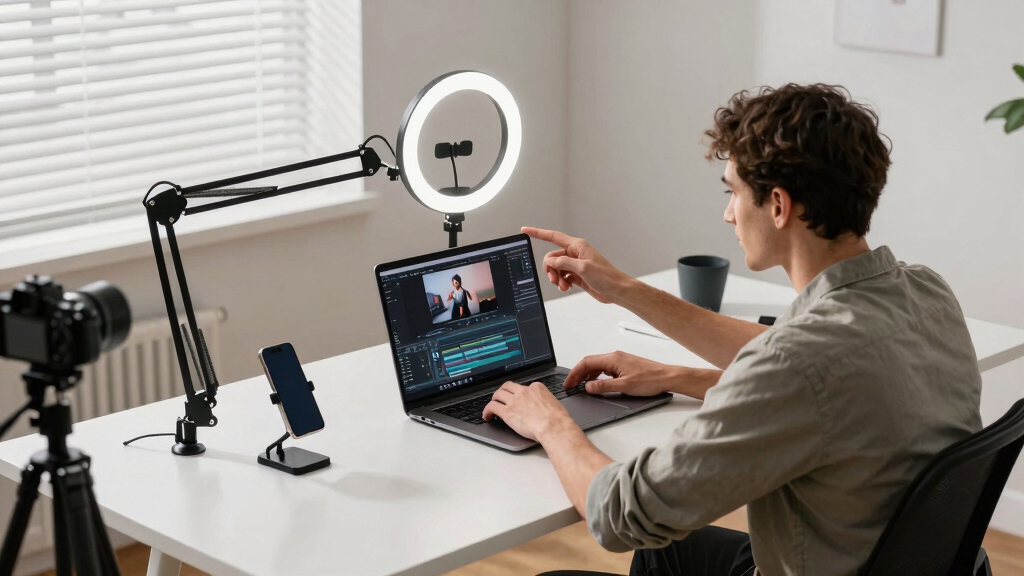
Choosing the best key light is essential for YouTubers aiming to improve their video quality. The Elgato Key Light stands out for its professional brightness and simple setup, making it ideal for serious content creators. On the other hand, the UBeesize 10-Inch Key Light offers a budget-friendly option with adjustable brightness, perfect for beginners. The main challenge is balancing brightness, ease of use, and price—higher-end options often deliver superior performance but come with a bigger price tag. Keep reading to see how these options compare and find the perfect fit for your setup.

Get smart everyday buys delivered free — and shop member deals
- Fast, free delivery on millions of items
- Access to Prime Big Deal Days deals on October 6–7
- Prime Video, Amazon Music and more included
Key Takeaways
- The Elgato Key Light offers unmatched brightness and professional control features but comes at a premium price.
- Budget-friendly options like the UBeesize provide decent lighting for newcomers but lack some advanced features.
- Adjustability, app control, and color temperature flexibility are common tradeoffs influencing choice.
- Larger panels like the Neewer 18″ kit deliver broader, softer light but are less portable and more expensive.
- Ease of setup and compatibility with existing gear are decisive factors for many YouTubers.
| UBeesize 10-Inch Key Light for Streaming, Desk Ring Light with Adjustable Arm |  | Best for Compact, Versatile Desk Lighting | Size: 10 inches | Lighting Technology: Side-Lighting | Adjustable Arm: Yes | VIEW LATEST PRICE | See Our Full Breakdown |
| Logitech for Creators Litra Glow Premium LED Streaming Light – Graphite | 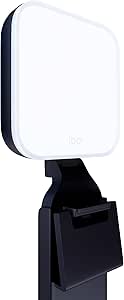 | Best for Natural, Full-Spectrum Lighting | Technology: TrueSoft | Lighting Type: LED | Color Temperature: Adjustable | VIEW LATEST PRICE | See Our Full Breakdown |
| Neewer 2-Pack Dimmable Bi-Color 480 LED Video Light Kit with Tripod Stand |  | Best for Multi-Scene Versatility and Color Accuracy | LED Count: 480 LEDs (240 white + 240 yellow) | Color Temperature: 3200K to 5600K | CRI: 96+ | VIEW LATEST PRICE | See Our Full Breakdown |
| NEEWER CB60B 70W LED Video Light with 2.4G & APP Control, COB Bi-Color |  | Best for Professional, App-Controlled Lighting | Power: 70W | Maximum Illuminance: 34000lux@1m | Color Temperature: 2700K-6500K | VIEW LATEST PRICE | See Our Full Breakdown |
| Neewer 18″ LED Video Light Panel Key Lighting Kit with Remote, 2 Pack, 45W |  | Best for Large, Adjustable Panel Lighting | Number of Lights: 2 | Light Size: 18 inches | Power: 45W | VIEW LATEST PRICE | See Our Full Breakdown |
| Elgato Key Light, Professional 2800 Lumens Studio Light |  | Best for Remote Control and Precise Studio Lighting | Brightness: 2800 Lumens | Color Temperature: 2900 – 7000 K | LED Type: OSRAM | VIEW LATEST PRICE | See Our Full Breakdown |
| key lights for YouTuber | Color Temperature | Power | CRI |
|---|---|---|---|
| UBeesize 10-Inch Key Light for | — | — | — |
| Logitech for Creators Litra Gl | Adjustable | USB-powered | — |
| Neewer 2-Pack Dimmable Bi-Colo | 3200K to 5600K | — | 96+ |
| NEEWER CB60B 70W LED Video Lig | 2700K-6500K | 70W | 97+ |
| Neewer 18" LED Video Light Pan | 3200K~5600K | 45W | 97+ |
| Elgato Key Light | 2900 – 7000 K | — | — |
More Details on Our Top Picks
UBeesize 10-Inch Key Light for Streaming, Desk Ring Light with Adjustable Arm
The UBeesize 10-inch ring light stands out for its soft, glare-free illumination, making it ideal for face-focused streaming and video calls. Its flexible arm allows precise positioning, which is crucial for tight desk setups where space is limited. Compared to larger lighting options like the Neewer 18-inch panels, it’s more portable and easier to mount in confined areas, but its smaller size means it can’t light larger scenes or provide high brightness levels. The built-in timer adds convenience, though it lacks adjustable brightness and color temperature, which limits fine-tuning. This pick makes the most sense for creators who prioritize simplicity and space-efficiency over advanced lighting controls.Pros:- Soft, glare-reducing light ideal for face illumination
- Flexible, adjustable arm for precise positioning
- Built-in timer functions for convenience
Cons:- Limited to 10-inch size, restricting larger scene coverage
- No brightness or color temperature adjustment
Best for: YouTubers with small desks or limited space seeking adjustable, soft lighting for facial clarity
Not ideal for: Streamers needing powerful, large-area lighting or customizable color temperatures
- Size:10 inches
- Lighting Technology:Side-Lighting
- Adjustable Arm:Yes
- Timer Options:2-hour, 4-hour, 8-hour
- Base:Metal C-clamp with non-slip silicone
- Application:Streaming, video calls, gaming, recording
Our verdict“A strong choice for creators needing compact, adjustable lighting focused on face and detail enhancement.”
Logitech for Creators Litra Glow Premium LED Streaming Light – Graphite
The Logitech Litra Glow excels at delivering natural, full-spectrum LED light that evenly illuminates the face, reducing shadows and enhancing video quality. Its adjustable brightness and color temperature offer greater control compared to the fixed-output UBeesize, making it suitable for creators who want a more professional, flattering look. Its frameless diffuser provides broad, soft light, which is preferable over more directional lights like the Neewer 2-pack for face-centric shoots. However, its USB-powered design limits placement options, and it’s primarily suited for desktop setups rather than larger or multi-light configurations. This makes it a strong choice for streamers who prioritize portability and natural skin tones.Pros:- Full-spectrum, natural lighting for a flattering appearance
- Adjustable brightness and color temperature
- Wide, soft light reduces shadows
Cons:- Requires USB port, limiting placement options
- Limited to desktop or laptop mounting
Best for: YouTubers aiming for flattering, natural-looking light in desk-based streaming or video conferencing
Not ideal for: Creators needing powerful, adjustable lighting for large or multi-person scenes
- Technology:TrueSoft
- Lighting Type:LED
- Color Temperature:Adjustable
- Brightness:Adjustable
- Mounting:3-way monitor mount
- Power:USB-powered
Our verdict“Ideal for creators who want natural, adjustable lighting that enhances facial features without complexity.”
Neewer 2-Pack Dimmable Bi-Color 480 LED Video Light Kit with Tripod Stand
This duo of Neewer 480 LEDs offers excellent color accuracy with a high CRI of 96+, making it suitable for both photography and streaming. The adjustable brightness and wide color temperature range of 3200K to 5600K provide flexibility that surpasses single-light options like the UBeesize or Logitech. The included sturdy stands and complete accessories make it a versatile, all-in-one solution for larger setups or multi-light configurations. The main tradeoff is that it requires external power and takes up more space, so it’s less portable and less ideal for tight desk environments. It’s a solid choice for creators who need consistent, natural lighting across multiple angles.Pros:- High CRI for natural, vibrant colors
- Adjustable brightness and color temperature
- Complete kit with stands, diffusers, and cases
Cons:- Batteries not included, requiring extra purchase
- Can be bulky for small or mobile setups
Best for: YouTubers who require adjustable, high-CRI lighting for multi-angle or professional-style shoots
Not ideal for: Streamers with limited space or those seeking ultra-portable, compact solutions
- LED Count:480 LEDs (240 white + 240 yellow)
- Color Temperature:3200K to 5600K
- CRI:96+
- Light Stand Height:3 to 6.2 feet
- Power Source:Power adapters included
- Package Includes:2 LED lights, 2 stands, 2 diffusers, 2 power adapters
Our verdict“Best suited for creators seeking versatile, high-quality lighting for multi-light or professional setups.”
NEEWER CB60B 70W LED Video Light with 2.4G & APP Control, COB Bi-Color
The NEEWER CB60B offers high output with 70W of power, making it suitable for both professional videography and streaming. Its wide color temperature range from 2700K to 6500K allows precise tuning for different environments, outperforming smaller or less adjustable lights like the UBeesize. The app and remote control provide convenient adjustments that are invaluable during shoots, although some users may find setup complex. Its Bowens mount compatibility allows use with various modifiers, adding to its versatility. The main tradeoff is that it requires an external power source, limiting mobility. This makes it ideal for creators who want high-powered, customizable lighting with remote control features.Pros:- High brightness with 70W power output
- Full adjustable color temperature from 2700K to 6500K
- App and remote control for easy adjustments
Cons:- Requires external power, reducing portability
- Setup can be complex for some users
Best for: Professional YouTubers and streamers who want high brightness, precise control, and compatibility with modifiers
Not ideal for: Casual creators needing simple, plug-and-play solutions or portable setups
- Power:70W
- Maximum Illuminance:34000lux@1m
- Color Temperature:2700K-6500K
- CRI:97+
- TLCI:98+
- Scene Effects:12
- Control:2.4G & APP
- Mount Type:Bowens
Our verdict“Perfect for creators seeking powerful, customizable lighting with remote control in a professional setting.”
Neewer 18″ LED Video Light Panel Key Lighting Kit with Remote, 2 Pack, 45W
This Neewer kit features two sizable 18-inch panels, offering broad, adjustable lighting that’s ideal for multi-person setups or larger filming areas. Its 45W power per panel with high CRI of 97+ delivers vibrant, natural light suitable for both video and photography. The remote control simplifies operation during shoots, and its dual power options add to convenience. Compared with smaller lights like the UBeesize or Logitech, these panels provide more coverage and flexibility for different scenarios. The main downside is their bulkiness and the need for additional accessories for battery power, making them less suited for tight or mobile setups. They represent a solid choice for creators scaling up their production quality.Pros:- Large, adjustable 18-inch panels for broad coverage
- High CRI for vibrant, natural colors
- Remote control for easy adjustments
Cons:- Batteries not included, requiring extra purchase
- Can be bulky and less portable for mobile setups
Best for: YouTubers needing large, adjustable lighting for multi-subject or studio-style recordings
Not ideal for: Streamers with limited space or those requiring lightweight, portable lighting
- Number of Lights:2
- Light Size:18 inches
- Power:45W
- CRI:97+
- Color Temperature:3200K~5600K
- Remote Control:Yes
- Power Options:AC or Sony NP-F batteries
Our verdict“Best for creators who need sizeable, adjustable lighting to cover larger or multi-person scenes efficiently.”
Elgato Key Light, Professional 2800 Lumens Studio Light
The Elgato Key Light stands out for its seamless Wi-Fi connectivity, allowing remote adjustments via app, which makes it a perfect choice for streamers and content creators who value convenience. Compared to the Neewer 18″ LED Panel Kit, it offers more precise control over brightness and color temperature without needing manual adjustments, but this comes with a higher price point. The adjustable telescopic pole and glare-free diffusion contribute to professional-quality lighting, while the high-quality OSRAM LEDs keep heat output low, reducing discomfort during long sessions. However, the reliance on app setup and Wi-Fi connectivity may complicate use for less tech-savvy users, and its premium features make it less ideal for casual or budget-conscious YouTubers. This pick makes the most sense for creators who prioritize remote control and consistent studio lighting over initial cost.
Pros:- Wi-Fi enabled for remote control via app
- Adjustable color temperature from 2900K to 7000K
- High-quality OSRAM LEDs produce minimal heat
- Easy installation with telescopic height adjustment
Cons:- Relatively high price for casual users
- Requires compatible device and app setup
- Limited to studio lighting scenarios, less portable
Best for: YouTubers and streamers who want precise, adjustable lighting with remote control capabilities
Not ideal for: Casual creators or those with limited tech setup who prefer simple, plug-and-play options
- Brightness:2800 Lumens
- Color Temperature:2900 – 7000 K
- LED Type:OSRAM
- Power Consumption:up to 45 W
- Weight:2.86 lb / 1.3 kg
- Dimensions:1.18 x 13.77 x 9.84 in / 30 x 350 x 250 mm
- Telescopic Pole Length:minimum 22 in / 55 cm, maximum 49 in / 125 cm
- Connection:Wi-Fi, 802.11 b/g/n
- Supported Devices:Windows 10 (64-bit), macOS 10.14+, iOS, Android
Our verdict“This light is ideal for creators who need customizable, remote-controlled studio lighting but at a premium price point.”
How We Picked
These products were evaluated based on key performance factors such as brightness, color accuracy, ease of use, build quality, and price-to-performance ratio. Consideration was also given to versatility, whether the light offers app or remote control, and how well it suits different content creation environments. The ranking reflects a balance of professional features for serious creators and affordability for newcomers, ensuring each product serves a specific creator profile effectively.Factors to Consider When Choosing Best Key Lights For YouTubers
When selecting a key light, understanding your specific needs can make a significant difference. Consider how much brightness you require based on your filming space and camera settings. Color temperature flexibility is also important for matching your environment or achieving a desired aesthetic. Size and portability might matter if you frequently move your setup. Ease of control, whether via app, remote, or manual adjustments, can streamline your workflow. Lastly, factor in your budget and long-term value—sometimes investing more upfront yields better results and durability.Brightness and Light Output
Brightness determines how well your face is lit and can vary significantly between models. For small or indoor setups, lower lumen outputs may suffice, but larger or more professional setups benefit from higher lumens to ensure even, shadow-free lighting. Keep in mind that more powerful lights might also generate more heat, which can affect comfort and equipment longevity. Balancing brightness with energy consumption and heat output is key to selecting the right model.
Color Temperature and Adjustability
Most YouTubers prefer lights with adjustable color temperature, allowing them to match ambient lighting or create a specific mood. A range between 3200K (warm) and 5600K (daylight) covers most needs. Failing to consider this can result in mismatched lighting that looks unnatural or inconsistent across videos. Some models include presets or memory functions, simplifying quick adjustments during recording sessions.
Size, Portability, and Mounting Options
The physical size of your key light influences where and how you set it up. Smaller, compact lights are easier to position for desk or face lighting, ideal for streamers or those with limited space. Larger panels provide a softer, more diffuse light but require sturdier mounts and more space. Compatibility with standard mounts or tripods also affects how seamlessly a light integrates into your existing setup.
Ease of Use and Control
Controls range from simple knobs to sophisticated app integrations. While manual adjustments are straightforward, app or remote controls can save time and allow for more precise tuning, especially in dynamic filming environments. Consider whether you prefer wired or wireless operation, and if the light supports features like dimming or scene presets that can streamline your workflow.
Price and Long-Term Value
Budget constraints are always a factor, but investing in a higher-quality light can improve your video quality and durability over time. Cheaper models may lack features like color accuracy or adjustable brightness, leading to more editing work. Conversely, premium options often include better build quality, longer warranties, and more advanced controls, which could justify the higher price for dedicated creators.
Frequently Asked Questions
Is a larger key light always better for YouTube videos?
Not necessarily. Larger lights tend to produce softer, more even illumination, which is ideal for close-up shots and reducing shadows. However, they can be less portable and more expensive. Smaller, more focused lights are easier to position and manage but might require additional accessories to achieve the desired softness. The best choice depends on your filming space, aesthetic preference, and mobility needs.
Should I prioritize brightness over color accuracy?
While brightness is important to illuminate your face clearly, color accuracy impacts how natural and professional your videos appear. A light that is too bright but has poor color rendering may wash out your skin tone or produce unnatural hues. For most YouTubers, a balanced combination of sufficient brightness and high color fidelity yields the best results, especially if you plan to do live streams or on-camera appearances.
Can I rely on cheap LED lights for professional-looking videos?
Cheap LED lights can be suitable for beginners or casual content, but they often lack consistency in color temperature, brightness, and build quality. Over time, these shortcomings may lead to uneven lighting or color shifts that require extensive post-production correction. Investing in a mid-range or higher-end key light generally offers more reliable results and can better support the growth of your channel.
Is app control worth paying extra for?
App control adds convenience by allowing adjustments without physically touching the light, which is especially useful during live streams or multi-light setups. It also often provides finer control over brightness and color temperature, as well as scene presets. While it might add to the initial cost, the increased flexibility and ease of use can significantly improve your workflow, making it worth considering if you frequently tweak your lighting.
What is the best type of key light for small desk setups?
For small desk setups, compact and adjustable lights like the UBeesize 10-Inch Key Light or similar models are ideal. They are easy to position close to your face, don’t take up much space, and typically include adjustable brightness and color temperature. Larger panels, while offering broader light coverage, can overwhelm limited spaces and may require more complex mounting solutions. Focus on portability and ease of adjustment for tight environments.
Conclusion
For creators just starting out or working on a tight budget, the UBeesize 10-Inch Key Light offers a good mix of affordability and performance. Serious YouTubers or those aiming for professional quality should consider the Elgato Key Light for its high brightness and simple control interface. Content creators with larger studios or needing softer, more diffuse light might find the Neewer 18″ LED Panel Kit to be a better fit. Beginners should prioritize ease of setup and affordability, while advanced users should look for lights with extensive control options and higher output to match their growing needs.
Fall Picks
fall essentials
As an affiliate, we earn on qualifying purchases.