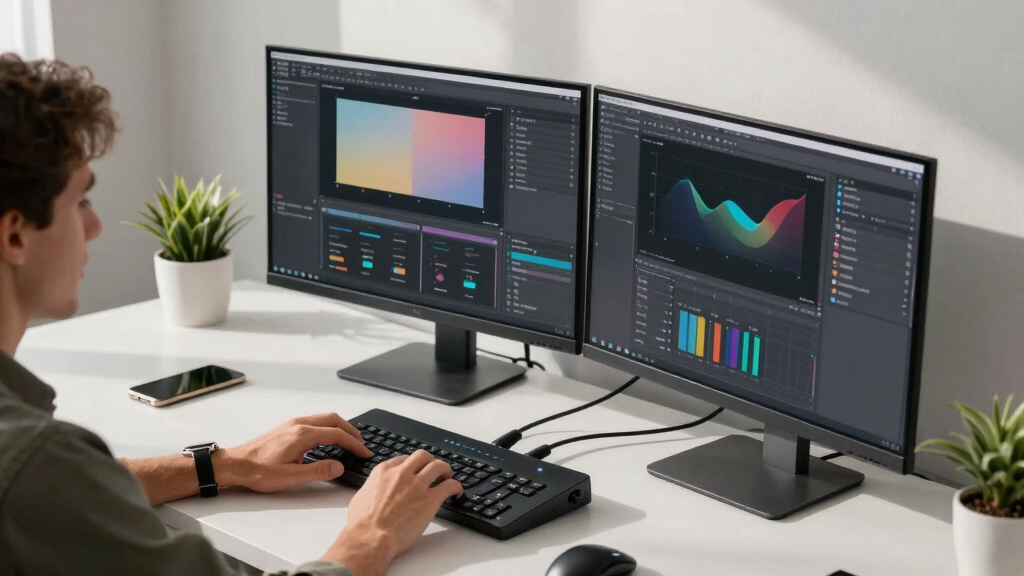
Switching between multiple computers while maintaining dual monitors can be a game-changer for creators who need seamless workflow transitions. The best dual-monitor KVM switches provide high-resolution support, reliable switching, and easy setup—without sacrificing performance. The UGREEN 8K@60Hz Displayport KVM stands out for its impressive resolution, while the AV Access KVM Switch Dock offers a feature-rich solution ideal for home office and gaming. However, buyers face tradeoffs like price, compatibility, and complexity—especially when balancing features versus simplicity. Continue reading for a detailed breakdown of the top picks tailored for different creator needs.
Key Takeaways
- High-end models like the AV Access KVM support 4K@144Hz and extensive connectivity, making them ideal for demanding workflows.
- Compatibility varies: HDMI-based switches are more common, but DisplayPort options offer higher resolutions and future-proofing.
- Built-in features like EDID emulation and remote control significantly enhance usability for multi-tasking creators.
- Price correlates strongly with features; budget options often lack high resolutions or multi-device support.
- Ease of setup and switching is a key factor—simpler models tend to prioritize user-friendly interfaces over extensive port options.





More Details on Our Top Picks
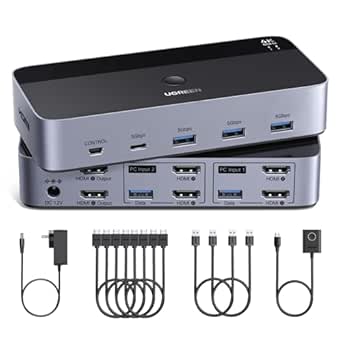
This UGREEN DisplayPort KVM switch stands out for supporting up to 8K@60Hz resolution, surpassing many competitors like the Hearvo HDMI KVM Switch, which maxes out at 4K. The switch’s robust build quality and straightforward plug-and-play design make it suitable for professional creators who need ultra-high-definition visuals and reliable performance. Compared to the Unitek KVM Switch, this model offers better resolution support and more versatile USB-C sharing, making it ideal for high-end video editing and rendering setups. The main tradeoff is its reliance on DisplayPort cables, which may require additional purchase if not included. It supports Windows, MacOS, and Linux, making it highly compatible.
Pros:- Supports up to 8K@60Hz resolution for ultra-high-definition output
- Solid metal casing ensures durability and heat dissipation
- Includes multiple USB 3.0 ports for fast data transfer
- Plug-and-play with no driver installation needed
Cons:- Requires external 12V power supply, adding clutter
- Limited to DisplayPort connections, not compatible with HDMI-only setups
Best for: Creators who require 8K resolution and seamless switching for professional-grade visual workflows.
Not ideal for: Users with only HDMI-equipped monitors or those on a tight budget, as it requires specific cables and supports only DisplayPort outputs.
- Resolution Support:8K@60Hz
- USB Ports:4 USB 3.0
- Material:Aluminum
- Connector Type:DisplayPort
- Power Supply:12V/2A external
- Compatibility:Windows, MacOS, Linux
Bottom line: This switch is perfect for creators demanding the highest resolution and robust build quality, despite requiring specific cables and power sources.
UGREEN HDMI KVM Switch 2 Monitors 2 Computers 4K@60Hz, with 4 USB 3.0 Ports for 2 Computers Sharing 2 Monitors Keyboard Mouse Printer with 4 HDMI Cables, 2 USB Cables, Power Adapter and Controller
This UGREEN HDMI KVM switch offers reliable 4K@60Hz performance and a straightforward setup, making it a great choice for creators who primarily use HDMI monitors. Compared to the Hearvo HDMI KVM Switch, it includes four HDMI cables and a power adapter, reducing the need for additional purchases. Its compatibility with Windows, MacOS, and Linux ensures broad usability. The switch’s dual-monitor support and multiple USB 3.0 ports facilitate sharing peripherals like graphics tablets or external drives. The main limitation is its lack of EDID emulation, which could lead to display issues on some setups, especially when switching frequently. It’s ideal for creators who want a reliable, plug-and-play HDMI solution.
Pros:- Supports 4K@60Hz with HDMI compatibility
- Includes 4 HDMI cables and a power adapter in the package
- Simple plug-and-play operation with no driver required
- Dual-monitor support for efficient workspace management
Cons:- Lacks EDID emulation, which may cause display flicker or resolution issues
- Limited to HDMI connections, not suitable for DisplayPort-only setups
Best for: Creators with HDMI-based monitors seeking a dependable, cost-effective dual-monitor KVM switch.
Not ideal for: Professionals who need higher resolutions above 4K or use DisplayPort-only setups, as it is limited to HDMI 2.0 with 4K@60Hz.
- Resolution Support:4K@60Hz
- USB Ports:4 USB 3.0
- Cables Included:4 HDMI
- Compatibility:Windows, MacOS, Linux
- Power Supply:Included
- Switching Method:Button, Remote
Bottom line: A strong choice for HDMI-centric creators needing high-resolution dual displays at an affordable price, with some display compatibility considerations.
Hearvo HDMI KVM Switch 2 Monitors 2 Computers, USB 3.0,4K@60Hz KVM Switches Sharing of Dual Monitors Keyboard Mouse and Printer Between 2 Computers,with EDID,2 USB Cables and Controller -S7232H2
The Hearvo HDMI KVM Switch excels with its EDID emulation, ensuring stability and compatibility across various display and system configurations, making it suitable for creators working with complex setups. Compared to the Unitek KVM Switch, it includes EDID support, which helps maintain resolution and color accuracy during switchovers. Its four USB 3.0 ports support a range of peripherals, and the build quality feels sturdy. The main tradeoff is a lower user rating and limited detailed specs available, which suggests it might lack some advanced features like high-end HDR support. It’s well-suited for creators who need reliable multi-device switching with minimal display issues.
Pros:- Supports 4K@60Hz with EDID emulation for stability
- Includes 2 USB-C cables and a wired controller
- Reliable switching between two computers with dual monitors
- Supports multiple peripherals with 4 USB 3.0 ports
Cons:- Lower user rating (4.1) indicating possible reliability issues
- Limited detailed technical specs, possibly lacking advanced HDR or gaming features
Best for: Creators requiring EDID emulation for stable dual-monitor operation across different systems.
Not ideal for: Users who prioritize the highest resolution beyond 4K or need HDMI-only connections without EDID help, as it’s primarily HDMI with EDID support.
- Resolution Support:4K@60Hz
- USB Ports:4 USB 3.0
- EDID Support:Yes
- Cables Included:2 USB-C
- Switching Method:Button, Controller
- Compatibility:Windows, Mac, Linux
Bottom line: Ideal for creators who need dependable dual-monitor switching with EDID stability, accepting some limitations in advanced features.
The CMSTEDCD HDMI KVM Switch offers solid 4K@60Hz performance at an accessible price point, making it suitable for creators on a budget who need dual-monitor support. Compared to higher-end models like the Unitek KVM Switch, it may lack some advanced features such as EDID emulation or remote control, but it performs reliably for general tasks and light editing. The device’s metal casing suggests durability, and including a desktop controller simplifies switching. A potential downside is its limited compatibility with some high-power USB devices and absence of hotkey support. It’s best for creators who need basic dual-monitor switching without extra bells and whistles.
Pros:- Supports 4K@60Hz resolution
- Includes a durable metal casing
- Easy to switch with a desktop controller
- Affordable for entry-level creators
Cons:- Lacks EDID emulation, which might cause display flicker
- No remote or hotkey switching support
Best for: Budget-conscious creators needing a dependable dual-monitor setup with simple operation.
Not ideal for: Professionals requiring EDID support, advanced HDR, or extensive peripheral compatibility, as it’s more basic in features.
- Resolution Support:4K@60Hz
- USB Ports:4 USB 3.0
- Switching Method:Button, Controller
- Material:Metal
- Power Supply:Included
- Compatibility:Multiple OS
Bottom line: A practical choice for creators seeking reliable dual-monitor support at a lower price, with some feature limitations.
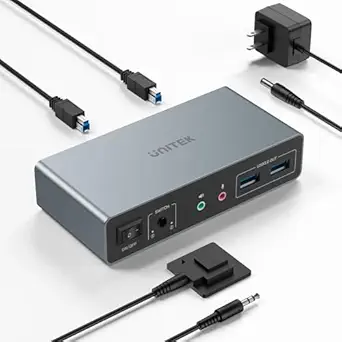
Unitek KVM Switch 2 Monitors 2 Computers 4K@60Hz HDMI+Displayport Dual Monitor KVM Switches 3 USB Ports for Sharing Keyboard Mouse Hard Drives Mic Headset 2 USB-B Cable DC 5V Adapter Controller
The Unitek KVM Switch provides flexible dual-input options, supporting both HDMI and DisplayPort, which makes it highly adaptable for creators with mixed hardware. Its support for 4K@60Hz and comprehensive USB sharing with three ports makes it suitable for professional workflows involving multiple peripherals, such as external drives or audio equipment. Compared to the Hearvo HDMI KVM, it offers broader input options and a more extensive accessory package, including two USB-B cables and a 5V power adapter. The main drawback is that it’s designed primarily for desktop use, limiting portability. It’s ideal for creators with diverse hardware needs who prioritize flexibility and connectivity options.
Pros:- Supports both HDMI and DisplayPort inputs
- Includes 3 USB ports for multiple peripherals
- Supports 4K@60Hz resolution
- Flexible dual-input options
Cons:- Designed mainly for desktop use, less portable
- Limited to 4K resolution, not higher resolutions like 8K
Best for: Creators with hybrid HDMI and DisplayPort setups needing versatile, multi-input operation.
Not ideal for: Creators seeking ultra-high resolution beyond 4K or those requiring portable solutions, as it’s optimized for stationary use.
- Resolution Support:4K@60Hz
- Input Types:HDMI, DisplayPort
- USB Ports:3 USB
- Cables Included:2 USB-B, power
- Switching Method:Button, Controller
- Compatibility:Windows, Mac, Linux
Bottom line: A versatile dual-input switch well-suited for creators with diverse hardware but less focused on high-end resolutions or portability.
This KVM switch stands out for its support of 4K@60Hz resolution and broad compatibility with Windows, macOS, and Linux, making it ideal for creators who need crisp visuals across multiple machines. Compared to the AV Access dock, this switch offers a straightforward, dedicated hardware solution that excels in dual-monitor setups without complex configurations. Its HDMI 2.0 and HDCP 2.2 compliance ensure vivid, flicker-free images, while the built-in EDID emulation preserves your display layout, reducing desktop reorganization. The switch’s USB 3.0 ports enable fast peripheral sharing, boosting workflow efficiency. A tradeoff is that it requires each connected computer to support dual display output, limiting use with older or less capable systems. Also, it lacks hotkey switching, which could be inconvenient for frequent toggling. Its physical controls—push buttons and remote—offer flexible operation, but the absence of hotkey support might be a drawback for some power users. Overall, this pick makes the most sense for creators seeking reliable, high-resolution dual HDMI switching with seamless peripheral sharing.
Pros:- Supports crisp 4K@60Hz resolution for high-quality visuals
- Broad OS compatibility with EDID emulation for layout preservation
- USB 3.0 ports for fast peripheral sharing
Cons:- Requires computers to support dual monitor output, limiting compatibility
- No hotkey switching, which reduces quick toggling convenience
Best for: Professional creators and power users who need reliable 4K dual HDMI support with high-speed peripheral sharing.
Not ideal for: Users with older computers or systems not supporting dual display output, as compatibility is limited.
- Resolution Support:4K@60Hz
- HDMI Standard:HDMI 2.0
- Bandwidth:18Gbps
- USB Ports:3 x USB 3.0
- Compatibility:Windows, macOS, Linux
- Switching Methods:Push Button, Remote
Bottom line: This switch is best suited for creators who prioritize high-resolution, dual HDMI outputs with reliable peripheral sharing and are okay with manual switching methods.
AV Access KVM Switch Dock 2 Monitors 2 Laptops, 4K KVM Switch Dual HDMI Monitor, 2 USB-C MST Ports, 60W PD for Each PC, 1G Ethernet, EDID Emulation, 2K@144Hz, 1080P@240Hz,Ideal for Home Office & Gaming
This model shines for its multifunctionality, combining a 12-in-1 docking station with dual HDMI outputs supporting 4K@60Hz and high refresh rates up to 240Hz for smooth gaming. Compared with the simpler dual HDMI switches like the first product, this dock offers extensive ports, including USB 3.0, USB 2.0, Ethernet, SD card reader, and headset, making it a true all-in-one solution for creators and gamers alike. Its 60W power delivery for each port enables charging laptops while in use, and its EDID emulation maintains display settings during switching. The primary tradeoff is its compatibility limitations: Mac OS cannot output extended dual screens, and 5K monitors aren’t supported. The device’s size and weight (3.9 pounds) also make it less portable than a dedicated KVM switch. However, its fast switching and high refresh rates make it an excellent choice for high-performance setups where versatility is valued. This makes it ideal for home offices and gaming, but less so for users needing pure, dedicated dual-monitor switching without peripherals.
Pros:- Supports high refresh rates up to 240Hz for gaming
- Includes comprehensive ports: USB, Ethernet, SD, headset
- Power delivery up to 60W for each laptop, enabling simultaneous charging
Cons:- Limited compatibility with Mac OS and 5K monitors
- Size and weight reduce portability for mobile creators
Best for: Gamers and home office users seeking a versatile docking solution with high refresh rates and extensive peripheral support.
Not ideal for: Mac users or those requiring extended dual displays on Macs, due to OS limitations and compatibility issues.
- Resolution Support:4K@60Hz, 2K@144Hz, 1080P@240Hz
- Ports:2 HDMI, 2 USB-C MST, 8 total USB ports
- Power Delivery:60W per port
- Ethernet:1G
- Compatibility:Full functional with Windows, limited with Mac
- Switching:Button and optional remote
Bottom line: This dock is best for creators who need a multifunctional, high-refresh-rate setup with extensive port options, accepting some OS and compatibility limitations.

How We Picked
These products were evaluated based on their video resolution support, multi-device switching capability, build quality, ease of use, and compatibility with common creator setups. Performance was prioritized to ensure smooth transitions without lag, especially at 4K or higher resolutions. We also considered additional features like remote control, EDID emulation, and port variety, which improve daily usability. Products were ranked to balance high-end performance with accessible features, making the list valuable for different creator needs and budgets.Factors to Consider When Choosing Best Dual-monitor KVM Switches For Creators
Choosing the right dual-monitor KVM switch depends on several critical factors. Creators should consider their resolution requirements, compatibility with existing gear, and whether they need extra features like remote switching or EDID emulation. Understanding these factors helps avoid common pitfalls, such as buying a switch that can’t handle your monitor’s resolution or one that complicates daily workflows. Balancing features with budget is also essential, as more advanced options tend to come at a higher cost but offer significant convenience and future-proofing.Resolution and Refresh Rate
Creatives working with high-resolution images, videos, or 3D content need a KVM switch that supports at least 4K@60Hz or higher. Lower resolutions may be sufficient for basic tasks but will limit visual fidelity. Pay attention to the maximum supported resolution and refresh rate—some switches now support 4K@144Hz, ideal for gaming and fast-paced editing. Choosing a switch with higher specs ensures your workflow remains smooth and your display quality uncompromised, but it may also increase the cost.
Compatibility and Connectivity
Check the ports on your monitors and computers—whether HDMI, DisplayPort, or USB-C—and ensure the switch supports these connections. Some models support multiple connection types, offering greater flexibility, especially if you upgrade hardware frequently. Compatibility issues often cause frustration, so verify that your devices’ specs align with the switch’s supported inputs and outputs. Also, consider whether the switch supports multi-USB device sharing, like printers and external drives, which can streamline creative workflows.
Ease of Use and Switching Method
Fast, reliable switching is essential during intensive work sessions. Some switches feature physical buttons, remote controls, or software-based switching. Physical buttons are straightforward but can be limiting if your setup is behind a monitor or in a tight space. Remote controls or keyboard hotkeys offer more convenience, especially for creators who switch frequently. Additionally, look for features like auto-switching based on active input, which can save time and reduce workflow interruptions.
Build Quality and Reliability
Since KVM switches often stay connected for long periods, durability matters. Aluminum or metal cases tend to last longer and dissipate heat better than plastic. Reliable switches also feature sturdy cables, well-secured ports, and minimal latency. Investing in a well-built switch ensures consistent performance, especially during extended sessions or demanding tasks. Cheaply made options may develop connection issues or break down prematurely, leading to workflow disruptions.
Additional Features and Future-Proofing
Features like EDID emulation allow your monitors to consistently display correct resolutions, avoiding flickering or detection issues. Support for 60W or higher Power Delivery (PD) helps charge laptops while in use, reducing clutter. USB hub support enables connecting peripherals like external drives or audio gear directly through the switch. Consider these extras if you want a setup that adapts easily to future upgrades, saving time and money down the line.
Frequently Asked Questions
Will a dual-monitor KVM switch work with my gaming setup?
Many dual-monitor KVM switches support high resolutions and refresh rates suitable for gaming, especially those supporting 4K@60Hz or higher. However, if you’re aiming for ultra-smooth gameplay at 144Hz or above, you’ll need a switch explicitly rated for those specs, such as models with 144Hz support. Keep in mind that some switches may introduce slight latency, so verify the specifications if low latency is critical for your gaming experience. Compatibility with your graphics card and monitor inputs should also be checked to ensure seamless performance.
Can I connect external drives or audio devices through these switches?
Most dual-monitor KVM switches include USB ports that support peripherals like keyboards, mice, and printers. Some models also support additional USB devices such as external drives or audio gear, but this isn’t universal. If connecting external drives or complex peripherals is a priority, look for switches with multiple USB ports and high data transfer rates. Remember that sharing external drives over a KVM could introduce slight delays, so for high-speed data transfer, dedicated connections are preferable.
Do I need a special cable setup for different monitors and computers?
Most switches come with the cables needed for typical setups, but compatibility depends on your monitor inputs and your computers’ outputs. HDMI and DisplayPort are common, while USB-C adds flexibility but can be less prevalent. It’s essential to verify that the included cables match your devices or be prepared to purchase appropriate adapters. Using the wrong cable type or low-quality cables can lead to resolution issues or signal degradation, so investing in good-quality cables compatible with your hardware is advisable.
How does EDID emulation improve my dual-monitor setup?
EDID (Extended Display Identification Data) emulation helps your monitors communicate their capabilities to connected devices consistently, preventing detection issues. Without it, switching between computers might cause flickering, resolution drops, or monitors not being recognized correctly. A switch with EDID emulation maintains stable display settings, especially when switching frequently or using multiple resolution-dependent applications. This feature reduces setup headaches and ensures your creative environment remains stable during workflow changes.
Is it worth paying extra for a premium dual-monitor KVM switch?
Investing in a premium model often delivers higher resolutions, faster refresh rates, better build quality, and more advanced features like remote switching or multiple USB hubs. For creators with demanding workflows—such as video editing, 3D rendering, or gaming—these features can significantly improve daily efficiency. However, if your needs are basic—like simple document editing or light multitasking—a mid-range or budget switch may suffice. Weigh the added cost against your specific performance requirements and future plans.
Conclusion
Choosing the right dual-monitor KVM switch depends heavily on your specific needs. For creators seeking the best overall experience, the AV Access KVM Switch Dock offers excellent performance with high resolutions and robust features. Those prioritizing value without sacrificing quality will find the Hearvo HDMI KVM Switch a well-rounded choice. Beginners or casual users should consider simpler, more affordable models like the UGREEN HDMI KVM Switch. Meanwhile, professionals demanding ultra-high resolutions, extensive connectivity, or future-proofing will benefit from premium options like the Unitek KVM Switch. Select according to your workflow complexity, budget, and technical preferences to optimize your creative environment.