Choosing the best wireless printer for a home office involves balancing print quality, ease of setup, and ongoing costs. The Epson EcoTank ET-2800 stands out as an excellent basic option with cartridge-free printing, while the HP OfficeJet Pro 8125e offers faster performance and advanced features for busy households. A key tradeoff is often between upfront cost and long-term ink expenses—cheaper printers may end up costing more over time due to ink refills. Continue reading for a detailed comparison to help you find the perfect fit for your home workspace.
Key Takeaways
- Top printers combine ease of use with cost-effective ink solutions, especially for frequent printing needs.
- All-in-one models with scanning and copying are essential for versatile home office setups.
- Compact designs are available without sacrificing performance, ideal for small spaces.
- Premium options tend to include features like duplex printing and larger paper capacities, but at a higher price.
- Wireless connectivity reliability varies, so choosing a model with strong Wi-Fi support ensures smoother operation.




More Details on Our Top Picks
Epson EcoTank ET-2800 Wireless Color All-in-One Cartridge-Free Supertank with Scan and Copy, The Ideal Basic Home Printer – Black
This model stands out for its remarkable ink savings and straightforward setup, making it a top choice for those who want reliable color printing without high ongoing costs. Compared to the HP Smart Tank 5000, the Epson ET-2800 offers a more compact design and a simple interface, though it lacks some advanced features like automatic duplexing. Its refillable ink tanks can last for thousands of pages, drastically reducing ink expenses—perfect for families or small offices with high-volume print needs. The small LCD screen might be less intuitive for some users, and it doesn’t support duplex printing, which is a notable tradeoff for its price point. However, for everyday printing that prioritizes affordability and ease, this Epson excels.
Pros:- Significant ink savings—up to 90% compared to cartridges
- Refillable tanks simplify long-term maintenance
- Vivid, detailed prints with Micro Piezo technology
Cons:- No automatic duplex printing, increasing manual effort for double-sided jobs
- Small LCD display may be less user-friendly for some
Best for: Budget-conscious households or small home offices needing large volumes of color printing without constant ink replacements.
Not ideal for: Users requiring duplex printing or advanced scanning features, as the ET-2800 lacks automatic two-sided printing and has a basic scanner.
- Printer Type:Inkjet
- Print Speed Black & White:10 ppm
- Print Speed Color:5 ppm
- Scan Type:Flatbed
- Maximum Print Resolution:5760 x 1440 dpi
- Wireless Connectivity:Wi-Fi
- Item Weight:8.8 Pounds
- Control Method:Color LCD
Bottom line: This pick suits those seeking a cost-effective, reliable printer for everyday color printing with minimal fuss.
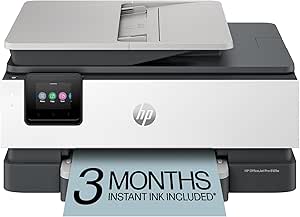
HP OfficeJet Pro 8125e Wireless All-in-One Color Inkjet Printer, Print, scan, Copy, ADF, Duplex Printing Best-for-Home Office, 3 Month Instant Ink Trial Included, AI-Enabled (405T6A)
This printer makes the most sense for professionals or small business owners who need fast, high-quality color output with versatile scanning and copying. Unlike the Canon PIXMA TS6520, the HP OfficeJet Pro 8125e offers a larger paper capacity (225 sheets) and automatic duplexing, making it better suited to busy environments. Its AI-optimized printing ensures web pages and emails are formatted perfectly, saving paper and frustration. While it’s slightly larger and consumes more power, its robust features justify the tradeoff for frequent, professional-quality printing. It also includes a 3-month Instant Ink trial, reducing ongoing costs for high-volume users. For those prioritizing speed and volume, this HP is a dependable choice.
Pros:- Fast print speeds—up to 20 ppm black, 10 ppm color
- High paper capacity (225 sheets)
- Auto 2-sided printing and ADF for productivity
Cons:- Larger physical size may be less suitable for small spaces
- Higher power consumption compared to basic models
Best for: Home offices requiring fast, high-volume printing with professional quality and automatic duplexing.
Not ideal for: Casual users or those with space constraints, as its larger footprint and higher power draw may be less suitable.
- Printer Type:Inkjet
- Print Speed Black & White:20 ppm
- Print Speed Color:10 ppm
- Maximum Paper Capacity:225 sheets
- Duplex Printing:Automatic
- Control Method:Touchscreen
- Wireless Connectivity:Wi-Fi
- Item Weight:8 Kilograms
Bottom line: Ideal for home offices that need quick, reliable, and professional-quality color documents regularly.
Canon PIXMA TS6520 Wireless Color Inkjet Printer Duplex Printing, White – Home Printer with Copier/Scanner, 1.42” OLED Display, Intuitive Control Panel, Compact Design
This model is perfect for users who want a versatile, easy-to-use printer that handles both documents and photos well. Compared with the Canon PIXMA TS4320, the TS6520 offers a larger 1.42-inch OLED display and automatic duplexing, making it more suitable for frequent, multi-purpose use. Its compact design fits well in small spaces, and the dual-cartridge system provides sharp text and vibrant color, ideal for family or hobbyist use. Setup is straightforward, and wireless connectivity supports printing from smartphones and tablets. The main tradeoff is the slightly higher price and a more complex ink system, but for those who value quality and convenience, this Canon model delivers.
Pros:- Vivid color and sharp text quality
- Easy setup and intuitive control panel
- Compact design fits small spaces
Cons:- No automatic document feeder, limiting scanning/copying speed
- Slightly higher cost compared to basic models
Best for: Home users who want a reliable all-in-one printer for occasional printing, copying, scanning, and photo printing.
Not ideal for: High-volume printing or users who need automatic document feeders for large scanning or copying jobs, as it lacks an ADF.
- Printer Type:Inkjet
- Print Speed Black & White:14 ppm
- Print Speed Color:9 ppm
- Maximum Media Size:8.5 x 14 inches
- Duplex Printing:Auto
- Control Method:OLED display
- Wireless Connectivity:Wi-Fi
- Item Weight:14.8 Pounds
Bottom line: This printer suits those seeking simple, versatile printing with excellent photo quality for light to moderate use.
Canon PIXMA TS4320 Wireless Color Inkjet Printer for Duplex Printing, White – Home Printer with Copier/Scanner, Compact Design, Easy Setup, 1 Year Limited Warranty
This entry is ideal for users who need a simple, affordable printer for light tasks like printing homework, recipes, or occasional photos. Compared to the Canon PIXMA TS6520, the TS4320 offers a more basic feature set, lacking an OLED display and automatic duplexing, but it still supports wireless printing and easy setup. Its compact design and straightforward operation make it perfect for small households or students. The 1-year warranty and basic ink system mean fewer features but sufficient reliability for infrequent use. The primary tradeoff is slower print speed and less advanced media handling, making it less suitable for high-volume or photo-intensive tasks. For occasional printing needs, this Canon model offers excellent value.
Pros:- Affordable price with reliable basic features
- Easy wireless setup and operation
- Compact size fits small spaces
Cons:- No automatic duplexing, requiring manual double-sided printing
- Slower print speeds and limited media support
Best for: Casual home users or students needing a reliable, budget-friendly printer for light tasks.
Not ideal for: Frequent or high-volume printing, or users needing duplex or advanced media handling capabilities.
- Printer Type:Inkjet
- Print Speed Black & White:14 ppm
- Print Speed Color:9 ppm
- Maximum Media Size:8.5 x 14 inches
- Duplex Printing:No
- Control Method:Basic buttons
- Wireless Connectivity:Wi-Fi
- Item Weight:14.8 Pounds
Bottom line: This printer is perfect for light, occasional printing where affordability and simplicity are priorities.
Brother DCP-L2640DW Wireless Compact Monochrome Multi-Function Laser Printer with Copy and Scan, Duplex, Mobile, Black & White | Includes Refresh Subscription Trial(1), Works with Alexa
This Brother model stands out for its impressive speed and all-in-one functionality, making it a strong choice for small home offices that need reliable print, scan, and copy capabilities. Compared to the HP Envy 6155e, it offers faster black-and-white printing up to 36 ppm and includes duplex and mobile options, which are essential for productivity. However, unlike the HP, it’s monochrome only, so if color printing is a priority, this may not suit your needs. The built-in Ethernet and dual-band wireless provide flexible connectivity, and the Refresh subscription ensures toner supply without surprises. The tradeoff is that its compact size might limit paper capacity and color versatility. Overall, this model makes the most sense for users prioritizing speed, durability, and monochrome output in a small space.
Pros:- Fast print speeds up to 36 ppm for black-and-white documents
- All-in-one functionality including scanning and copying
- Dual-band wireless and Ethernet for flexible connectivity
- Includes a toner subscription for cost savings
Cons:- Monochrome only, not suitable for color printing
- Limited paper capacity at 50 pages
- Larger footprint than typical compact printers
Best for: Small business owners or home office users needing fast monochrome printing with multi-function features.
Not ideal for: Home users who require color printing or photo-quality output, as it only prints in black and white.
- Print Speed (Black/White):36 ppm
- Scan Speed:up to 23.6/7.9 ipm
- Connectivity:Wi-Fi 2.4GHz/5GHz, Ethernet, USB
- Auto Document Feeder:50 pages
- Printer Type:Laser Mono 3-in-1
- Paper Capacity:50 pages
- Compatible Toner:Brother TN830 or TN830XL
- Mobile Compatibility:Brother Mobile Connect app
- Duplex Printing:Yes
Bottom line: This model is ideal for small offices or individuals who need quick, reliable monochrome printing in a compact form.
HP Envy 6155e Wireless All-in-One Color Inkjet Printer, Portobello, Print, scan, copy, Duplex printing Best-for-home, 3 month Instant Ink trial included, AI-enabled (714L5A)
This HP Envy 6155e makes a compelling case for families or home users who want vibrant color output and easy touchscreen controls. It surpasses the Brother DCP-L2640DW in color capability, offering crisp, true-to-screen prints with HP’s AI technology that removes unwanted content, ideal for photos and colorful reports. The 100-sheet input tray and auto duplex are useful for daily tasks, but it’s slower at 7 ppm color and 10 ppm black compared to the Brother laser. Connectivity is seamless via dual-band Wi-Fi and the intuitive 2.4″ touchscreen, plus the Instant Ink subscription simplifies ink management. The main tradeoff is its slower speed and higher color ink costs, which may not suit high-volume users. This printer suits households that prioritize high-quality, colorful prints over rapid output.
Pros:- Vibrant, true-to-screen color printing with HP AI technology
- Auto duplex and large 100-sheet input tray
- Intuitive 2.4″ touchscreen interface
- Includes 3 months of Instant Ink service
Cons:- Slower print speeds (7 ppm color, 10 ppm black)
- Higher ongoing ink costs for color printing
- Larger footprint due to color ink cartridges
Best for: Home users or families focusing on photo printing, colorful documents, and easy-to-use touchscreen controls.
Not ideal for: High-volume or monochrome-only users who need rapid black-and-white printing, as this model prioritizes color quality.
- Print Speed (Color/Black):7 ppm / 10 ppm
- Input Tray Capacity:100 sheets
- Connectivity:Dual-band Wi-Fi, touchscreen
- Auto Duplex:Yes
- Maximum Paper Size:8.5 x 14 inches
- Printer Type:All-in-One Inkjet
- Additional Features:AI content removal, mobile app
- Included Trial:3 months Instant Ink
- Warranty:One-year limited
Bottom line: This all-in-one is well-suited for households that want vibrant color and easy operation, accepting slower speeds for quality.
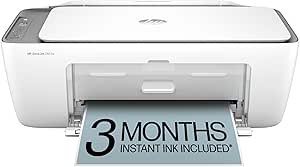
HP DeskJet 2855e Wireless All-in-One Color Inkjet Printer, Scanner, Copier, Best-for-home, 3 month Instant Ink trial included. This printer is only 2.4 ghz capable. (588S5A)
This HP DeskJet 2855e emphasizes affordability and simplicity, making it an excellent choice for casual home printing like letters, lists, and recipes. Its 5.5 ppm color and 7.5 ppm black speeds are modest but sufficient for low-volume tasks. The 60-sheet input tray and flatbed scanner provide basic functionality, and the 2.4 GHz Wi-Fi limits some flexibility compared to dual-band models like the Envy 6155e. The 3 months of Instant Ink are a plus, but ongoing ink costs may add up for frequent printers. The main drawback is its limited speed and paper capacity, which restricts its use for larger or more frequent jobs. This pick is perfect for students or families who need a straightforward, affordable color printer for light use.
Pros:- Very affordable price point
- Includes 3 months of Instant Ink
- Wireless printing with reliable 2.4 GHz Wi-Fi
- Compact and lightweight design
Cons:- Limited to 2.4 GHz Wi-Fi, less flexible connectivity
- Slower speeds (5.5 ppm color, 7.5 ppm black)
- Small paper capacity at 60 sheets
Best for: Casual home users or students with low-volume printing needs, especially those on a budget.
Not ideal for: High-volume or photo printing enthusiasts who require faster speeds and larger paper capacity.
- Print Speed (Color/Black):5.5 ppm / 7.5 ppm
- Input Tray Capacity:60 sheets
- Connectivity:Wi-Fi 2.4 GHz only
- Printer Type:All-in-One Inkjet
- Maximum Media Size:8.5 x 14 inches
- Additional Features:Flatbed scanner, copier
- Included Trial:3 months Instant Ink
- Weight:7.55 pounds
- Warranty:One-year limited
Bottom line: This printer works best for light, casual color printing in a budget-conscious home environment.
Brother Work Smart 1360 Wireless Color Inkjet All-in-One Printer with Automatic Duplex Printing and 1.8” Color Display | Includes Refresh Subscription Trial(1) (MFC-J1360DW) (Uses LC501 Series Inks)
This Brother MFC-J1360DW offers a well-rounded feature set for home offices that want reliable color printing along with copying and scanning. Its automatic duplex printing and 150-sheet paper tray make it suitable for moderate workloads, and the 1.8″ color display simplifies operation. Compared to the HP DeskJet 2855e, it provides larger paper capacity and faster black-and-white speeds up to 16 ppm, making it better suited for frequent printing. While it supports cloud app integration, it’s slightly bulkier, which might be a concern for very limited spaces. The key tradeoff is that color print quality, while good, may not match premium photo printers. Overall, this model prioritizes productivity and ease of use for small to medium home offices.
Pros:- Automatic duplex printing for double-sided documents
- Large 150-sheet paper tray reduces refills
- Easy-to-use 1.8″ color display
- Supports cloud app printing and scanning
Cons:- Bulkier size compared to compact models like HP DeskJet 2855e
- Color print quality is good but not for professional photo work
- Higher initial cost than basic inkjet printers
Best for: Home office users needing dependable color printing, copying, and scanning with higher capacity and productivity features.
Not ideal for: Those seeking the smallest footprint or primarily monochrome printing, as this model is somewhat larger and more feature-rich than necessary.
- Print Speed (Black/Color):16 ppm / 9 ppm
- Paper Capacity:150 sheets
- Connectivity:Wi-Fi, cloud app support
- Automatic Duplex:Yes
- Display:1.8″ color LCD
- Printer Type:Color Inkjet All-in-One
- Supported Apps:Google Drive, Dropbox, OneDrive
- Included Trial:Refresh subscription
- Warranty:One-year limited
Bottom line: This Brother model is best suited for home offices that need consistent, productive color printing with larger paper capacity.
How We Picked
To determine the best wireless printers for home offices, I focused on several key factors. Performance metrics such as print speed, color accuracy, and scanning quality were prioritized, along with ease of setup and user interface. I also evaluated ongoing costs, including ink or toner expenses and refill frequency, since these impact long-term value. Build quality and durability matter for daily use, while features like duplex printing, paper capacity, and mobile connectivity help determine versatility. The ranking reflects a balance of affordability, functionality, and user-friendliness, aiming to serve different types of home office needs.Factors to Consider When Choosing Best Wireless Printers For Home Offices
When selecting a wireless printer for your home office, understanding your specific needs is crucial. Consider how often you’ll print, the types of documents, and whether you’ll need scanning or copying features. Budgeting for ongoing ink or toner costs is just as important as initial price. Also, pay attention to wireless compatibility and ease of setup to avoid frustration. Finally, think about space constraints and whether a compact model can meet your performance demands without compromise.Performance and Print Quality
High-quality print output and fast speeds are vital if you print frequently or need professional-looking documents. Inkjet printers generally excel in color accuracy, making them suitable for photo printing or color graphics, while laser printers offer faster speeds and sharper text for document-heavy tasks. Consider your main printing needs to select a model that balances quality and speed without overpaying for features you won’t use.
Cost of Operation
Initial purchase price is only part of the total cost. Ink or toner expenses can quickly add up, especially with traditional cartridges. Models like the Epson EcoTank or HP Smart Tank use refillable ink tanks, dramatically reducing per-page costs. Conversely, cartridge-based printers might be cheaper upfront but cost more over time, which is a critical factor if you print regularly. Think about your expected volume and ongoing expenses before making a choice.
Ease of Setup and Connectivity
A wireless printer should be simple to connect and maintain. Look for models with straightforward setup processes and reliable Wi-Fi support. Features like mobile app printing, cloud integration, and compatibility with multiple devices add convenience. However, some printers may have connectivity issues or require frequent resets, so reading user reviews can help gauge real-world reliability. Ease of use is especially important if you’re not tech-savvy.
Size and Design
In a home environment, space is often limited. Compact printers that deliver solid performance are ideal for small desks or shelves. While larger multifunction printers tend to have higher paper capacities and more features, they may not fit comfortably in tight spaces. Balance your space constraints with your printing needs to choose a model that looks good and functions well without crowding your workspace.
Additional Features and Future-Proofing
Features like duplex printing, automatic document feeders, and large paper trays add convenience and efficiency for busy home offices. AI-enabled smart features can streamline tasks and improve workflow. Consider whether you might need to upgrade or expand your setup later; selecting a model with versatile connectivity options and upgrade paths can save money and hassle in the long run.
Frequently Asked Questions
How important is wireless connectivity stability for a home office printer?
Wireless connectivity stability is essential because a reliable connection reduces print errors and frustrations, especially if multiple devices access the printer. A stable Wi-Fi signal ensures your prints are sent smoothly without dropped connections or delays. Choosing a model with strong Wi-Fi support and good user reviews on connectivity can prevent headaches and keep your workflow seamless.
Should I prioritize ink tank systems over traditional cartridges for home use?
Ink tank systems typically offer lower ongoing costs and longer intervals between refills, making them ideal for frequent printing. They also tend to produce fewer print quality issues over time. However, they usually come with a higher upfront price. If you print often, investing in an ink tank printer can save money and reduce inconvenience, but for occasional use, a cartridge-based model might suffice.
Is duplex printing a necessary feature for home offices?
Duplex printing, which allows double-sided printing automatically, saves paper and time, making it a valuable feature for busy home offices. If you frequently print documents or reports, this feature can improve efficiency and reduce waste. However, not all models include duplex printing, and some that do may be more expensive. Consider your printing volume and environmental preferences when deciding.
Can I rely on a compact printer to handle high-volume printing?
While compact printers save space, they often have smaller paper trays and slower speeds, making them less suitable for high-volume printing. If you print daily or in large quantities, a larger model with higher capacity and faster output is preferable. A compact printer works best for occasional or light use, so assess your volume needs carefully before choosing a smaller device.
How do I choose between inkjet and laser printers for home use?
Inkjet printers generally produce better color quality and are more affordable upfront, making them suitable for photo printing and occasional use. Laser printers offer faster speeds, sharper text, and lower per-page costs when printing large volumes, perfect for document-heavy tasks. Your choice depends on your primary needs: opt for inkjet if color accuracy matters, and laser if speed and volume are your priorities.