For creators juggling multiple devices and demanding workflows, the right KVM dock switch can streamline your setup and boost productivity. The best options support multiple monitors, fast switching, and high resolutions, but tradeoffs often include complexity, price, or limited compatibility. The Ugreen HDMI KVM Switch stands out for its simplicity and reliable 4K support, while the AV Access 8K DisplayPort KVM caters to those needing ultra-high resolutions and multi-monitor setups. Many options struggle with balancing ease of use versus extensive connectivity or high refresh rates. Keep reading for a detailed comparison to find the best fit for your creator workspace.
Key Takeaways
- Multi-monitor support with high resolutions remains a key differentiator, especially for creative workflows requiring detailed visuals.
- Ease of switching—whether via remote, button, or software—significantly impacts daily usability for creators handling multiple devices.
- Compatibility with a variety of devices and ports (HDMI, DisplayPort, USB-C) ensures broader flexibility in complex setups.
- Build quality and reliability are more critical here than in simple switchers, given the demands of professional work.
- Price varies widely; investing in high-end models often provides more ports, higher resolutions, and future-proofing for demanding workflows.




More Details on Our Top Picks
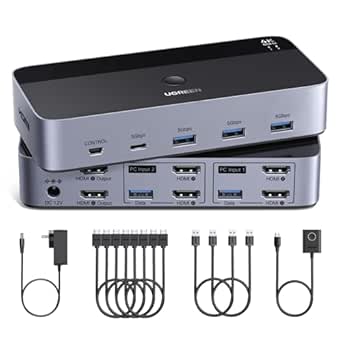
UGREEN HDMI KVM Switch 2 Monitors 2 Computers 4K@60Hz, with 4 USB 3.0 Ports for 2 Computers Sharing 2 Monitors Keyboard Mouse Printer with 4 HDMI Cables, 2 USB Cables, Power Adapter and Controller
This UGREEN HDMI KVM switch stands out for its ability to manage two computers across two monitors with impressive 4K@60Hz resolution, making it ideal for creators who need high-quality visuals. Compared with the Anker model, it offers broader compatibility with multiple HDMI cables and a desktop controller that keeps your workspace tidy. Its plug-and-play setup suits both professionals and home office users, but it lacks hotkey switching, which might slow workflow for power users. The four USB 3.0 ports support fast data transfer, perfect for sharing peripherals like printers and drives, though EDID emulation isn’t supported, potentially causing display issues with some setups. This switch is best for creators who prioritize dual screens and straightforward operation without extra software.
Pros:- Supports 4K@60Hz with HDR and HDCP 2.2 for vivid, high-quality images
- Includes 4 HDMI cables, 2 USB-C, and USB-A cables for complete connectivity
- Desktop controller offers outside-the-desk switching for a cleaner workspace
Cons:- Lacks hotkey or hotkey shortcut support for faster switching
- Does not support EDID emulation, which may cause display flickering or resolution issues
Best for: Creators who need to seamlessly switch between two high-resolution computers on dual monitors with minimal latency.
Not ideal for: Users who rely on hotkey switching or require EDID emulation for seamless multi-monitor setups or hotkeys for quick toggling.
- Resolution Support:4K@60Hz
- USB Ports:4 USB 3.0
- Video Inputs:2 HDMI
- Switching Mode:Button & Controller
- Power Supply:Power Adapter included
- Compatibility:Windows, MacOS, Linux
Bottom line: Ideal for creators who value straightforward dual-monitor switching with reliable 4K output and a tidy setup.
USB C KVM Docking Station Switch 3 Montors 2 Computers with 100W PD Supply Hybrid Displayport and HDMI KVM Triple 4K60Hz or Dual 4K144Hz Extended Display for Laptop and PC Share 15 in 1 Dock
This USB C KVM docking station excels in offering a comprehensive 15-in-1 dock, combining triple monitor support with charging and networking, making it a top choice for hybrid creators juggling multiple devices. Compared with the AV Access 8K switch, it provides more ports for peripherals like SD cards and Ethernet, plus 100W PD charging for laptops, all in a single device. Its support for dual 4K144Hz or triple 4K60Hz displays caters to high-performance workflows, but it requires a USB-C port supporting DP Alt Mode and Thunderbolt, limiting compatibility for some laptops. The switch offers both button and wired controller switching, ideal for multi-device setups, though it might be overkill for users only needing dual displays. This model is perfect for creators who need a docking station and KVM combined in a single, versatile device.
Pros:- Supports triple 4K@60Hz or dual 4K144Hz displays for high-fidelity visuals
- Includes 15-in-1 ports: Ethernet, SD, TF, USB, and charging
- High 100W PD charging supports fast power delivery to laptops
Cons:- Requires laptops with USB-C DP Alt Mode and Thunderbolt support
- Complex setup may be overwhelming for casual users
Best for: Power users needing a docking station with multi-monitor support, charging, and switching for multiple laptops.
Not ideal for: Laptop-only users without Thunderbolt support or those seeking simple dual-monitor setups without dock features.
- Display Support:Triple 4K@60Hz / Dual 4K144Hz
- USB Ports:6 USB 3.0
- Power Delivery:100W
- Video Inputs:3 DisplayPort
- Ethernet:Gigabit
- Compatibility:USB-C with DP Alt Mode & Thunderbolt
Bottom line: Best suited for demanding creators who need a docking station with advanced multi-monitor and charging capabilities.
The Anker USB 3.0 HDMI KVM switch offers a balance of simplicity and high performance with support for 4K@60Hz visuals and five USB ports, making it suitable for creators with limited space but multiple peripherals. Compared with the AV Access 8K switch, it lacks triple monitor support but compensates with a magnetic remote for quick toggling—ideal for those who prefer a straightforward, one-button switch. Its compatibility with a range of devices, including MacBooks and iPads, broadens its appeal, though it doesn’t support hotkey switching or EDID emulation, which could be limiting for some professional workflows. The included cables and remote make setup flexible, but the single HDMI output limits multi-monitor setups for demanding creatives. This switch is perfect for users who want a simple, reliable device in a compact form.
Pros:- Supports 4K@60Hz with simple remote toggling
- Includes five USB 3.0 ports for peripherals
- Cables included for quick setup
Cons:- Limited to single HDMI output, not suitable for triple monitor configurations
- No hotkey support or EDID emulation for advanced setups
Best for: Creators needing a compact, easy-to-use switch for single or dual monitor setups with multiple USB peripherals.
Not ideal for: Professionals who require multi-monitor extended desktop or hotkey switching for rapid workflow changes.
- Resolution Support:4K@60Hz
- USB Ports:5 USB 3.0
- Video Inputs:1 HDMI, 2 USB-C
- Switching Method:Magnetic Remote
- Compatibility:Windows, Mac, iPad
- Cables Included:Yes
Bottom line: Best for users who want an easy, versatile switch for small, single or dual monitor workspaces with minimal fuss.
4K USB C KVM Switch Dock 2 Monitors 2 Laptops, Dual HDMI Monitor KVM Switch for 2 Laptops, 100W PD and 1G Ethernet for 2 Laptops with Wired Remote Control and USB C Cable Included
This 4K USB C KVM switch dock combines dual monitor support with docking station features, including Ethernet, SD card, and 100W PD charging, making it ideal for creators who work across two laptops and need a full accessory hub. Compared with the Plugable USB Sharing Switch, it offers more extensive docking capabilities but is limited to two laptops, not supporting hotkey switching or multi-monitor extended mode on MacOS. Its wired remote control simplifies switching without re-plugging, but its compatibility depends heavily on laptops supporting DP over USB-C and video transmission protocols. The USB-C cables and Ethernet ports boost productivity, though setup complexity may be higher. This device suits creators seeking a combined docking and switching solution for dual-laptop environments.
Pros:- Supports dual HDMI monitors at 4K@60Hz
- Includes Ethernet, SD, TF, and USB ports for full docking
- Wired remote control for quick switching
Cons:- Limited to two laptops, no multi-device hotkey support
- Requires laptops that support DP over USB-C for video transmission
Best for: Creators managing two laptops with a need for docking, networking, and dual monitor support in a streamlined setup.
Not ideal for: Users who need more than two computers or multi-monitor extended desktops on MacOS without MST support.
- Display Support:Dual HDMI 4K@60Hz
- USB Ports:4 USB 3.0, SD, TF
- Power Delivery:100W
- Ethernet:1Gbps
- Switching Method:Wired Remote
- Compatibility:USB-C with DP Alt Mode
Bottom line: Best for dual-laptop users who need a docking station with easy switching and multiple peripheral connections.
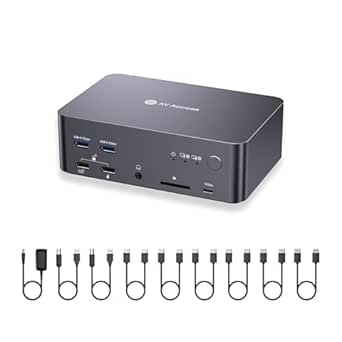
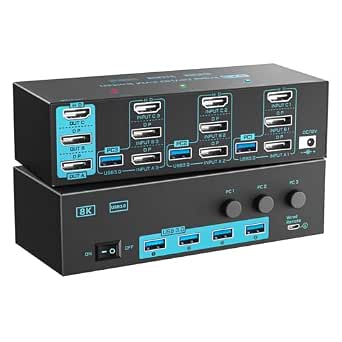
AV Access 8K DisplayPort KVM Switch 2 PC 3 Monitors, with 6 DP Cables, Triple Monitor 8K@60Hz 4K@165Hz 1080P@240Hz, USB 3.0 Hub, LAN, Audio, SD Card All-Aluminum, 12-in-1 Dock for Home Gaming
The AV Access 8K DisplayPort KVM switch offers unparalleled resolution support, including 8K@60Hz and 4K@165Hz, making it ideal for high-end gaming and professional content creation across three monitors. Compared with the UGREEN dual HDMI switch, it supports far higher refresh rates and multi-monitor configurations, with added USB hub, LAN, and SD card slots for a comprehensive setup. Its all-metal construction ensures durability, and auto wake-up features streamline workflow. However, it exclusively supports desktops with three DisplayPort outputs and does not work with laptops, limiting portability. Its advanced features come with a higher price point and setup complexity, suitable for users who demand top-tier visual fidelity and multitasking capabilities.
Pros:- Supports 8K@60Hz and 4K@165Hz for ultra-high-resolution visuals
- Includes 6 DisplayPort cables for flexible multi-monitor setups
- All-metal durable construction with LAN and SD card support
Cons:- Limited to desktops with 3 DisplayPort outputs, not portable for laptops
- Complex setup and higher cost for casual users
Best for: High-performance gamers and content creators with desktop setups requiring triple monitors and 8K resolution.
Not ideal for: Laptop users or those seeking a portable or simple switch without multi-monitor or high refresh rate support.
- Resolution Support:8K@60Hz, 4K@165Hz
- Display Outputs:3 DisplayPort
- USB Ports:USB 3.0 Hub
- LAN & Audio:Gigabit Ethernet, 3.5mm Audio
- Build Material:All aluminum
- Compatibility:Desktops with 3 DisplayPort outputs
Bottom line: Best suited for demanding professionals needing ultimate resolution and multi-monitor support on desktop gaming and creative workstations.
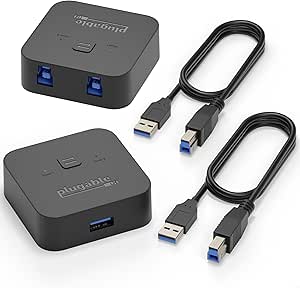
Plugable USB 3.0 Sharing Switch, One-Button USB A Switch to Share Devices Between 2 Computers | KVM Switch for Keyboards, Docking Stations & More
This USB sharing switch stands out for its effortless one-touch toggle, making it ideal for creators who primarily need to share peripherals like keyboards, mice, and docking stations between two computers. Unlike more complex KVMs that handle video, this model focuses solely on USB devices, which can be a drawback if you require video switching. Compared to multi-monitor options, it offers a straightforward, budget-friendly solution that boosts workflow efficiency without the added complexity.
However, it doesn’t support USB-C or Thunderbolt docks, limiting compatibility for newer setups. The plug-and-play nature means no drivers are needed, which is a plus for quick setup. The LED indicators help identify the active device easily, minimizing errors. A key tradeoff is the limited cable length (1.8m) which might restrict placement flexibility.
Pros:- One-touch toggle for quick switching
- Plug-and-play with no driver installation needed
- LED indicators for easy status recognition
Cons:- Limited to USB device sharing, no video support
- Compatibility excludes USB-C and Thunderbolt docks
Best for: Creators who need quick, reliable USB peripheral sharing between two laptops without video switching.
Not ideal for: Those with multi-monitor setups or requiring video switching, as this switch only handles USB devices.
- Device Compatibility:USB 3.0, 2.0, 1.1 devices
- Number of Ports:1 USB A input, 1 USB A output
- Cable Length:1 meter
- Switching Method:One-button toggle
- LED Indicators:Yes
- Compatibility Limitations:No USB-C/Thunderbolt support
Bottom line: This switch is perfect for creators who want a simple, reliable way to share USB peripherals between two computers without the complexity of video switching.
8K/4K KVM Switch 3 Monitors 3 Computers Triple Monitor 3 Port 2 Displayport 1.4 and HDMI 2.1 USB 3.0 KVM Switches, DP 1.4 Supports 8K@30Hz/4K@144Hz, HDMI Supports 8K@60Hz /4K@120Hz with Wired Remote
This model makes the most sense for creators needing to manage three high-resolution monitors across multiple systems. It supports dual DisplayPort 1.4 and HDMI 2.1 ports, enabling stunning 8K@30Hz and 8K@60Hz visuals, surpassing many competitors like the Plugable USB 3.0 switch, which only handles USB peripherals. The inclusion of a wired remote adds convenience for switching between three systems with a single click, ideal for complex creative workflows.
Compared to more affordable options, this switch offers top-tier resolution support but at a higher price point and with the requirement that each PC supports triple-monitor output, which can limit compatibility. The cables are included but are limited to 2 meters for optimal 8K resolution, which could restrict setup flexibility. The device also features HDR, G-Sync, and VRR support, making it excellent for multimedia creators.
Pros:- Supports up to 8K@60Hz and 4K@144Hz resolutions
- Includes wired remote for quick switching
- Supports HDR10+, G-Sync, and VRR for multimedia tasks
Cons:- Requires each PC to support triple monitor output
- Higher price compared to simpler multi-monitor switches
Best for: Advanced creators and professionals with high-res multi-monitor setups needing seamless switching at 8K or 4K resolutions.
Not ideal for: Casual users or those with only dual monitors, as the full capabilities are optimized for triple-monitor configurations.
- Max Resolution:8K@30Hz/60Hz, 4K@144Hz/120Hz
- Ports:2 DisplayPort 1.4, 1 HDMI 2.1
- USB Ports:4 USB 3.0
- Cable Length:2 meters
- Switching Method:Wired remote + physical button
- Compatibility:Requires PC support for triple monitors
Bottom line: This switch is ideal for creators with demanding high-resolution multi-monitor setups who need seamless, high-quality switching at 8K or 4K.
This UGREEN model is a strong contender for creators who require a compact yet powerful solution to control two computers with three monitors and multiple USB peripherals. It supports high resolutions up to 8K@60Hz and 4K@240Hz, making it suitable for high-end graphics work or gaming. Compared to larger, more expensive switches, its aluminum chassis and bundled cables make it a space-efficient, ready-to-go package for demanding setups, including HDMI 2.1 and DisplayPort 1.4 support.
On the downside, it requires each system to have the necessary ports and support for triple display output, which might limit compatibility with some laptops or older desktops. The included cables are of high quality but limited to 6 feet, possibly requiring longer cables for certain setups. It does not include a remote control, so switching must be done via physical buttons on the device, which could be less convenient in some scenarios.
Pros:- Supports 8K@60Hz and 4K@240Hz resolutions
- Bundled with multiple cables for quick setup
- Aluminum chassis offers durability and a sleek look
Cons:- Requires systems to support triple monitor output
- Switching via physical button only, no remote control
Best for: Power users with dual systems who need a compact, high-resolution multi-monitor setup without sacrificing performance.
Not ideal for: Users with single systems or setups not supporting triple display output, as the device’s full capabilities won’t be utilized.
- Max Resolution:8K@60Hz, 4K@240Hz
- Ports:2 HDMI, 4 DisplayPort 1.4, 2 USB C, 4 USB 3.0
- Cable Length:6 feet bundled cables
- Build Material:Aluminum
- Switching Method:Physical button
- Power Supply:Included
Bottom line: This switch is excellent for creators who want a compact, high-performance multi-monitor control solution with high resolutions and durable build quality.
The MINIX K1 delivers a compact, stylish solution for creators needing to switch between two computers using a single monitor. Its USB-C dual input design supports 4K@120Hz HDR, offering excellent display quality for most creative tasks. Compared to multi-monitor options, this device is limited to a single display but excels in portability and simplicity, making it suitable for on-the-go creators or tight workspace environments. The 100W PD port allows for charging compatible devices, reducing desk clutter.
However, its single monitor support may be a limitation for those with multi-screen workflows. Unlike larger switches like the Plugable or UGREEN models, it doesn’t support multiple displays or extensive USB ports, which could be a drawback for advanced users. The aluminum chassis adds durability and a premium feel, but the setup requires ensuring your device’s USB-C port supports video output.
Pros:- Supports 4K@120Hz HDR resolution
- Includes 100W PD charging port
- Compact, lightweight aluminum design
Cons:- Limited to a single monitor setup
- No support for multiple displays or extensive USB ports
Best for: Creators needing a portable, single-monitor control solution with high-resolution output and charging capabilities.
Not ideal for: Users with multi-monitor setups or requiring extensive USB connectivity, as this switch only supports one display and limited peripherals.
- Max Resolution:4K@120Hz HDR
- Ports:2 USB-C (video), 2 USB-A
- Power Delivery:100W
- Compatibility:Windows, Mac, Linux, Android
- Build Material:Aluminum
- Switching Method:Button
Bottom line: This switch is best suited for creators who prioritize portability and high-quality single-monitor control with charging support.

How We Picked
These KVM dock switches were selected based on their ability to support multi-monitor setups, high resolutions, and fast switching tailored for creator workflows. We prioritized products that offer reliable build quality, broad compatibility, and ease of use, especially those that handle 4K and 8K signals with minimal latency. The evaluation also considered port versatility, whether they include necessary cables or require additional accessories, and their suitability for desktop or portable setups. The ranking reflects a balance of performance, value, and user-centric features, ensuring each product serves a specific creator need effectively.
Factors to Consider When Choosing Best KVM Dock Switches For Creator Workflows
Choosing the right KVM dock switch for creator workflows involves understanding several key factors. Beyond basic switching, creators need to consider resolution support, multi-monitor capabilities, device compatibility, and ease of control. The right device should seamlessly integrate into your existing setup without adding complexity or sacrificing performance. Here are the main considerations to keep in mind:Resolution and Refresh Rate Support
High-resolution support, such as 4K@60Hz or 8K@60Hz, is essential for creators working with detailed visuals, video editing, or high-fidelity graphics. Be aware that some switches support higher refresh rates only at lower resolutions or require specific ports and cables. Choosing a switch that matches your display capabilities prevents bottlenecks and ensures your workflow remains smooth and crisp.
Multi-Monitor Compatibility
If your creative tasks demand multiple screens, verify that the switch can handle your monitor count and resolutions simultaneously. Some models support triple or even quad monitor setups, but often with tradeoffs in complexity or cost. Ensuring your graphics hardware aligns with the switch’s capabilities avoids frustrating limitations during intensive work sessions.
Device Compatibility and Connectivity
Not all KVM switches support every device type equally. USB-C, HDMI, DisplayPort, and Ethernet compatibility vary, so check that your laptops, desktops, and peripherals are fully supported. Also, consider whether the switch provides sufficient USB ports to connect your keyboard, mouse, and external drives. Overlooking this can lead to inconvenient workarounds or additional adapters.
Ease of Use and Switching Method
Switching should be quick and intuitive, especially when frequent toggling between devices. Remote controls, dedicated buttons, or software-based switching each have pros and cons. For creators, a physical remote or simple button often offers faster access, but software control can provide additional flexibility. Consider your workflow and preference for hardware or software toggling.
Build Quality and Reliability
Given the intensive use in creator environments, durability matters. Aluminum enclosures tend to last longer and dissipate heat better than plastic models. Also, look for models with stable power supplies and well-rated cables, to prevent signal degradation or interruptions during critical work. Investing in quality reduces downtime and maintenance hassle over time.
Frequently Asked Questions
Can I connect multiple monitors with a single KVM switch?
Yes, many KVM switches support multiple monitors, with some capable of handling three or more displays simultaneously. However, the number of supported monitors and maximum resolution varies by model. Ensure your graphics card can drive the number of displays you plan to connect, and choose a switch designed for multi-monitor setups if your workflow requires it. Compatibility with your display inputs (HDMI, DisplayPort, USB-C) is also essential to avoid extra adapters or limitations.
Will a KVM dock switch slow down my connection or reduce video quality?
High-quality KVM switches are designed to support high resolutions and refresh rates without noticeable degradation. However, lower-end models or those not optimized for 4K/8K signals might introduce latency or reduce image clarity, especially at high refresh rates. Always check the supported resolutions and refresh rates before buying to ensure your workflow remains crisp and responsive.
Is a powered KVM switch necessary for my creator setup?
Powered KVM switches generally provide more stable signal transmission and better compatibility with high-resolution displays and multiple peripherals. If you work with 4K or 8K monitors, or connect many devices, opting for a powered model can prevent flickering or connection issues. Unpowered switches may be sufficient for simpler setups but can struggle with demanding resolutions or multiple displays.
Can I use a KVM switch with laptops that only have USB-C ports?
Many modern KVM switches now support USB-C, either directly or via adapters. Ensure the switch explicitly states compatibility with USB-C input, as some models only support HDMI or DisplayPort. Using a switch designed for USB-C can simplify your setup, reduce cable clutter, and provide higher data transfer rates, especially for creator devices that rely on fast data and video transfer over USB-C.
Are all KVM switches compatible with Mac and Windows devices?
Most KVM switches support both Mac and Windows, but features like hotkey switching or specific port compatibility may vary. Check the product specifications for OS support and consider models with broad driver support or plug-and-play operation. Compatibility issues are rare with reputable switches, but verifying this before purchase can save troubleshooting time later.
Conclusion
For creators seeking the best overall experience, the AV Access 8K DisplayPort KVM offers unmatched resolution support and multi-monitor capabilities. Budget-conscious users or those just starting out may prefer the UGREEN HDMI KVM Switch for its simplicity and reliable 4K performance. Professionals working with ultra-high resolutions or complex multi-monitor setups should consider premium options like the 8K/4K KVM Switch for maximum future-proofing. Beginners or those with limited space will find the MINIX K1 USB C KVM straightforward and compatible, while advanced users requiring extensive connectivity will benefit from the AV Access or UGREEN DisplayPort models. Match your specific needs, device compatibility, and budget to select the ideal KVM dock switch for your creative workflow.