
Colorgrading is a vital step in creating visually compelling videos and photos, offering control over mood, tone, and style. The best tools range from professional calibration kits to advanced software workflows, but choosing the right option depends on your skill level and needs. The Calibrite ColorChecker Passport stands out for accurate color calibration, while DaVinci Resolve excels for comprehensive grading workflows. Many options come with a tradeoff between complexity and ease of use, so understanding your priorities is key. Continue reading for a detailed breakdown of each product and what makes them unique.

Get smart everyday buys delivered free with Prime
- Fast, free delivery on millions of items
- Prime Video, Amazon Music and more included
- Member-only deals all year
Key Takeaways
- Calibration tools like Calibrite excel in ensuring color accuracy across devices, essential for professional workflows.
- Software with integrated AI, such as DaVinci, can dramatically speed up grading but may require a learning curve.
- Foundational knowledge in color theory and psychology enhances grading quality more than just having advanced tools.
- Beginner-friendly options often sacrifice some control for simplicity, perfect for learning or quick results.
- Choosing the right product depends heavily on whether your focus is on video, photography, or cinematic storytelling.



More Details on Our Top Picks
Calibrite ColorChecker Passport Photo 2 Portable Color Calibration Kit for Photo and Video, 4 Target Set
This kit stands out for its portability and comprehensive targets, making it ideal for photographers and videographers who need reliable color calibration in the field. Compared with larger, stationary calibration tools, this set offers quick, accurate profiling without sacrificing mobility. It supports DNG and ICC workflows, which is a plus for users seeking consistent color across different devices and projects. However, it requires compatible software and camera setups, making it less suitable for beginners or casual users. Its focus on calibration means it doesn’t replace general-purpose accessories like light meters or advanced monitors, but it excels in maintaining color fidelity during shoots.
Pros:- Portable and lightweight design for easy transport
- Supports custom white balance and camera profiling
- Includes multiple targets for comprehensive calibration
- Protective case with lanyard enhances usability in various environments
Cons:- Requires compatible software and camera setup to function properly
- Limited to calibration tasks, not a versatile camera accessory
Best for: Professional photographers and videographers needing portable calibration tools for fieldwork
Not ideal for: Casual hobbyists or beginners who prefer plug-and-play solutions without setup complexity
- Targets:4
- Includes:Folding protective case, Lanyard
- Software support:Calibrite PROFILER for DNG and ICC profiling
- Compatibility:Supported with compatible cameras and software
- Size:Compact
- Material:Plastic and cardboard
Our verdict“This calibration kit makes the most sense for professionals who need precise, portable color management on location.”
Color Grading with AI: Master DaVinci, Premiere, and Final Cut Workflows via Prompts
This course is tailored for editors eager to incorporate AI prompts into their color grading routines across DaVinci Resolve, Premiere, and Final Cut Pro. It contrasts with traditional methods like those in the ‘Color Correction Handbook,’ which focus more on manual adjustments. The AI focus offers a shortcut to complex looks, but it might require prior editing experience to fully benefit from the prompts. Since no detailed technical specifications are provided, it’s best suited for users already familiar with basic editing workflows who want to explore AI-assisted grading techniques.
Pros:- Covers multiple editing platforms for versatility
- Focuses on AI-driven workflows, saving time
- Helps improve overall video editing skills with color techniques
- Accessible for those already familiar with editing software
Cons:- Lacks detailed technical specifications or step-by-step guides
- Content may be less useful for users unfamiliar with basic editing workflows
Best for: Intermediate editors interested in integrating AI tools into their color grading process
Not ideal for: Complete beginners or users seeking detailed technical specifications and step-by-step instructions without prior editing knowledge
Our verdict“This course makes the most sense for editors looking to streamline color grading with AI tools on popular platforms.”
Color With Confidence: Master Color Theory, Color Psychology, Harmony, Lightroom Color Grading, Film Looks, and Cinematic Photography
This course offers a broad yet practical overview of color theory, Lightroom grading, and cinematic looks, making it ideal for photographers and creatives aiming to deepen their understanding of color. Unlike the more technical calibration-focused Calibrite kit, this course emphasizes artistic application and theory, providing exercises that translate into more compelling images. Although it doesn’t specify pricing or beginner level, its comprehensive coverage suggests it’s better suited for those with some foundational knowledge who want to elevate their color skills. It’s less about technical precision and more about artistic mastery.
Pros:- Covers a wide range of color topics from theory to cinematic looks
- Provides practical exercises to reinforce learning
- Focuses on artistic application of color in photography
- Suitable for those wanting to enhance creative expression
Cons:- No specific pricing or beginner guidance provided
- Content may be too advanced for complete novices
Best for: Photographers and visual artists wanting to understand color psychology and apply color creatively
Not ideal for: Absolute beginners or users seeking technical calibration tools or detailed technical specs
Our verdict“This course is best for photographers and creatives aiming to master color as an artistic tool rather than technical calibration.”
Camera Color Correction White Balance Card, 4-in-1 Set by Pixiss
This 4-in-1 set excels in providing quick, reliable reference points for exposure and color balance during shoots, making it a practical choice over more comprehensive calibration tools like the Calibrite kit. Its waterproof, durable design suits outdoor environments, and the inclusion of a ruler plus microfiber cloth adds to its utility. However, being limited to just four cards, it doesn’t offer the depth of calibration possible with specialized software or larger tools, which might be a drawback for advanced colorists. Its primary role is on-location color correction, not detailed profiling or calibration workflows.
Pros:- Durable, waterproof, and lightweight design
- Includes multiple color reference cards and a ruler
- Compact and portable for field use
- Comes with microfiber lens cloth for cleaning
Cons:- Limited to basic color correction references
- Not suitable for detailed calibration tasks
Best for: On-location photographers and videographers who need fast, durable reference tools for shooting environments
Not ideal for: Studio-based professionals requiring detailed color calibration or advanced profiling capabilities
- Size:4 inches
- Material:Matte card
- Includes:Color checker, gray, white, black cards, microfiber lens cloth
- Features:Waterproof, durable, lightweight, with lanyard and ruler
Our verdict“This set makes the most sense for fieldwork where quick, reliable color correction is needed without complex setup.”
Beyond the LUT: Color Theory for Modern Video Editors
This book offers a thorough exploration of color theory principles tailored to modern workflows, making it invaluable for editors wanting to go beyond simple LUT application. It contrasts with software-based guides by emphasizing the conceptual foundation needed for effective color storytelling. While it lacks detailed technical specifications and user ratings, its focus on practical techniques and modern editing contexts makes it useful for those looking to improve their understanding of color as a storytelling tool rather than just technical correction. It’s a good fit for editors who want to refine their color language and make more intentional choices.
Pros:- Comprehensive coverage of color theory and storytelling
- Provides practical techniques for enhanced video quality
- Focuses on modern editing workflows and creative application
- Helps develop a more intentional approach to color grading
Cons:- Lacks detailed technical specifications
- No user reviews or ratings available
Best for: Video editors seeking to deepen their understanding of color theory and storytelling techniques
Not ideal for: Beginners or users seeking specific technical calibration tools, as it focuses more on theory and workflow concepts
Our verdict“This book makes the most sense for editors who want to build a strong theoretical foundation for more impactful color grading.”
Color Correction Handbook: Professional Techniques for Video and Cinema
This book stands out for its thorough coverage of professional color correction techniques tailored for video and cinema production. Unlike more introductory options like Color Grading 101, it dives deep into advanced methods, making it ideal for those seeking a comprehensive understanding of color workflows. However, it lacks multimedia content and specific technical details, which might hinder practical application for some. This resource is perfect for seasoned editors or cinematographers who want a detailed reference to refine their craft and master complex correction techniques.
Pros:- Provides in-depth professional techniques
- Suitable for both video and cinema production
- Enhances understanding of complex color correction workflows
Cons:- No practical exercises or multimedia content
- Lacks specific product features or software instructions
Best for: Experienced video editors and cinematographers looking for a detailed, professional reference to elevate their color correction skills
Not ideal for: Beginners or hobbyists who need step-by-step tutorials or practical exercises without extensive technical jargon
- Format:Print book
- Pages:350
- Level:Advanced
- Target Audience:Professional editors and cinematographers
Our verdict“This book is best suited for experienced professionals seeking a detailed technical reference in color grading.”
Color Grading 101: Getting Started Color Grading for Editors, Cinematographers, Directors, and Aspiring Colorists
This book offers a clear, approachable introduction to color grading, making it a strong choice for newcomers and those new to workflows like those in Color Grading Mastery. While it covers fundamental concepts and practical tips, it doesn’t delve into advanced topics or software-specific workflows, which may leave more experienced users wanting more depth. Its straightforward style makes it ideal for those starting out, but less suitable for professionals seeking complex techniques or detailed LUT management.
Pros:- Comprehensive introduction to fundamental concepts
- Practical tips suitable for beginners
- Accessible language and structure
Cons:- Lacks coverage of advanced topics
- No multimedia or video content to reinforce learning
Best for: Beginners, students, and aspiring colorists seeking a practical introduction to core concepts in color grading
Not ideal for: Experienced editors or filmmakers who need advanced workflows, detailed LUT integration, or in-depth technical training
- Format:Print book
- Pages:200
- Level:Beginner
- Target Audience:Students and novice editors
Our verdict“This book is perfect for beginners wanting a solid foundation in color grading basics without overwhelming technical details.”
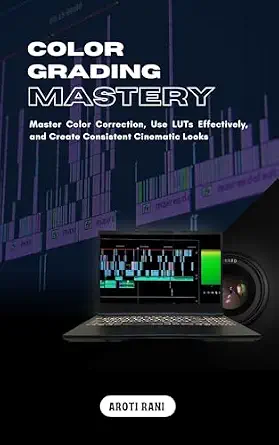
Color Grading Mastery: Master Color Correction, Use LUTs Effectively, and Create Consistent Cinematic Looks
This course emphasizes practical mastery of color correction, especially in the effective use of LUTs and creating consistent cinematic aesthetics, making it a strong complement to Mastering Color Grading in DaVinci Resolve. Compared to books that focus on theory or workflow, it offers hands-on techniques that can elevate a video project’s look. Its content may challenge beginners or those unfamiliar with basic editing, as prior knowledge of color concepts or LUTs is beneficial. For those seeking a comprehensive, applied skill set, this course hits the mark.
Pros:- Comprehensive coverage of color correction techniques
- Focus on practical application with LUTs
- Suitable for both beginners with some experience and advanced users
Cons:- Lacks detailed technical specifications
- Content may require existing familiarity with editing software
Best for: Intermediate to advanced video editors and filmmakers aiming to refine their use of LUTs and achieve professional cinematic looks
Not ideal for: Absolute beginners or hobbyists with little editing experience who need foundational lessons before tackling advanced techniques
- Format:Online course
- Duration:8 hours
- Level:Intermediate to advanced
- Software Focus:Premiere, DaVinci Resolve
Our verdict“This course is ideal for those with basic editing skills looking to master LUTs and cinematic color grading techniques.”
Mastering Color Grading in DaVinci Resolve: A Step-by-Step Guide to Transforming Log Footage Using a Node Workflow That Finally Makes Sense
This book excels at demystifying DaVinci Resolve’s node workflow, making complex log footage transformations accessible for both beginners and experienced editors, unlike more generic guides. Its step-by-step approach breaks down technical processes into manageable parts, which is especially useful compared to less structured resources. However, it doesn’t specify software versions or technical details, which could be a drawback for users working with different or newer Resolve versions. This makes it a smart choice for users who want clarity and practical guidance in Resolve’s powerful environment.
Pros:- Clear, step-by-step instructions
- Focus on practical node workflow
- Suitable for both beginners and advanced users
Cons:- No mention of specific software versions
- May be too advanced for absolute beginners
Best for: Editors and colorists using DaVinci Resolve who want a clear, guided approach to transforming log footage with node workflows
Not ideal for: Complete beginners unfamiliar with log footage or node-based workflows, or users working with other editing platforms
- Format:Print book
- Pages:250
- Level:Beginner to advanced
- Focus:DaVinci Resolve node workflows
Our verdict“This guide is perfect for Resolve users seeking a straightforward, structured approach to mastering log footage and node workflows.”

How We Picked
Products were evaluated based on performance, usability, build quality, and value. Priority was given to tools that offer tangible improvements in workflow and results, whether through hardware calibration or advanced software features. We balanced professional-grade options with accessible solutions suitable for beginners, ensuring that each pick addresses specific user needs. The ranking reflects a combination of practicality, versatility, and innovation, helping buyers find the best fit for their level and goals.Factors to Consider When Choosing Colorgrading
Selecting the right colorgrading tools involves understanding several key factors that influence your final results. Beyond just features and price, consider how each product integrates into your workflow, your level of expertise, and your specific project needs. Making an informed choice can save you time and improve your creative output.Calibration and Color Accuracy
Accurate calibration tools like color checkers are fundamental for maintaining color consistency across devices and media. If your work demands precision—such as professional photography or high-end video production—investing in reliable calibration hardware is worthwhile. For casual or hobbyist projects, software-based solutions might suffice, but beware of potential color shifts without proper calibration.
Ease of Use and Learning Curve
Some tools, especially advanced software with AI features, can significantly accelerate your workflow but may require a steep learning curve. Beginners should prioritize intuitive interfaces and guided workflows that help them understand core concepts without frustration. More experienced users might prefer open-ended tools that offer deeper control and customization.
Workflow Compatibility
Ensure that your chosen tools integrate seamlessly with your editing environment—be it DaVinci Resolve, Premiere, Final Cut, or Lightroom. Compatibility can affect efficiency and reduce the risk of workflow bottlenecks. Consider whether you need hardware calibration, color grading plugins, or standalone software, and select based on your existing setup.
Budget and Long-term Value
Pricing varies widely, from affordable hardware kits to costly professional software. Balance your immediate needs with potential growth—investing in scalable tools can pay off as your skills improve. Remember that cheaper options might lack features or accuracy, leading to more time spent fixing issues later, so weigh the tradeoffs carefully.
Educational Resources and Support
Tools backed by comprehensive tutorials, active user communities, and customer support can drastically shorten your learning curve. Especially for beginners, access to educational material can turn a complex tool into a valuable asset. For pros, ongoing support and updates ensure your investment remains relevant over time.
Frequently Asked Questions
Do I really need calibration tools like color checkers?
Calibration tools are essential if you require color accuracy across multiple devices—such as monitors, cameras, and printers—especially in professional settings. They help establish a consistent color profile, reducing discrepancies that can ruin a project’s visual coherence. For casual work or social media content, software calibration might be enough, but investing in hardware calibration ensures higher fidelity and confidence in your results.
Is AI-powered color grading suitable for beginners?
AI-assisted grading can be a powerful aid, automating complex adjustments and speeding up workflows. However, relying solely on AI might limit your understanding of foundational color principles. Beginners can benefit from AI tools when used as learning aids, but it’s important to grasp core concepts to achieve desired creative effects and troubleshoot issues independently.
Should I prioritize software or hardware for colorgrading?
The choice depends on your workflow and precision needs. Hardware calibration tools ensure consistent color across devices, crucial for professional-grade work. Software solutions, especially those integrated into editing programs, offer convenience and flexibility. Combining both—calibration hardware and advanced software—provides the most reliable results for serious projects.
Can I get professional results with free or low-cost tools?
While free and inexpensive tools can produce decent results for hobbyists or quick edits, achieving true professional-grade colorgrading often requires investing in better equipment, software, or training. Lower-cost options may lack accuracy, advanced features, or support, leading to limitations in creative control or consistency. For serious projects, allocating budget toward quality tools pays dividends in final quality.
What should I look for in learning resources for colorgrading?
Effective educational resources include step-by-step tutorials, comprehensive guides, and active community forums. Look for materials that cover both technical skills and artistic principles—such as color theory and psychology. The availability of ongoing support and updates can also help you stay current with software developments and industry best practices.
Conclusion
For those seeking a comprehensive, professional-grade solution, DaVinci Resolve remains the best overall choice thanks to its robust features and free access. Beginners or hobbyists should consider user-friendly options like Color Grading with AI or Color Correction Handbook, which simplify complex tasks. For precise color calibration, the Calibrite ColorChecker Passport offers unmatched accuracy. Budget-conscious buyers can find value in entry-level hardware or software without sacrificing too much control. Ultimately, select tools that match your skill level, project scope, and long-term goals to create compelling, consistent visuals in 2026.
Halloween Picks
halloween
As an affiliate, we earn on qualifying purchases.