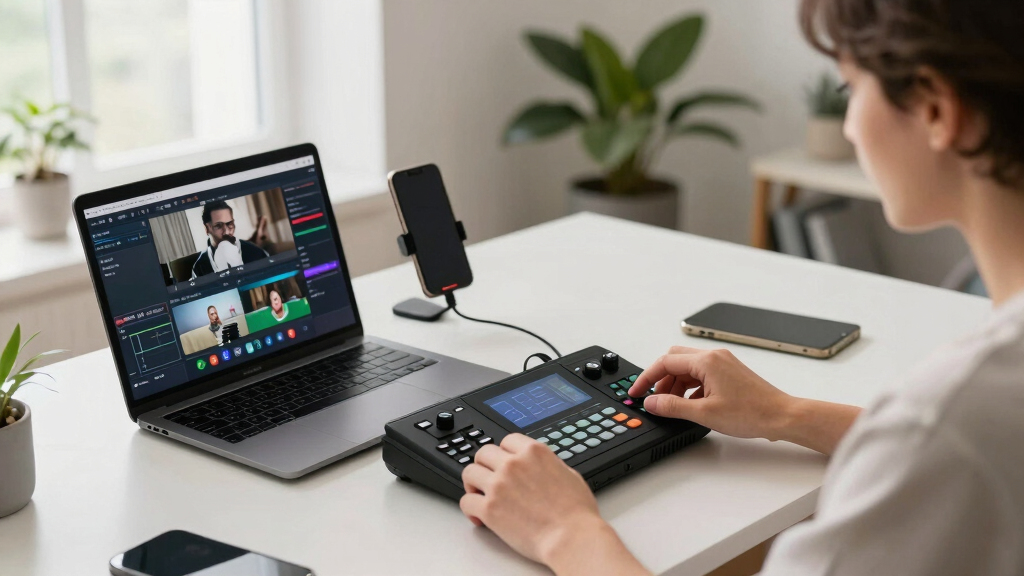
Finding the best live video switcher for TikTok and YouTube workflows involves balancing features, ease of use, and budget. The ideal switcher should support multiple inputs, low latency, and seamless switching to keep your streams professional. RGBlink Mini stands out as the overall top pick for its versatility and reliable performance. CINETREAK Stream 1 excels with advanced PTZ control and dual RTMP support, making it perfect for more complex setups. Meanwhile, the Mixer Plus offers a portable, beginner-friendly option with a simple interface. The main tradeoffs include price versus features and complexity versus ease of use. Keep reading for a detailed comparison to find the best fit for your streaming needs.

Get smart everyday buys delivered free with Prime
- Fast, free delivery on millions of items
- Prime Video, Amazon Music and more included
- Member-only deals all year
Key Takeaways
- Top picks vary based on the complexity of setup and desired features, with dedicated hardware offering more stability for professional use.
- Portability and ease of use are key for beginners or mobile streamers, favoring compact models like Mixer Plus or RGBlink Mini.
- Advanced models like CINETREAK and Tenveo provide extensive input options and control features suited for multi-camera or professional setups.
- Price ranges significantly, with higher-end switchers offering 4K support and NDI capabilities that are unnecessary for casual streamers.
- Low latency and support for multiple streaming protocols are common features that define high-quality switchers in 2026.


More Details on Our Top Picks
RGBlink Mini Video Mixer Switcher with 4 x HDMI Inputs 2K Input/Output Real Time Live Streaming, Support Output 6 Pictures PVW and PGM, for Facebook, YouTube, Instagram, Tiktok, RTMPS
This compact switcher stands out for its 4 HDMI inputs and 2K support, making multi-camera setups straightforward for solo streamers. Its USB 3.0 output acts as a webcam, simplifying integration with popular streaming platforms like OBS and Streamlabs. Compared to larger, more complex switchers, the RGBlink Mini offers an intuitive interface with 14 transition effects and nine picture-in-picture layouts, ideal for those who want professional results without extra fuss. Its portability and remote control via LAN make it versatile for both studio and mobile use. However, the 2K resolution, while good, isn’t as sharp as 4K models, and some users may find the transition effects limited compared to premium options like the FoMaKo M1. This pick makes the most sense for solo streamers seeking high-quality, easy-to-manage live production.
Pros:- Supports 4 HDMI inputs with 2K output for multi-camera setups
- USB 3.0 webcam function enhances streaming software compatibility
- Built-in transition effects and picture-in-picture layouts
Cons:- Limited to 2K resolution, not 4K
- Transition effects are fewer than high-end switchers
- No integrated recording or multi-view monitoring
Best for: Solo content creators and small streamers who need an easy, reliable solution with multi-camera support.
Not ideal for: Large production teams or multi-camera studios requiring 4K output and extensive control features.
- Number of HDMI inputs:4
- Output resolution:2K
- USB output:3.0
- Transition effects:14
- Picture-in-picture layouts:9
- Control method:LAN remote
Bottom line: This switcher is perfect for solo streamers seeking a compact, straightforward device with solid multi-camera capabilities.
CINETREAK Stream 1 Live Streaming Switcher 4 HDMI & AUX Inputs, PTZ Control Dual RTMP Streaming Chroma/Luma Key Recording & Playback and Landscape & Portrait Livestreaming(NDI Updatable)
The CINETREAK Stream 1 excels with its 4 HDMI plus auxiliary inputs, making it ideal for virtual studio setups that require multiple media sources. Its built-in PTZ control supports up to four cameras, perfect for dynamic shooting angles. Compared to simpler switchers like the RGBlink Mini, it offers advanced features such as chroma/luma keying, dual RTMP streaming, and recording options, making it suitable for professional broadcasters. The device supports both landscape and portrait livestreaming, which is a boon for social media content. A potential tradeoff is its steeper learning curve and higher price point, which may not suit casual users. Also, while it supports NDI updates, this feature requires additional licensing. Overall, it’s meant for those demanding high flexibility and professional-grade virtual production tools.
Pros:- Supports 4 HDMI inputs plus auxiliary media sources
- PTZ camera control for up to 4 cameras
- Chroma/luma keying and dual RTMP streaming
Cons:- Higher cost and complexity compared to basic switchers
- Steeper learning curve for beginners
- Requires additional licensing for NDI support
Best for: Producers and broadcasters setting up virtual studios or multi-camera streaming for social media.
Not ideal for: Casual streamers or solo creators who don’t need advanced PTZ, keying, or multi-source capabilities.
- HDMI inputs:4
- PTZ control:up to 4 cameras
- Streaming protocols:Dual RTMP
- Keying features:Chroma/Luma
- Recording options:Record & Playback
- Livestreaming modes:Landscape & Portrait
Bottom line: This switcher is tailored for professional virtual studios needing multi-source flexibility and advanced streaming features.
Mixer Plus Compact Video Switcher 4 HDMI with 4”Built-in Screen, Portable Live Streaming Switcher for Multi-Camera, Online Class, Event, YouTube, OBS, Zoom
The Mixer Plus combines a 4-channel HDMI switcher with a 4-inch built-in screen, making it a standout for portable, multi-camera live streaming. Its size and integrated display give users real-time multi-view monitoring, which is invaluable during dynamic events or outdoor shoots. Compared to larger, rack-mounted switchers like the FoMaKo M1, it’s more compact and easier to carry, yet still offers professional features like PTZ control via VISCA, chroma key, and logo overlay. The device supports up to 4 HDMI inputs and has customizable output options, including PGM and multi-view. A drawback is its limited screen size, which might be less ideal in very complex multi-camera setups. This product is best suited for mobile journalists, event hosts, or educators needing flexibility and portability.
Pros:- Built-in 4-inch multi-view screen
- Supports 4 HDMI inputs and PTZ control
- Portable design with professional features
Cons:- Limited to 1080p output resolution
- Screen size might be small for complex multi-camera setups
- Fewer transition effects compared to higher-end models
Best for: On-the-go videographers, educators, and event organizers requiring portable multi-camera switching.
Not ideal for: Large studio setups requiring extensive control or 4K resolution output.
- HDMI inputs:4
- Built-in screen size:4 inches
- Supported resolutions:1080p
- Control features:VISCA PTZ
- Output options:Multiple including PGM and multi-view
- Portability:Yes
Bottom line: Ideal for mobile productions needing a compact, all-in-one switcher with real-time monitoring.
FoMaKo 4K HDMI Video Mixer Switcher, 5-Channel Live Streaming Switcher, 4K 60FPS Input, 1080p 60FPS Output, Support PTZ Controller, HDMI Video Switcher, M1
The FoMaKo M1 offers 5 HDMI inputs with 4K 60FPS support, making it ideal for professional broadcasters and high-quality streaming. Its robust feature set includes PTZ camera control, multiple transition effects, and flexible output options like PGM, PVW, and multi-view. Compared to the Mixer Plus, it provides higher resolution support and more extensive input channels, suitable for complex multi-camera productions. Its user-friendly control panel with a fader allows precise transition control, and the device supports both landscape and portrait modes, broadening its social media applicability. Downsides include its larger size and higher price point, which may be a barrier for smaller setups. This switcher is best for serious content creators and live event producers demanding top-tier image quality and versatile control.
Pros:- Supports 5 HDMI inputs with 4K 60FPS
- PTZ camera control and multiple transition effects
- Supports both landscape and portrait streaming modes
Cons:- Larger footprint and higher cost
- Complex setup for beginners
- No built-in recording, requires external storage
Best for: Professional streamers and broadcasters producing high-resolution multi-camera live content.
Not ideal for: Casual streamers or those with limited space or budget, due to its size and cost.
- HDMI inputs:5
- Resolution support:4K 60FPS
- Switching mode:Fader and buttons
- Modes supported:Landscape & Portrait
- Control features:PTZ, transitions
- Size:Larger
Bottom line: This is the go-to switcher for high-end live productions requiring 4K output and comprehensive camera control.
Live Streaming Video Mixer, 4 HDMI 4 Channel Input Video Switcher 2 Output HDMI Switcher, Support 1080P@60Hz, HDCP 1.4, Digital Audio Mixer Professional Streaming
This budget-friendly switcher supports 4 HDMI inputs and dual outputs, making it a solid choice for entry-level or small-scale streaming setups. Its support for 1080P@60Hz ensures decent quality for most streaming needs. The device also functions as a digital audio mixer, helping synchronize sound across multiple sources. Compared to higher-end models like the FoMaKo M1, it offers fewer transition effects and lacks advanced features like PTZ control, but its simple interface and affordability make it appealing for beginners or educators. The size and basic feature set limit its use in complex productions, but it provides reliable switching for basic live streams and recordings. The main tradeoffs are lower resolution support and fewer control options, which are acceptable for casual use.
Pros:- Supports 4 HDMI inputs at 1080P@60Hz
- Dual HDMI outputs for preview and program
- Includes digital audio mixing
Cons:- Limited to 1080P resolution
- Fewer transition effects and controls
- No PTZ camera support
Best for: Small creators and educators on a budget needing reliable multi-camera switching with basic features.
Not ideal for: Pro broadcasters or large studios requiring 4K resolution and advanced control features.
- HDMI inputs:4
- Output resolution:1080p
- Outputs:2 HDMI
- Audio:Digital mixer
- Streaming support:Supports HDCP 1.4
- Size:Compact
Bottom line: This switcher provides essential multi-camera switching at an affordable price for entry-level streamers and educators.
RGBlink Mini V3 Video Switcher with Customizable Features via TAO Cloud – 4K HDMI Switcher, 2.1″ Touch Screen, Multi-Cam Live Streaming, Dual HDMI Output, Recording & PTZ Control
This compact 4K HDMI switcher stands out for its flexible TAO Cloud activation, allowing users to tailor features like PTZ control and recording through a pay-as-you-go model. Compared with the Tenveo 4K60FPS HDMI Switcher, the Mini V3 offers a touch screen and customizable effects, making it more adaptable for content creators needing precise control. However, this flexibility comes with a tradeoff: the setup process and cloud activation can be complex for beginners. Its dual HDMI outputs support seamless multi-view monitoring, and the UVC mode simplifies streaming directly to platforms like YouTube and Facebook. The inclusion of recording to USB drives and chroma key effects makes it suitable for semi-professional workflows. A key drawback is its reliance on internet connection for features and the need for firmware updates, which may inconvenience some users. Nonetheless, this model makes the most sense for creators who want a feature-rich, customizable entry-level switcher that can evolve with their needs.
Pros:- Supports 4K HDMI input with flexible customization via TAO Cloud
- Touch screen control enhances user interface
- Dual HDMI outputs for program and preview monitoring
- Supports UVC webcam mode for instant streaming
Cons:- Cloud activation and firmware updates can be complex for novices
- Requires internet connection for full feature set
- Build quality is more plastic and less durable than higher-end models
Best for: Content creators and live streamers who want customizable features and future expandability without high upfront costs.
Not ideal for: Beginners seeking a plug-and-play device with minimal setup, as the configuration can be complex.
- Resolution:4K HDMI
- Touch Screen:2.1 inches
- Inputs:4 HDMI
- Outputs:2 HDMI
- Recording:USB up to 2TB
- Features:Chroma key, transition effects
Bottom line: Ideal for experienced streamers and content creators seeking a customizable, budget-friendly 4K switcher with versatile features.
Tenveo 4K60FPS HDMI Video Switcher Mixer, 4*SDI & 4*HDMI Input, 5CH Live Streaming Switcher, 5.5’’ FHD Screen, 1080P60FPS Output, USB Video Recording, Support PTZ Camera and Controller, NDI Included
This professional-grade switcher supports 4K60FPS inputs and integrates multiple camera controls, making it well-suited for large productions like church services, conferences, or studio setups. Compared with the RGBlink Mini V3, the Tenveo PC500 excels in multi-camera management and supports SDI alongside HDMI, offering greater flexibility for high-end productions. Its 5-channel switching and built-in 5.5″ FHD screen enable easy monitoring and switching during live events. However, the device’s size and setup complexity could be overwhelming for casual users or small streamers. Dual recording via SD cards and USB drives allows for secure backup and post-editing, while PTZ camera control offers dynamic shot options. A notable tradeoff is its hefty price and larger footprint, which might not suit small or mobile setups. This model makes the most sense for professional environments requiring robust multi-input support and integrated control features.
Pros:- Supports 4K60FPS HDMI and SDI inputs for high-quality sources
- Built-in 5.5” FHD monitor for easy control
- Supports dual recording and multi-platform streaming
- Includes PTZ camera control with presets
Cons:- Large and less portable than basic switchers
- Higher price point may be prohibitive for small creators
- Steep learning curve for new users
Best for: Professional streamers, broadcasters, and large venues that need multi-camera switching with SDI and PTZ control.
Not ideal for: Casual or solo streamers with limited space or budget, as it offers more complexity and cost than necessary.
- Inputs:4 HDMI, 4 SDI
- Outputs:2 HDMI, 1 USB
- Max Resolution:4K60FPS
- Screen:5.5 inches FHD
- Streaming:Multi-platform, dual RTMP
- Recording:SD card & USB
Bottom line: Best suited for professional productions needing multi-input flexibility, PTZ support, and high-quality output.
Video Switcher for Live Streaming, Dual 4K HDMI Input Capture Card for Streaming, USB 3.0 Audio Video Capture Card HDMI Switcher Record in 1080P 60FPS Low Latency
This HDMI capture card excels at real-time, low-latency switching between two sources, making it ideal for event-style setups where a computer is used for streaming. Compared with the Osee GoStream Deck, this device is more straightforward for direct video switching, but it lacks the comprehensive control panel and multi-platform streaming support. The device’s main strength lies in its ultra-low latency and simple plug-and-play operation, which means no need for external software if you only want to switch sources. However, it cannot independently stream or record; it only outputs video to a computer for further processing. Its build quality and lack of onboard controls make it less suitable for complex productions but perfect for quick, real-time source switching during live events or gaming. The tradeoff is the absence of multi-source inputs or advanced features like graphics overlay, which are supported by higher-end models.
Pros:- Low latency HDMI source switching
- Plug-and-play with USB 3.0 support
- Supports 1080P60FPS output for smooth video
- Compatible with major streaming software
Cons:- No onboard controls or multi-source support
- Cannot stream or record independently
- Limited to source switching only
Best for: Event producers or gamers needing quick, real-time source switching without the complexity of multi-input management.
Not ideal for: Content creators who require multi-camera support, overlays, or standalone streaming capabilities, as it is primarily a capture device.
- Inputs:2 HDMI 4K60
- Output:1080P60
- Interface:USB 3.0
- Latency:Ultra-low
- Supported Resolutions:4K60, 1080P60
- Compatibility:Windows, Mac, Linux
Bottom line: Perfect for quick, low-latency source switching in live events or gaming, where simplicity is key.
Osee GoStream Deck HDMI Pro Live Streaming Multi Camera Video Mixer Switcher with NDI Updatable
The Osee GoStream Deck offers extensive connectivity with 4 HDMI inputs, 2 HDMI outputs, and 2 Type-C ports for versatile device integration. Unlike the RGBlink Mini V3, it provides a comprehensive control panel featuring physical buttons, T-Bar, and macro functions, making it more suitable for professional live production environments. Its ability to support multi-platform streaming, including RTMP and NDI HX, makes it highly adaptable for online broadcasts, conferences, and church services. The device supports graphics overlays, chroma key, and PiP, aligning well with broadcasters seeking professional-quality overlays. A key tradeoff is its bulkier size and higher price point, which may be overkill for small or casual streamers. Its onboard controls and multi-output options make it ideal for high-end, multi-camera workflows that require robust control and multi-platform streaming capabilities.
Pros:- Multiple HDMI and Type-C ports for extensive connectivity
- Physical control panel with T-Bar and macros
- Supports multi-platform streaming including NDI HX
- Graphics overlay and chroma key support
Cons:- Larger and heavier than basic switchers
- Higher cost may not suit casual users
- Complex setup for beginners
Best for: Broadcasters, large-scale live event producers, and organizations needing multi-platform streaming with NDI support.
Not ideal for: Solo or small-scale streamers with limited space or budget, as it offers more features than necessary for simple setups.
- Inputs:4 HDMI, 2 Type-C
- Outputs:2 HDMI, 1 USB
- Streaming Support:RTMP, NDI HX
- Control:Physical buttons, T-Bar
- Overlay Features:Chroma key, PiP
- Size:Larger, professional form factor
Bottom line: Best suited for professional broadcasters and large-scale live productions requiring extensive control and multi-platform streaming.

How We Picked
I evaluated these switchers based on performance, usability, build quality, and value for TikTok and YouTube streamers. Priority was given to models supporting multiple HDMI inputs, low latency switching, and reliable output quality. Ease of setup and user interface also played a role, especially for beginners. Devices offering advanced features like NDI, PTZ control, or multi-protocol streaming were rated higher for professional workflows. The ranking balances versatility, price, and user experience to match different streaming needs.Factors to Consider When Choosing Best Live Video Switchers For TikTok And YouTube Workflows
Choosing the right live video switcher depends on your specific streaming setup, technical skill, and budget. Considering key factors can help you avoid costly mistakes and select a device that scales with your growth. Here are the main considerations to keep in mind:Input and Output Options
Assess how many cameras and devices you need to connect. Most switchers support HDMI, but some add SDI or NDI for professional-grade setups. Make sure the switcher’s input count matches your current camera count and consider future expansion. Also, check output options for streaming directly to platforms like TikTok and YouTube, ensuring compatibility with your encoder or streaming software.
Ease of Use and Interface
Intuitive controls and clear interfaces reduce setup time and errors during live streams. Touchscreens and dedicated hardware buttons can make switching more fluid. For beginners, a simple UI with minimal configuration is preferable, while advanced users might prioritize customizable control options or integration with external devices.
Video Quality and Latency
High-quality output with minimal delay is essential for professional-looking streams. Look for switchers supporting at least 1080p at 60Hz, with some high-end models offering 4K support. Low latency ensures real-time switching without noticeable lag, which is critical for engaging interactions on TikTok and YouTube.
Streaming Protocols and Compatibility
Ensure the switcher supports popular streaming protocols like RTMP, RTSP, or NDI, especially if you plan to use advanced streaming setups. Compatibility with your existing software, such as OBS, Streamlabs, or platform-specific apps, can streamline your workflow and reduce setup headaches.
Portability and Power Options
If you stream on the go or set up in different locations, portability matters. Compact, lightweight models with battery options or simple power adapters are advantageous. Consider also the durability and build quality if you’ll transport the device frequently.
Price and Future Proofing
Higher-priced switchers typically include more features like 4K support, NDI, or multiple outputs. Balance your current needs with potential growth; investing a bit more can save you from needing an upgrade soon. Avoid overly complex setups if you’re just starting, but don’t compromise on essential features for future expansion.
Frequently Asked Questions
Can a live video switcher be used with a smartphone for TikTok streams?
Yes, some live switchers support connection to smartphones via HDMI or USB-C, allowing you to incorporate mobile footage into your streams. However, ensure the switcher has the necessary compatibility and that your phone can output a compatible video signal. For simpler setups, there are also dedicated mobile switchers designed specifically for TikTok and quick streaming on the go.
Is 4K support necessary for TikTok and YouTube streams?
While 4K support is ideal for future-proofing and higher quality, most TikTok and YouTube streams are effectively delivered at 1080p. If you plan to produce content with higher production values or want to repurpose streams for other platforms, a switcher supporting 4K can be beneficial. Otherwise, investing in 1080p models can save costs without sacrificing quality for typical streams.
What is the main benefit of NDI compatibility in a live switcher?
NDI support allows for network-based video transmission, enabling multiple cameras and sources to feed into the switcher over a local network. This simplifies cable management and facilitates multi-camera setups without extensive hardware. NDI also improves scalability and integration with professional streaming environments, making it a strong feature for larger or more complex productions.
How important is low latency in a live switcher for TikTok and YouTube?
Low latency is critical for maintaining real-time interaction with your audience, especially on TikTok where live reactions are immediate. High latency can cause noticeable delays that disrupt viewer engagement and make conversations feel disconnected. Most professional switchers aim for sub-100ms delay to ensure seamless live streaming experiences.
Should I prioritize a portable switcher or a more feature-rich model?
Your choice depends on your streaming environment and goals. Portable switchers are ideal for mobile or on-the-go streaming, offering quick setup and simple controls. However, they might lack advanced features like multi-protocol support or extensive input options. If your setup is fixed or you require high flexibility and control, investing in a feature-rich model might be the better long-term decision.
Conclusion
For streamers just starting out or those who prioritize simplicity, the Mixer Plus provides an easy, portable solution. If you need a reliable, all-around performer with solid features, the RGBlink Mini stands out as best overall. For advanced users seeking professional-grade capabilities like NDI and multiple input types, the Tenveo 4K60FPS Switcher offers excellent future-proofing. Budget-conscious creators will find value in models supporting 1080p streaming, while those aiming for high-end production should consider premium options with 4K and extensive control options. Tailor your choice to your technical skills, setup complexity, and long-term goals for streaming success in 2026.
Halloween Picks
halloween
As an affiliate, we earn on qualifying purchases.