
Finding the best sublimation printer for small businesses involves balancing print quality, cost, and ease of use. The Sawgrass SG500 stands out as the top choice for its dedicated sublimation technology and reliable performance. For those on a tighter budget, the Epson EcoTank ET-2800 offers solid versatility, though it lacks dedicated sublimation features. Meanwhile, the Sublimation Starter Kit bundle provides a beginner-friendly setup for entrepreneurs just starting out. Every option involves tradeoffs—higher-end models deliver better quality but come with a higher price, while cheaper options might lack some key features. Continue reading for a detailed breakdown to help you choose the best fit for your small business needs.
Key Takeaways
- Dedicated sublimation printers like the Sawgrass SG500 deliver the most consistent, high-quality results for small business use.
- Entry-level models such as the Epson EcoTank ET-2800 are more affordable but lack specialized sublimation features, making them better suited for occasional or hobbyist use.
- Bundles including heat presses and supplies can save money and simplify setup for beginners entering the sublimation market.
- Wireless connectivity options are increasingly standard and important for flexible small business operations.
- Print resolution and ink technology significantly influence final product quality, with dye-sublimation offering vibrant, durable results.




More Details on Our Top Picks
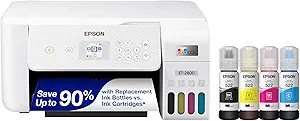
Epson EcoTank ET-2800 Wireless Color All-in-One Cartridge-Free Supertank with Scan and Copy
The Epson EcoTank ET-2800 stands out for small business owners seeking an affordable, easy-to-use printer that balances quality and cost efficiency. Compared with the Brother Sublimation Printer, it offers broader versatility as an all-in-one device with scanning and copying, making it suitable for diverse small business needs. Its cartridge-free ink system dramatically reduces ongoing costs, with enough ink to print thousands of pages, which is essential for startups. The high resolution of 5760 x 1440 dpi ensures sharp text and vibrant images, ideal for printing marketing materials. However, it lacks dedicated sublimation features and does not support heat transfer directly, so it’s better suited to general printing rather than specialized sublimation projects. The ET-2800’s simple setup and reliable wireless connectivity make it perfect for those new to small business printing. Still, its slower print speeds of 10 pages per minute may be a tradeoff for its affordability and ease of use. BestFor: Small business owners starting out who need a versatile, cost-effective all-in-one printer. NotIdealFor: Businesses focused solely on sublimation or requiring high-volume, fast printing. Pros:
- Cartridge-free ink system offers significant long-term savings
- High-resolution printing for detailed images and documents
- All-in-one functionality with scanning and copying
- Easy wireless setup suitable for small business environments
- Slower print speed compared to laser alternatives
- No direct sublimation transfer capabilities
- Printer Type:Inkjet
- Print Resolution:5760 x 1440 dpi
- Printer Speed:10 ppm B&W
- Connectivity:Wi-Fi, USB, Ethernet
- Scanner Type:Flatbed
- Maximum Paper Size:8.5 x 14 inches
- Weight:8.8 pounds
Liene PixCut S1 Color Sticker Printer & Cutting Machine
The Liene PixCut S1 combines high-resolution printing with precise AI-powered cutting, making it a perfect fit for small craft businesses focused on custom stickers and labels. Unlike traditional sublimation printers, the PixCut S1 specializes in sticker creation and cutting, streamlining the process into one device, which saves space and reduces costs for small-scale operations. Its 300 DPI dye-sublimation technology delivers vibrant, true-to-life colors, essential for product labeling and personalized gifts. The AI auto-cutting feature ensures professional edges without manual trimming, increasing productivity. However, its maximum media size of 4×7 inches limits larger projects, and it’s primarily designed for stickers—not general sublimation or large-format printing. The device’s compact size and user-friendly app make it accessible for beginners and hobbyists. Still, the small media capacity and limited print size might be a drawback for growing businesses needing larger or more versatile printing options. BestFor: DIY crafters and small businesses making custom stickers, labels, and personalized gifts. NotIdealFor: companies needing larger-format sublimation or multi-purpose printing. Pros:
- All-in-one print and cut functionality boosts efficiency
- Vibrant 300 DPI color printing for detailed designs
- AI auto-cutting ensures professional finishes
- Compact, lightweight design ideal for small spaces
- Limited media size restricts larger projects
- Primarily designed for stickers—not general sublimation
- Printer Type:Thermal Dye Sublimation
- Print Resolution:300 DPI
- Maximum Media Size:4×7 inches
- Weight:6.2 pounds
- Connectivity:Bluetooth, App control
- Color Capabilities:16.7 million colors
- Additional Features:Auto-cutting, AI image extraction
Epson EcoTank ET-4800 Wireless All-in-One Cartridge-Free Supertank Printer
The Epson EcoTank ET-4800 offers a comprehensive solution for small businesses that require printing, scanning, copying, and even faxing in a single device. Its high-capacity EcoFit ink bottles significantly lower ongoing costs, which is crucial for small business owners managing tight budgets. The 5760 x 1440 dpi resolution guarantees crisp text and vibrant images, suitable for marketing materials and client documents. Its built-in flatbed scanner and copier, along with Ethernet connectivity, make it flexible for a small home office or retail setting. While it has no dedicated sublimation features, its reliable performance and large ink tanks make it a cost-effective choice for general business printing. The slower speed of 10 pages per minute, typical for inkjet all-in-ones, is a tradeoff for its versatility and low operating costs. It’s ideal for those who need multi-functionality without focusing solely on sublimation. BestFor: Small home-based businesses needing all-in-one functionality with low running costs. NotIdealFor: Businesses focused on high-volume sublimation or requiring rapid print speeds. Pros:
- High-capacity ink tanks reduce refill frequency and cost
- Versatile functions including fax, scan, and copy
- High-resolution output for quality documents and images
- Reliable wireless and Ethernet connectivity
- Slower print speeds may affect busy workflows
- No direct support for sublimation transfer
- Printer Type:Inkjet
- Print Resolution:5760 x 1440 dpi
- Print Speed:10 ppm
- Connectivity:Wi-Fi, Ethernet
- Scanner Type:Flatbed
- Maximum Paper Size:8.5 x 14 inches
- Weight:15.4 pounds
Sublimation Starter Kit – 15×15 Heat Press & Printer Bundle 8in1 Professional Combo for Mug Tumbler T-Shirt Business
This Sublimation Starter Kit provides everything needed to launch a small sublimation business, especially for those starting with apparel and mug customizations. The included 15×15 heat press with even heat distribution is ideal for T-shirts, mugs, and tumblers, making it versatile for a range of products. The bundle features an Epson WF-2860 sublimation printer with chipless ink system, allowing quick setup without expensive cartridges, which reduces ongoing costs. Its pre-filled sublimation ink and extensive accessories, including transfer paper and blanks, make it beginner-friendly and ready to use. Nonetheless, the kit’s focus on sublimation means it’s not suitable for general printing or larger-format projects. Its size and limited media compatibility (8.5×11 inches) are suitable for small-scale production but may limit expansion. This makes it perfect for hobbyists or small startups but less so for high-volume or broad product lines. BestFor: New entrepreneurs and hobbyists starting a sublimation business with T-shirts, mugs, and tumblers. NotIdealFor: businesses needing large-format or multi-purpose printing beyond sublimation. Pros:
- Complete bundle with heat press, printer, and accessories
- Pre-filled chipless sublimation ink for quick setup
- Large 15×15 inch heat press for versatile projects
- Beginner guidance and comprehensive starter kit
- Limited media size restricts larger designs
- Primarily designed for sublimation, not general printing
- Heat Press Size:15×15 inches
- Printer Model:Epson WF-2860
- Ink System:Chipless, pre-filled sublimation
- Maximum Media Size:8.5 x 11 inches
- Included Accessories:transfer paper, blanks
- Temperature Control:up to 250°C
- Operation:Easy setup with guided videos
Brother Sublimation Printer
The Brother Sublimation Printer excels in producing vibrant, long-lasting prints suitable for small batches of customized items like mugs, shirts, and accessories. Its compatibility with the Artspira app simplifies design import and editing, making it accessible for those new to sublimation. With a focus on vibrant color output, Brother’s genuine sublimation inks ensure sharp, durable images that withstand multiple washes, ideal for personalized products. The compact size and built-in touch panel streamline operation, perfect for small business or craft use. However, its print speed is quite slow, at around 0.01 pages per minute, limiting efficiency for larger orders. The maximum media size of 8.5×11 inches and the need for additional heat press equipment mean it’s best suited for small-scale production rather than high-volume manufacturing. This makes it a great choice for hobbyists and small entrepreneurs. BestFor: Small businesses or hobbyists focusing on personalized, vibrant sublimation projects. NotIdealFor: high-volume production or large-format sublimation needs. Pros:
- Vibrant, long-lasting color output
- Compatible with Artspira app for easy design management
- Compact design with touch panel for easy operation
- Includes genuine sublimation inks for durability
- Very slow print speed limits productivity
- Limited media size for larger projects
- Printer Type:Dye Sublimation
- Print Resolution:1440 x 1440 dpi
- Maximum Media Size:8.5 x 11 inches
- Print Speed:0.01 ppm
- Connectivity:Wireless, USB
- Color Capabilities:Vivid 16.7 million colors
- Additional Features:Artspira app compatibility
Sawgrass SG500 Sublimation Printer Bundle with Anti-Clog Technology | Only Printer Designed Exclusively for Sublimation | Includes 31mL SubliJet UHD Inks & TruePix Paper | Wi-Fi
This printer stands out for its dedicated design for sublimation, providing consistently vibrant, high-definition results that surpass general inkjet options like the Epson ET-2803, especially due to its specialized SubliJet UHD inks and TruePix paper. Its compact size makes it ideal for small business setups aiming for professional quality without bulky equipment, though it involves a higher initial investment and limited media flexibility compared to larger format printers. Compared to the Epson SureColor F170, the SG500 offers easier setup and software integration, but the F170 may handle larger media sizes better. The bundle includes everything needed to start creating high-quality custom products, making it perfect for entrepreneurs serious about sublimation. Its anti-clog technology and user-friendly platform reduce maintenance hassles, though at a premium price and with media size restrictions. Overall, this pick is best for small businesses prioritizing reliable, high-resolution sublimation printing with a focus on ease of use and growth potential.
Pros:- Designed exclusively for sublimation, ensuring vibrant, sharp prints
- Includes a comprehensive bundle with inks and paper for immediate start
- Wi-Fi connectivity simplifies workflow and remote printing
- Anti-clog technology enhances long-term reliability
Cons:- Higher initial cost compared to multifunctional inkjet printers
- Limited media size up to 8.5” x 14” restricts larger projects
- Less versatile for non-sublimation printing needs
Best for: Small business owners focused on high-quality sublimation products and scalable growth
Not ideal for: Print shops needing larger media formats or general-purpose printers for multiple media types
- Printer Type:Dye Sublimation
- Resolution:1200 x 1200 dpi
- Connectivity:Wi-Fi
- Media Size:8.5 x 14 inches
- Inks Included:SubliJet UHD
- Dimensions:17.25″ D x 15.75″ W x 8.5″ H
Bottom line: Ideal for small businesses seeking dedicated, professional-grade sublimation with minimal maintenance.
Epson SureColor F170 Dye-Sublimation Printer. Includes Full Set of Ink, User Guide, & AC Power Cable SCF170 – Compact 8.5″ x 11″ Format – Original Product with Full Manufacturer Support by ORINOKIA.
This compact Epson model offers impressive image clarity with its PrecisionCore printhead, producing vibrant transfers suitable for small product runs, and compares favorably to the Sawgrass SG500 in terms of image quality and reliability. Its 8.5″ x 11″ media size is sufficient for many small-scale applications, though it lacks the dedicated sublimation technology of the Sawgrass, making it a good choice for those starting out or with limited space. Unlike the Sawgrass, it offers a straightforward setup with full support from Epson, but it may require more attention to ink quality and maintenance. Its high resolution and included ink set make it a solid choice for hobbyists and small businesses, though it’s less suited for larger-volume production. This printer is best for small-scale, high-quality sublimation projects where support and simplicity are valued over media versatility.
Pros:- Excellent image clarity with Epson’s PrecisionCore technology
- Includes a full set of sublimation inks and user support
- Compact 8.5” x 11” format ideal for small workspaces
- High resolution up to 5760 x 1440 dpi
Cons:- Limited media size restricts larger designs
- Lacks the anti-clog features of dedicated sublimation printers
- No multi-function options like scanning or copying
Best for: Beginners and small entrepreneurs needing high-quality sublimation in a compact, supported package
Not ideal for: High-volume shops or those needing larger media formats for bigger products
- Printer Type:Dye Sublimation
- Print Resolution:5760 x 1440 dpi
- Media Size:8.5″ x 11″
- Inks Included:Full set of Epson sublimation inks
- Dimensions:13.7″ D x 14.8″ W x 7.4″ H
- Connectivity:Wireless, USB, Ethernet
Bottom line: A reliable, high-quality sublimation printer suited for small-scale, quality-focused projects with Epson’s support backing.
Epson EcoTank ET-2803 Wireless Color All-in-One Cartridge-Free Supertank Printer with Scan, Copy and AirPrint Support
This model shines as a versatile all-in-one with cartridge-free operation and wireless convenience, ideal for small home offices or hobbyists who need reliable color printing, copying, and scanning. Its high-capacity ink tanks and low running costs outperform traditional cartridge printers, making it a cost-effective choice for frequent, everyday printing. While it doesn’t offer dedicated sublimation capabilities like the Sawgrass SG500, it is well-suited for printing on various media types, including stickers or transfers if compatible. Its 5760 x 1440 dpi resolution ensures sharp images, and the multi-functionality adds value for users who need more than just sublimation. However, it lacks the specialized inks and media support for professional sublimation products, making it less ideal for dedicated small business sublimation ventures.
Pros:- Cartridge-free design with high-capacity ink tanks
- Affordable to operate with low-cost ink bottles
- Wireless connectivity with AirPrint support
- High resolution for sharp color and detail
Cons:- Not designed specifically for sublimation, media compatibility may vary
- Limited to standard paper sizes, not for large-format projects
- Lacks anti-clog features typical in sublimation-dedicated printers
Best for: Home-based entrepreneurs needing a reliable, multi-purpose printer for high-volume color and black-and-white printing
Not ideal for: Professionals focusing solely on sublimation products or requiring larger media formats
- Printer Type:All-in-One Inkjet
- Resolution:5760 x 1440 dpi
- Media Size:Up to 8.5″ x 14″
- Connectivity:Wireless, USB, Ethernet
- Additional Functions:Scan, Copy
- Dimensions:22.8″ D x 14.8″ W x 10″ H
Bottom line: Best suited for home entrepreneurs needing a reliable, multifunctional printer with low running costs rather than dedicated sublimation work.
Epson EcoTank ET-2800 Wireless Color All-in-One Cartridge-Free Supertank with Scan and Copy, The Ideal Basic Home Printer – White
This Epson model offers a straightforward, reliable solution for everyday printing needs, with high-capacity ink tanks and wireless connectivity, making it suitable for small home offices or casual entrepreneurs. Its 10 ppm black and 5 ppm color print speeds are adequate for routine tasks, and the 5760 x 1440 dpi resolution ensures clear, vibrant prints. While it doesn’t feature the media flexibility or dedicated sublimation inks of higher-end models like the Sawgrass SG500, it provides excellent value for those focusing on basic print, copy, and scan functions. Its simple setup and low operating costs make it a good choice for infrequent or moderate use, but it is not tailored for professional sublimation or high-volume commercial production.
Pros:- Cartridge-free high-capacity ink tanks for low ongoing costs
- Wireless and mobile printing capabilities
- Compact design suitable for small spaces
- High DPI resolution for sharp output
Cons:- Limited media size and format options
- No dedicated sublimation media support
- Slower print speeds for high-volume needs
Best for: Home users and small office workers requiring dependable, low-cost color printing
Not ideal for: Small businesses or hobbyists focused on high-detail, large-format sublimation projects
- Printer Type:All-in-One Inkjet
- Resolution:5760 x 1440 dpi
- Media Size:Up to 8.5″ x 14″
- Connectivity:Wireless, USB, Ethernet
- Functions:Scan, Copy
- Dimensions:14.8″ D x 22.8″ W x 10″ H
Bottom line: A reliable, budget-friendly printer perfect for casual use or small-scale home office tasks, but not for dedicated sublimation work.
Brother SP-1 Sublimation Printer Starter Bundle with Full Ink Set, 160 Sublimation Transfer Sheets, 50 Blanks, Tape and More
The Brother SP-1 stands out for combining affordability with a comprehensive starter kit, making it ideal for entrepreneurs just beginning their sublimation journey. Compared to the Epson SureColor F170, it offers a more user-friendly setup and faster speeds suitable for small batch production, but it sacrifices some of the higher resolution and print quality of the Epson. The bundle includes a full set of vibrant inks, a large supply of sublimation paper, and blanks, reducing initial costs and setup time. Its Wi-Fi and Ethernet connectivity enable flexible placement, which is perfect for home studios. However, it has a maximum print resolution of 600 x 600 dpi, which may limit detail on highly intricate designs. The relatively compact size and reliable performance make this a strong choice for hobbyists and small-scale sellers. Overall, this printer makes the most sense for newcomers wanting a complete package with straightforward operation, though more advanced users seeking ultra-fine detail might prefer higher-end models.
Pros:- Complete starter bundle including inks, paper, and blanks, reducing initial setup costs.
- User-friendly setup and dependable Brother brand reliability.
- Fast printing speeds of up to 10 ppm suitable for small batch production.
Cons:- Maximum resolution of 600 x 600 dpi may limit fine detail for complex designs.
- Limited to 8.5 x 11 inch media, restricting larger format projects.
Best for: Hobbyists and small entrepreneurs starting with limited budgets and needing an all-in-one starter kit.
Not ideal for: High-volume producers or those requiring the most detailed, professional-grade print quality with high-resolution output.
- Printer Type:Dye Sublimation
- Resolution:600 x 600 dpi
- Connectivity:Wi-Fi & Ethernet
- Maximum Media Size:8.5 x 11 inches
- Maximum Sheet Capacity:160 sheets
- Print Speed:10 pages per minute
Bottom line: This pick is ideal for beginners and small businesses seeking an easy-to-use, all-in-one sublimation starter kit with good speed and reliability.
Epson SureColor F170 Dye-Sublimation Printer – Compact 8.5″ x 11″ Format – Includes Genuine Epson Ink, User Guide & Power Cable – Original OEM Product with Full Manufacturer Support
The Epson SureColor F170 delivers outstanding print clarity with its PrecisionCore printhead, making it perfect for small businesses aiming for professional results. Unlike the Brother SP-1, it offers a higher maximum resolution of 5760 x 1440 dpi, ensuring detailed, vibrant images on a variety of materials. The bundle includes genuine Epson inks and a 150-sheet auto-feed tray, which enhances efficiency for small-scale production runs. Its compact design fits easily into small workspaces, and the dust-resistant tray reduces maintenance and mess. The main tradeoff is the higher price point, which might be a barrier for absolute beginners or those with tight budgets. Nevertheless, its reliable OEM support and superior image quality make it a compelling option for crafters and small business owners who prioritize output excellence and durability. This printer is best suited for those who need consistent, professional-grade sublimation results without sacrificing space.
Pros:- Exceptional print quality with 5760 x 1440 dpi resolution for detailed images.
- Includes genuine Epson sublimation inks, certified for safety and color vibrancy.
- Space-saving, dust-resistant tray enhances cleanliness and ease of use.
Cons:- Higher initial cost compared to entry-level models like the Brother SP-1.
- Limited to a maximum media size of 8.5 x 11 inches, restricting larger projects.
Best for: Small business owners and hobbyists requiring high-resolution, professional-quality prints with reliable OEM support.
Not ideal for: Entry-level users or hobbyists with limited budgets who don’t prioritize ultra-fine detail or need high-volume output.
- Printer Type:Sublimation
- Resolution:5760 x 1440 dpi
- Connectivity:Wireless, USB, Ethernet
- Maximum Media Size:8.5 inches
- Maximum Sheet Capacity:150 sheets
- Print Speed:1 page per minute
Bottom line: The Epson F170 is best for small businesses that demand high-quality, durable sublimation prints with professional reliability and support.
How We Picked
To determine the best sublimation printers for small businesses, I focused on key criteria that influence daily usability and product quality. Performance metrics such as print resolution, ink technology, and speed were prioritized to ensure professional results. Ease of setup and operation, including wireless connectivity and user interface, were also crucial, especially for small teams or solo entrepreneurs. Build quality and reliability were evaluated through manufacturer reputation and warranty offerings, while value was assessed by comparing features relative to cost. The ranking reflects a balance between dedicated sublimation capabilities and overall usability for small business contexts, favoring models that provide consistent results with manageable investment.Factors to Consider When Choosing Best Sublimation Printers For Small Businesses
Choosing the right sublimation printer for your small business requires understanding several important factors. Beyond initial cost, you need to consider how the printer’s features align with your production volume, product types, and skill level. Investing in a dedicated sublimation printer can improve print quality and reliability, but may come at a higher upfront cost. The following factors will help guide your decision and avoid common pitfalls in selecting the best printer for your needs.Print Quality and Resolution
High print resolution, measured in dots per inch (DPI), directly impacts the vibrancy and detail of your final products. For small business use, a resolution of at least 1200 DPI is recommended to ensure sharp images on mugs, shirts, and other items. Cheaper printers with lower DPI may produce dull or blurry results, which can hurt your brand reputation. Always check the specifications to confirm the printer delivers professional-grade quality suitable for your product line.
Dedicated Sublimation Technology
Not all inkjet printers are suitable for sublimation work. Dedicated sublimation printers like the Sawgrass SG500 or Epson SureColor F170 are optimized for dye-sublimation inks, which produce vibrant, durable images. Using a non-specialized printer can lead to inconsistent colors and reduced longevity of your prints. Investing in a model designed specifically for sublimation ensures better color fidelity and less maintenance hassle over time.
Cost of Supplies and Maintenance
Beyond the initial purchase price, consider ongoing costs such as sublimation inks, transfer papers, and occasional maintenance. Some printers require proprietary inks, which can be pricier but offer better results and fewer clogs. Cheaper models or refillable ink systems might save money initially but could lead to more frequent issues or lower quality prints. Balancing upfront costs with long-term expenses is key to maintaining profitability.
Ease of Use and Connectivity
For small operations, ease of setup and operation is crucial. Wireless connectivity options like Wi-Fi or Ethernet simplify printing from multiple devices and reduce clutter. User-friendly interfaces and reliable software support also matter—complex machines can slow down production or increase training time. Consider your technical comfort level when selecting a model, especially if you’re new to sublimation printing.
Size and Footprint
Space constraints often influence small business equipment choices. Compact models like the Epson SureColor F170 fit well into tight spaces without sacrificing print quality. Larger, more professional setups may require dedicated rooms or larger workbenches, which could increase setup costs. Assess your available workspace to match your choice with your operational needs, avoiding clutter or workflow bottlenecks.
Frequently Asked Questions
Can I use standard inkjet printers for sublimation?
While some inkjet printers can be converted for sublimation by changing ink types, this is not always reliable or recommended for small business use. Dedicated sublimation printers are engineered specifically with compatible ink delivery systems, leading to more consistent results and less maintenance. Converting a standard printer might save money upfront but can cause issues like clogging or color inconsistencies, ultimately costing more in repairs and reprints.
How important is print resolution for sublimation quality?
Print resolution is vital for achieving vibrant, detailed images on your products. Higher DPI settings produce sharper, more professional-looking results, which are essential for product differentiation and customer satisfaction. For small business needs, a resolution of at least 1200 DPI is recommended to ensure your prints look polished and durable, especially on smaller items like mugs and shirts.
Is Wi-Fi connectivity necessary for small business sublimation printers?
Wireless connectivity adds significant convenience, especially if you need to print from multiple devices or share the printer across a small team. It simplifies the workflow and reduces cable clutter. However, some users prefer wired connections for reliability, particularly in busy production environments. Consider your workspace setup and printing habits when deciding whether Wi-Fi is a must-have feature.
What’s the main difference between dye-sublimation and inkjet printing?
Dye-sublimation uses heat to transfer dye-based inks onto substrates, resulting in vibrant, durable images that won’t crack or peel. Inkjet printing, in contrast, typically uses water-based inks designed for paper and non-porous surfaces, which are less suitable for producing long-lasting items. For small business applications focused on custom apparel, mugs, or gifts, dye-sublimation offers better quality, longevity, and professional appearance.
Are bundles with heat presses necessary for beginners?
Bundles including heat presses and starter supplies can be very helpful for newcomers, providing everything needed to start producing products immediately. They often offer better value and ensure compatibility between the printer and press. However, experienced users might prefer to choose equipment separately to customize their setup or upgrade specific parts over time. For most beginners, a bundle simplifies setup and reduces initial costs.
Conclusion
For small business owners, the choice depends on your specific needs and budget. If you seek the best overall quality and reliability, the Sawgrass SG500 remains the top recommendation, especially for dedicated sublimation printing. Budget-conscious entrepreneurs will find the Epson EcoTank ET-2800 a capable starter option, though it lacks dedicated sublimation features. Beginners aiming for ease and quick setup should consider bundles like the sublimation starter kit, which combine printer and accessories. For those with space constraints, compact models such as the Epson SureColor F170 offer a good balance of size and performance. Ultimately, your choice should align with your product offerings, volume expectations, and technical comfort level.