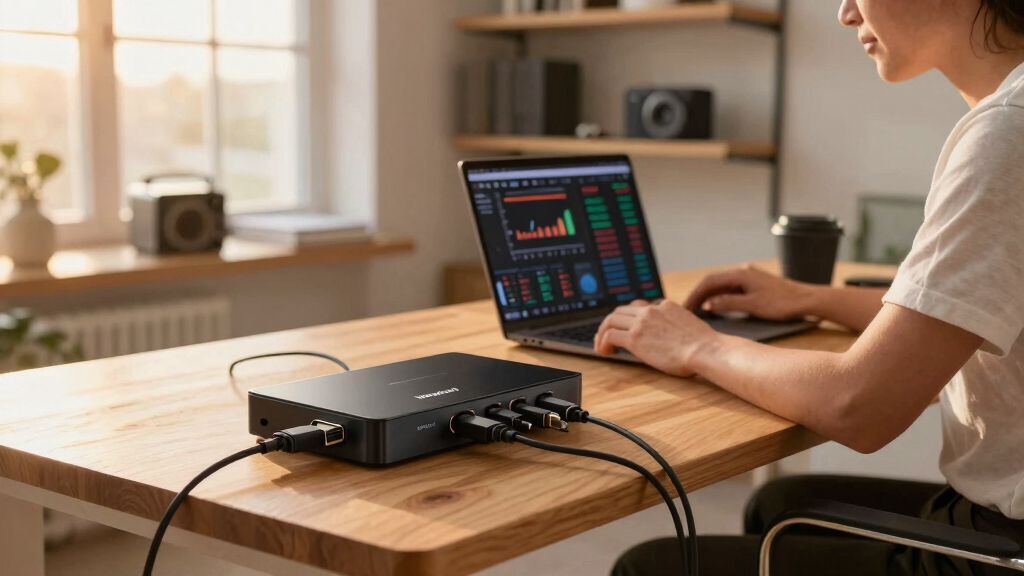
For remote entrepreneurs managing multiple devices, a high-quality KVM switch can streamline workflow and boost productivity. Among the many options, the Ugreen 8K@60Hz HDMI KVM Switch stands out as the best overall, offering robust performance and extensive connectivity. The Anker USB 3.0 HDMI KVM Switch is a strong contender for those seeking easy one-click switching with reliable support for 4K displays. Meanwhile, the Hearvo USB 3.0 HDMI KVM Switch with EDID excels in multi-monitor setups and adaptive display features. Buyers face tradeoffs between multi-monitor support, resolution, price, and ease of setup. Continue reading for a detailed breakdown of each option to find the best fit for your needs.
Key Takeaways
- Top picks vary mainly based on monitor count: single versus multi-monitor setups influence choice.
- High resolutions like 8K and 4K@60Hz are common among premium models, but hardware compatibility can limit performance.
- Ease of switching, whether via remote, buttons, or software, significantly impacts daily usability.
- Build quality, especially aluminum frames, adds durability but can increase cost.
- Multi-device support, such as multiple USB peripherals and audio, is a key differentiator for remote workflows.







More Details on Our Top Picks
This UGREEN KVM switch stands out for its high-performance video output up to 8K@60Hz, surpassing many competitors like the Hearvo 2-monitor switch, which maxes out at 4K. Its robust build quality, with an aluminum chassis, offers durability that cheaper plastic options lack. The inclusion of four USB 3.0 ports and multiple cables simplifies setup, making it ideal for power users managing multiple systems. Compared to the Anker model, which is more compact but supports fewer peripherals, this switch provides a more comprehensive solution for demanding workflows. The main tradeoff is size and weight; it’s bulkier and less portable. Also, it requires a constant power source, unlike some USB-powered options. This pick makes the most sense for entrepreneurs who need reliable multi-system control with top-tier video fidelity, and are okay with a larger desktop footprint.
Pros:- Supports 8K@60Hz resolution for future-proofing and superior image quality
- Includes four USB 3.0 ports with fast data transfer speeds
- Solid aluminum construction enhances durability and heat dissipation
- Easy switching via desktop controller and single button
Cons:- Requires external power supply, adding cable clutter
- Bulkier and heavier than compact alternatives
Best for: Remote entrepreneurs running high-resolution multimedia workflows or multiple systems requiring stable, high-quality output.
Not ideal for: Travelers or those with limited desk space, as its size and power requirements are less convenient for mobile setups.
- Maximum Resolution:8K@60Hz
- USB Ports:4 USB 3.0
- Material:Aluminum
- Weight:1.32 kg
- Color:Black
- Compatibility:Windows, MacOS, Linux
- Cables Included:4 HDMI, 4 USB-C
Bottom line: This switch is best suited for entrepreneurs needing high-resolution output and multiple peripherals, willing to accept size and power requirements.
Compared to the larger UGREEN 4-computer switch, this model is ideal for those who need a simple, space-efficient solution for two computers sharing a single monitor. Its slim profile makes it perfect for tight desks or minimalist setups, and the included remote control adds convenience for frequent switching. While it supports 4K@60Hz like the larger model, it does not support as many systems simultaneously, making it less suited for extensive multi-device environments. The build quality is solid, but it’s more plasticky than the aluminum version, which might impact longevity. It’s also worth noting that it requires a separate power source, unlike some USB-powered switches. This makes it an excellent choice for remote entrepreneurs with dual systems who prioritize space and ease of use, but not for those needing high multi-device capacity or ultra-high resolutions beyond 4K.
Pros:- Compact design fits small or cluttered desks
- Includes remote control for easy, cable-free switching
- Supports 4K@60Hz for high-quality display
- Driver-free, plug-and-play setup
Cons:- Limited to two systems, not expandable
- Requires external power supply, adding cables
Best for: Remote entrepreneurs managing two computers or consoles in a limited space who want straightforward, reliable switching.
Not ideal for: Power users with more than two systems or those needing 8K resolution, as it’s limited to 4K@60Hz and two devices.
- Maximum Resolution:4K@60Hz
- USB Ports:4 USB 3.0
- Material:Plastic
- Size:Approx. 5 x 3 x 1 inches
- Weight:0.33 lbs
- Compatibility:Windows, MacOS, Linux
- Cables Included:2 USB-C, 2 HDMI
Bottom line: This switch is perfect for dual-system users who need a space-saving, easy-to-operate device for high-quality display at 4K.
USB KVM Switch with Remote Control, HDMI Switch, 4K@60Hz KVM Switches for 2 Computers Sharing 1 Monitor, 4 USB Devices Such as Keyboard, Mouse, Printer, Scanner, Includes 2 USB-B Cables
This USB KVM switch offers reliable performance for two computers sharing a single monitor and peripherals, comparable to the Hearvo dual-monitor switch but at a more budget-friendly price. Its straightforward design and driver-free operation make it highly accessible for entrepreneurs who want easy switching without complex setup. It supports 4K@60Hz and four USB ports, enabling fast data transfer and high-quality visuals. However, it’s not as robust in build quality as higher-end aluminum models, and the remote control can sometimes feel less responsive. It’s ideal for those needing a simple, functional solution for everyday use, but it might not satisfy power users demanding ultra-high resolutions or extensive peripheral support. The main tradeoff is durability versus affordability.
Pros:- Plug-and-play, driver-free operation
- Supports 4K@60Hz resolution
- Includes remote control for convenient switching
- Affordable price point
Cons:- Less durable plastic construction
- Limited to two computers, not expandable
Best for: Entrepreneurs who need a straightforward, reliable dual-system switch at an affordable price with decent resolution support.
Not ideal for: Users requiring extensive peripherals, high durability, or resolutions above 4K, as it’s more suited for basic needs.
- Maximum Resolution:4K@60Hz
- USB Ports:4 USB 3.0
- Material:Plastic
- Size:Approx. 4 x 2.5 x 1 inches
- Weight:0.33 lbs
- Compatibility:Windows, Mac, Linux
- Cables Included:2 USB-B, 2 HDMI
Bottom line: This switch is ideal for entrepreneurs seeking an easy, cost-effective way to control two systems with reliable 4K output.
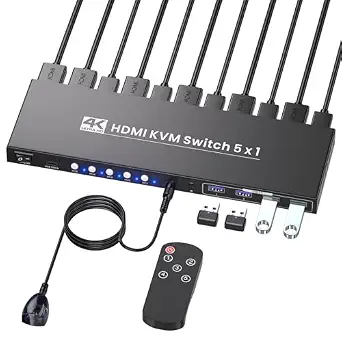
4K@60Hz HDMI KVM Switch 1 Monitor 5 Computers, USB 3.0 5 Port KVM Switch for Controlling 5 Computers with 1 Set of Keyboard, Mouse and 1 Monitor
This 5-port KVM switch from the Anker brand offers broad control for entrepreneurs managing multiple systems, outperforming smaller 2- or 4-port options like the Hearvo 2-monitor switch. Its support for 4K@60Hz across five systems makes it ideal for multi-system setups, such as testing labs or multi-server environments. The inclusion of five USB 3.0 ports enhances peripheral connectivity. Its simple push-button control and plug-and-play setup make it accessible, but the larger size and power needs can be a drawback for small or mobile setups. Compared to the compact Anker 3-port, this model sacrifices portability for increased capacity, which is perfect for dedicated stationary workspaces. Its main tradeoff involves size and power consumption, but it offers unmatched capacity for multi-system entrepreneurs.
Pros:- Supports five systems simultaneously at 4K@60Hz
- Includes five USB 3.0 ports for peripherals
- Easy push-button switching
- Plug-and-play, driver-free
Cons:- Larger and heavier than smaller switches
- Requires external power supply
Best for: Entrepreneurs managing multiple systems needing a reliable, high-resolution switch with extensive peripheral support.
Not ideal for: Mobile users or those with limited desk space, as its size and power requirements are substantial.
- Maximum Resolution:4K@60Hz
- USB Ports:5 USB 3.0
- Material:Plastic
- Size:Approx. 10 x 5 x 1.5 inches
- Weight:1.2 lbs
- Compatibility:Windows, MacOS, Linux
- Cables Included:5 HDMI, 5 USB-A
Bottom line: This switch is perfect for entrepreneurs who need to control multiple systems with high resolution and multiple peripherals in a fixed workspace.
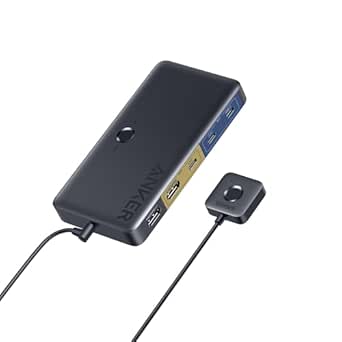
This Anker switch shines for its ease of use, combining a magnetic remote with a compact design ideal for entrepreneurs who switch between a laptop and a desktop. Its 4K@60Hz support matches professional standards but is limited to two systems, similar to the Hearvo dual-monitor setup. The five USB 3.0 ports enable fast data transfer for peripherals like printers and external drives. Its build quality is sturdy, with a sleek, modern look, but it’s not designed for extensive multi-device setups. The inclusion of all necessary cables reduces clutter, yet it’s less suitable for high-end or high-resolution multi-system environments. It’s a reliable, straightforward solution for dual system switching that prioritizes convenience over expandability.
Pros:- Magnetic remote for easy, one-click switching
- Supports 4K@60Hz resolution
- Includes all necessary cables for quick setup
- Compact and stylish design
Cons:- Limited to two systems, not expandable
- No support for multiple monitors or more than two devices
Best for: Entrepreneurs needing a simple, quick switch between a laptop and a desktop with 4K support and multiple USB peripherals.
Not ideal for: Power users with more than two systems or demanding high-res multi-monitor setups, as it only supports two devices.
- Maximum Resolution:4K@60Hz
- USB Ports:5 USB 3.0
- Material:Metal and plastic
- Size:Approx. 4 x 2.5 x 1 inches
- Weight:0.33 lbs
- Compatibility:Windows, Mac, Linux, iPad
- Cables Included:HDMI, 5 USB-A
Bottom line: This switch is best suited for users who need quick, reliable control over two devices with high-quality video and peripherals in a small footprint.
UGREEN HDMI KVM Switch 2 Monitors 2 Computers 4K@60Hz, with 4 USB 3.0 Ports for 2 Computers Sharing 2 Monitors Keyboard Mouse Printer with 4 HDMI Cables, 2 USB Cables, Power Adapter and Controller
This UGREEN model stands out for its seamless dual monitor support at 4K@60Hz, making it ideal for remote entrepreneurs needing efficient multi-display setups. Compared to the Hearvo USB 3.0 HDMI KVM Switch 1 Monitor 2 Computers, it offers higher resolution and two monitor outputs, which are essential for detailed work like design or data analysis. The inclusion of four HDMI cables and USB cables simplifies setup, though the requirement for a separate power supply can add clutter. Its sturdy build quality and quick switching via buttons or desktop controller provide a smooth user experience. However, it does not support hotkeys or EDID emulation, which could limit compatibility with some display configurations. This pick makes the most sense for professionals who need real-time multi-monitor control without fuss, but those with space constraints might find the setup bulky.
Pros:- Supports 4K@60Hz resolution on two monitors for crisp visuals
- Includes all necessary cables for quick setup
- Supports dual monitor control with quick button and controller switching
Cons:- Requires external power supply, adding cable clutter
- No hotkey or hotkey shortcut support for quick toggling
Best for: Remote entrepreneurs using dual monitors for design, video editing, or data work who value high resolution and fast switching.
Not ideal for: Users with very limited desk space or those seeking hotkey toggle capabilities, as the switch relies on physical buttons or external controller.
- Resolution:4K@60Hz
- Number of Monitors:2
- Number of Computers:2
- Included Cables:4 HDMI, 2 USB
- Switching Methods:Button, Desktop controller
- Power Supply:Required
Bottom line: Ideal for remote entrepreneurs who need reliable dual monitor control at high resolution without complicated setup.
This model is tailored for power users needing to control three monitors at ultra-high resolutions up to 8K@60Hz, making it perfect for high-end content creators or advanced remote entrepreneurs. Compared to the Hearvo HDMI KVM Switch 2 Monitors 2 Computers, it offers triple display support with a robust aluminum chassis and higher refresh rates, ideal for gaming or detailed visualization. The inclusion of multiple cables and a dedicated power adapter simplifies complex multi-monitor setups. Its dual switching modes—button and remote—allow flexible control, while the adaptive EDID ensures optimal display performance. The primary tradeoff is the need for computers supporting triple monitor outputs, which can limit compatibility. This makes sense for professionals with demanding visual requirements but less so for simpler office environments.
Pros:- Supports 8K@60Hz and 4K@240Hz for ultra-smooth visuals
- Controls three monitors with flexible switching options
- Includes multiple cables and a dedicated power supply
Cons:- Requires computers capable of triple monitor output
- Higher cost and complexity for standard setups
Best for: High-end content creators or engineers requiring triple-monitor control with ultra-high resolution and refresh rates.
Not ideal for: Entrepreneurs with basic multi-display needs or limited hardware support for triple outputs.
- Resolution:8K@60Hz / 4K@240Hz
- Monitors Supported:3
- Computers Supported:2
- Cables Included:4 DP, 2 HDMI, 2 USB-C
- Switching Modes:Button, Remote
- Material:Aluminum
Bottom line: Best suited for remote entrepreneurs with advanced visual needs and compatible hardware supporting triple 8K displays.
Hearvo USB 3.0 HDMI KVM Switch 1 Monitors 2 Computers, 4K@60Hz KVM Switches for 2 Computers Sharing Monitor Keyboard Mouse Hard Drives Printer, with EDID Adaptive, 2USB Cable and Controller -S7232H
This Hearvo model is an excellent choice for entrepreneurs who need to control two computers with a single monitor at 4K@60Hz, especially when desk space is limited. Compared to the UGREEN HDMI KVM Switch 2 Monitors 2 Computers, it offers a more compact form factor and includes EDID adaptive support, ensuring stable image quality across different displays. The switch’s plug-and-play setup, along with the included USB cables and remote control, facilitates easy switching, though it lacks multi-monitor support. Its build quality and straightforward operation make it suitable for daily use, but the absence of dual monitor capability limits its use for multi-display workflows. This makes it ideal for entrepreneurs with a single monitor setup seeking high-quality visuals and simple control.
Pros:- Supports 4K@60Hz resolution for clear visuals
- Compact, space-saving design
- Includes EDID adaptive support for display stability
Cons:- Limited to controlling one monitor, not suitable for multi-display workflows
- Lacks hotkey or shortcut switching
Best for: Entrepreneurs needing a reliable single-monitor KVM at 4K for space-constrained environments.
Not ideal for: Those requiring multi-monitor setups or hotkey toggling for faster switching.
- Resolution:4K@60Hz
- Monitors Supported:1
- Computers Supported:2
- Included Cables:2 USB, 2 HDMI
- Switching Method:Remote, Manual button
- EDID Support:Yes
Bottom line: Best for entrepreneurs with space limitations needing a simple, high-quality dual computer control on a single monitor.
Hearvo HDMI KVM Switch 2 Monitors 2 Computers, USB 3.0,4K@60Hz KVM Switches Sharing of Dual Monitors Keyboard Mouse and Printer Between 2 Computers,with EDID,2 USB Cables and Controller -S7232H2
This Hearvo model offers a reliable balance of high-resolution support and dual monitor control, making it suitable for most remote entrepreneurs needing efficient multi-tasking. Compared with the UGREEN HDMI KVM Switch 2 Monitors 2 Computers, it provides similar 4K@60Hz resolution but features a slightly more budget-friendly build that still maintains good performance. The inclusion of EDID adaptive support ensures stable display output, and the remote control adds flexibility for switching from a distance. Its primary tradeoff is the slightly lower overall review score, which suggests some users may experience occasional stability issues. Still, for most users, it provides a dependable and straightforward solution for dual-monitor control at high resolution.
Pros:- Supports 4K@60Hz for crisp images
- Includes EDID adaptive support for stability
- Remote control for convenient switching
Cons:- Review scores indicate some users experience minor issues
- No hotkey support for rapid toggling
Best for: Remote entrepreneurs who want reliable dual-monitor control with high resolution without complex setup.
Not ideal for: Power users needing hotkey toggle or more advanced display configurations.
- Resolution:4K@60Hz
- Monitors Supported:2
- Computers Supported:2
- Included Cables:2 USB, 2 HDMI
- Switching Methods:Remote, Button
- EDID Support:Yes
Bottom line: Suitable for entrepreneurs seeking a dependable dual-monitor setup at 4K, with simple switching options.
UGREEN USB 3.0 Switch 2 Computers Sharing USB C & A Devices, 4 Port USB Switcher Sharing Keyboard and Mouse, Printer/Scanner USB Switch Hub for Two Computers with 2 USB3.0 Cables and Controller
This UGREEN USB 3.0 switch is tailored for entrepreneurs who need to share peripherals like keyboards, mice, printers, or scanners between two computers without the need for video switching. Compared to the HDMI-based KVM switches, this model focuses solely on USB device sharing, making it ideal for space-saving, space-efficient setups. The inclusion of a USB-C port and four ports with data transfer speeds up to 5Gbps provides broad device compatibility and quick performance. It features simple button and controller switching, but it does not support video or monitor control, limiting its use to USB peripherals only. It’s a practical choice for those who prioritize peripheral sharing over multi-monitor control and want a straightforward, reliable device.
Pros:- Supports multiple USB devices with fast data transfer
- Includes both USB-C and USB-A ports for broad compatibility
- Simple button and remote control for easy switching
Cons:- Does not support video or monitor switching
- Limited to USB device sharing, not suitable for visual workflows
Best for: Entrepreneurs who need to switch USB peripherals between two computers efficiently without controlling video output.
Not ideal for: Users requiring multi-monitor switching or high-end video resolutions, as this device does not handle video signals.
- USB Ports:4 (3 USB-A, 1 USB-C)
- Data Transfer Speed:Up to 5Gbps
- Supported Devices:Keyboard, Mouse, Printer, Scanner
- Switching Methods:Button, Controller
- Power Supply:Optional
- Compatibility:Windows, macOS, Linux
Bottom line: Perfect for entrepreneurs needing quick, reliable switching of USB peripherals without monitor control or high-end video support.
MT-VIKI 8 Port KVM Switch HDMI, 4K@30Hz 1U Rack Mount KVM Switch w/IR Remote & Wire-Desktop Controller & 8 HDMI KVM Cables & Rack Ears & Power Adapter
This rack-mounted KVM switch excels in managing multiple servers or workstations from a centralized location, making it ideal for remote entrepreneurs with complex setups. Unlike the UGREEN 8K@60Hz HDMI KVM, which offers higher resolution, the MT-VIKI emphasizes 4K at 30Hz, prioritizing reliability over ultra-high resolution. Its 8 HDMI ports and included cables streamline deployment, but its 30Hz refresh rate may be a drawback for users needing ultra-smooth visuals. The three switching methods—panel button, IR remote, and desktop controller—provide versatile control options, yet rely on physical proximity or line-of-sight, unlike some remote-controlled alternatives. This model’s rackmount design, robust build, and broad OS compatibility position it as a top choice for infrastructure-heavy remote work environments. However, it does involve a tradeoff with slightly limited resolution and no multi-monitor support.
Pros:- Supports up to 8 computers with dedicated rackmount form factor
- Includes 8 HDMI KVM cables for plug-and-play setup
- Versatile control options: panel, IR remote, and wire-desktop controller
- Compatible with Windows, Mac, Linux, and more
Cons:- Limited to 4K at 30Hz, which may be insufficient for fast-paced visual tasks
- Rackmount setup may be overkill for simple home offices
- No multi-monitor support or advanced video features
Best for: Remote entrepreneurs managing multiple servers or workstations in a dedicated rack environment who need reliable, high-quality switching without high refresh rates.
Not ideal for: Solo remote workers or creative professionals needing ultra-high resolution and high refresh rates for multimedia editing or gaming.
- Number of Ports:8
- Resolution Support:4K@30Hz
- Mounting Type:Rack Mount
- Control Methods:Panel, IR remote, desktop controller
- Cable Included:8 HDMI KVM cables
- Compatibility:Windows, Mac, Linux
Bottom line: This switch is ideal for remote entrepreneurs with rack-based setups prioritizing reliability over ultra-high resolution, especially in infrastructure-heavy environments.
Hearvo USB 3.0 HDMI KVM Switch 1 Monitor 2 Computers, 8K@60Hz KVM Switches for 2 Computers Sharing Monitor Keyboard Mouse Hard Drives Printer,with EDID Adaptive,2*USB Cable and Controller -S7229H

Best Compact High-Resolution KVM for Remote Professionals with Dual USB-C and 8K Support
View Latest PriceThis compact KVM switch makes a compelling choice for remote entrepreneurs who need high-resolution output and broad device compatibility in a small footprint. Compared to the MT-VIKI 8 port, this model supports 8K at 60Hz, offering superior visual quality for detailed work like design or video editing. Its 4 USB 3.0 ports—three USB-A and one USB-C—allow seamless sharing of peripherals like printers, scanners, and webcams, unlike some models with fewer ports. The inclusion of EDID adaptive technology ensures stable, high-quality signals without the need for drivers, simplifying setup. However, its 2-port design limits scalability, making it less suitable for multi-server environments. The remote control enhances convenience, but the switch’s limited number of ports constrains its use in larger setups. This device suits those prioritizing performance and space efficiency over expansion.
Pros:- Supports stunning 8K@60Hz resolution for detailed visuals
- Includes 4 USB 3.0 ports (3 USB-A + 1 USB-C) for broad peripheral compatibility
- EDID adaptive technology for stable, high-quality signal transmission
- Compact, desktop-friendly design with remote control
Cons:- Limited to 2 computers, reducing scalability for larger setups
- Requires 3 HDMI cables and additional setup time for multiple devices
- No multi-monitor support; designed for single display use
Best for: Remote entrepreneurs needing a high-resolution, space-saving KVM with versatile USB device support and easy plug-and-play operation.
Not ideal for: Large-scale setups or those requiring control over multiple servers or workstations, as its 2-port design limits expansion.
- Resolution Support:8K@60Hz
- USB Ports:4 (3 USB-A, 1 USB-C)
- Number of Computers:2
- Control Method:Remote, push button
- EDID Support:Adaptive
- Included Cables:2 USB cables
Bottom line: This switch is perfect for space-conscious remote entrepreneurs who demand top-tier visual quality and USB peripheral flexibility for dual-computer control.

How We Picked
Products were evaluated based on performance, build quality, compatibility, and usability. Priority was given to devices supporting high resolutions (4K and above), multiple monitors, and fast switching capabilities. We also considered cable management, ease of setup, and additional features like remote control or multi-device support. The ranking reflects a balance between premium features and overall value, ensuring that each pick addresses different remote entrepreneur scenarios—from single monitor setups to complex multi-monitor environments. Devices with proven reliability and positive user feedback were favored to ensure long-term satisfaction.Factors to Consider When Choosing Best Premium KVM Switches For Remote Entrepreneurs
Choosing the right premium KVM switch involves understanding your specific needs. Consider how many monitors you require, the resolution support needed, and your preferred switching method. Durability and build quality matter for long-term use, especially if your setup is in a busy workspace. Compatibility with your devices—such as Mac, Windows, or Linux—is also crucial. Finally, weigh the importance of additional features like remote control, multi-device support, and cable management to find a switch that seamlessly integrates into your workflow.Number of Monitors and Video Resolution
Deciding how many monitors you need is fundamental. Single-monitor setups are simpler and often less expensive, but multi-monitor support can significantly enhance productivity. Look for KVM switches supporting at least 4K@60Hz for crisp visuals, especially if your work involves detailed graphics or video editing. Higher resolutions like 8K are available but often come with compatibility and performance caveats, so ensure your hardware can handle these specifications without issues.
Switching Method and Ease of Use
Ease of switching between computers can be a game-changer in daily use. Remote controls, physical buttons, or software-based switching each have their pros and cons. Remote controls offer convenience but can add cost and complexity. Physical buttons are reliable but require physical access. Software switching provides flexibility but may require additional setup and compatibility considerations. Think about your workflow and choose a method that minimizes disruption and maximizes speed.
Build Quality and Durability
Premium KVM switches often feature robust construction, typically aluminum or metal casings, which resist damage and improve heat dissipation. This durability is especially important if your setup is in a high-traffic or mobile environment. Cheaper plastic models may save money initially but can wear out faster, leading to reliability issues. Investing in a solid build ensures your device remains functional over years of heavy use.
Compatibility and Device Support
Verify that the KVM switch supports your devices’ interfaces and operating systems. Many premium models offer compatibility with Windows, Mac, and Linux, but some may require specific cables or adapters. Also, check support for your peripherals, such as high-speed USB devices, audio, and specialized hardware. An incompatible device can cause frustration, so matching features carefully saves time and avoids future upgrades.
Additional Features and Future-Proofing
Extra features like EDID adaptive support, multi-monitor configurations, and multi-port USB hubs can enhance your setup. Remote management options add convenience for remote entrepreneurs managing multiple systems. Consider future needs—if your workflow might expand, choosing a versatile model now could prevent costly upgrades later. Balance these extras against the added cost to find a solution that offers real value for your specific setup.
Frequently Asked Questions
Can a premium KVM switch support multiple high-resolution monitors simultaneously?
Yes, many premium KVM switches support multiple monitors at high resolutions, including 4K@60Hz and even 8K. However, compatibility depends on the switch’s specifications and your computer’s hardware capabilities. For multi-monitor setups, ensure the device explicitly states support for the number of monitors and resolutions you require. Keep in mind that higher resolutions and more monitors often demand more powerful graphics cards and data bandwidth, so matching your hardware with the switch’s features is essential for smooth performance.
Are remote controls or software-based switching better for remote entrepreneurs?
Remote controls typically offer quick, hardware-based switching, which is reliable and fast, ideal for busy workflows. Software-based switching can be more flexible and integrate with your operating system, but it may introduce latency or compatibility issues, especially if your system is customized or uses different OSes. For remote entrepreneurs who need to switch frequently and prefer convenience, remote controls tend to be more straightforward. However, if you prefer more automation or integration into your workflow, software options might serve better, provided they work seamlessly with your setup.
How important is build quality when choosing a premium KVM switch?
Build quality directly impacts the longevity and reliability of your KVM switch. Premium models with metal or aluminum casings are more durable, resist damage, and dissipate heat more effectively. This is especially important if your workspace is busy or mobile, where accidental knocks or environmental factors could damage cheaper plastic units. Investing in a well-built switch reduces the risk of hardware failure over time, ensuring your setup remains stable and dependable through years of use.
What should I consider if I want to upgrade to 8K support?
Upgrading to an 8K-capable KVM switch requires checking both the switch’s specifications and your hardware. Your computer’s GPU must support 8K output at the desired refresh rate, and your cables need to be high-quality and rated for 8K transmission. Compatibility with your monitors and the rest of your setup is crucial, as fewer switches support 8K at 60Hz without issues. Often, 8K models are more expensive and may require additional configuration, so ensure your entire workflow can handle the bandwidth and resolution before investing.
Is multi-monitor support worth the extra cost in a KVM switch?
Multi-monitor support can significantly enhance productivity, especially for tasks requiring extensive screen real estate. For remote entrepreneurs managing complex workflows, multi-monitor setups reduce window switching and improve multitasking efficiency. While premium KVM switches with multi-monitor support tend to cost more, the benefits often outweigh the expense in terms of time saved and workflow improvements. If your work involves detailed data analysis, design, or content creation, investing in a multi-monitor capable switch is a smart move.
Conclusion
For most remote entrepreneurs, the Ugreen 8K@60Hz HDMI KVM Switch offers an excellent balance of performance, durability, and multi-device support, making it the best overall choice. Those seeking straightforward, reliable switching with minimal fuss should consider the Anker USB 3.0 HDMI KVM Switch for its simplicity and support for 4K displays. If multi-monitor setups are essential, the Hearvo USB 3.0 HDMI KVM Switch with EDID provides impressive multi-display management. Beginners or those on a tighter budget might prefer entry-level models, but for true premium performance, investing in a high-end, multi-monitor-capable switch ensures longevity and seamless workflow. Choose based on your monitor count, resolution needs, and workflow complexity to get the best fit.