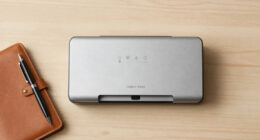
When searching for the best scanners with automatic document feeders, the key factors are speed, reliability, and ease of use. The Canon imageFORMULA R10 stands out as the overall top pick, offering excellent portability and duplex scanning for mobile users. For those needing higher capacity, the ScanSnap iX2500 provides a larger touchscreen and 100-page feeder, ideal for busy offices. Meanwhile, the Epson Workforce ES-400 II strikes a balance between speed and affordability for small to medium workloads. Because these devices vary widely in features and price, understanding your specific scanning needs is essential. Continue reading for a detailed breakdown of each option and how they compare.
Key Takeaways
- Top picks balance speed, capacity, and ease of setup to match different user needs.
- Portability remains a key factor for mobile professionals, with compact models like the Canon R10 excelling here.
- Larger automatic document feeders benefit busy offices but often come with higher price tags.
- Wireless connectivity adds convenience but can introduce setup complexity or reliability issues.
- Premium models tend to offer advanced features like touchscreen controls and high-volume capacity, justifying their higher prices.


More Details on Our Top Picks
Canon imageFORMULA R10 – Portable Document Scanner, USB Powered, Duplex Scanning, Document Feeder, Easy Setup, Convenient, Perfect for Mobile Users, White
This lightweight, portable scanner is designed for users who need to scan on the go, such as remote workers or mobile professionals. Compared to the ScanSnap iX2500 or Plustek PS188, the R10’s standout feature is its compact size and USB-powered operation, making it ideal for quick scans in multiple locations without bulky equipment. Its duplex scanning at 12 pages-per-minute covers basic needs efficiently, but the build quality feels slightly less robust than the more premium models like the iX2500, especially the thinner casing and fragile output tray. The built-in software is straightforward, with automatic updates, but it lacks advanced features found in higher-end scanners. It handles various media types like receipts, reports, and cards well, but isn’t suited for high-volume or photo-intensive tasks. Energy-efficient and Mac/Windows compatible, it’s perfect for users prioritizing portability over speed or heavy-duty use.
Pros:- Ultra-lightweight and portable design
- USB powered with no external power source needed
- Supports duplex scanning up to 12 ppm
- Broad media compatibility including cards and embossed surfaces
Cons:- Build quality feels less sturdy compared to higher-end models
- Limited speed for large batch scanning
- No extended document tray for very long pages
Best for: Travelers, remote workers, or those needing quick, mobile document digitization
Not ideal for: Heavy-volume office environments or high-resolution photo scanning due to slower speed and less durable construction
- Scanner Type:Portable Document Scanner
- Connection Type:USB
- Resolution:600 dpi
- Wattage:2.5W
- Sheet Capacity:20
- Color Depth:24 bits
- Dimensions:3.74″D x 11.22″W x 1.57″H
- Weight:998 grams
Bottom line: Best suited for mobile professionals who need quick, reliable scans without bulky hardware.
Plustek PS186 Desktop Document Scanner, with 50-Pages Auto Document Feed (ADF). for Windows 7/8 / 10/11 (Intel/AMD only)
The Plustek PS186 is built as a dependable workhorse for busy office settings, capable of handling up to 50 pages per minute with a 50-sheet ADF. Unlike the more portable Canon R10 or ScanSnap iX2500, it offers robust paper handling and is optimized for high-volume scanning, making it suitable for legal, financial, or administrative environments. Its support for OCR and full-text search enhances document management, and the ability to customize up to 255 scan profiles speeds up repetitive tasks. However, its size and weight are less convenient for mobile use, and the interface can be slightly clunky, requiring frequent calibration and careful paper preparation to avoid jams. The scanner’s design favors durability over compactness, and it works best with standard office documents rather than photos or irregular media. It’s a smart choice for organizations needing quick, efficient batch scanning with advanced file management features.
Pros:- High-speed 30 ppm duplex scanning
- Supports OCR and full-text search
- Customizable scan profiles for efficiency
- Automatic categorization with barcode recognition
Cons:- Bulkier and heavier than portable models
- Requires more desk space
- Calibration needed for optimal performance
Best for: Small to medium office environments requiring fast batch processing and robust document handling
Not ideal for: Mobile users or those needing to scan photos or irregular media frequently due to size and media limitations
- Scanner Type:Document Scanner with ADF
- Connection Type:USB
- Resolution:600 dpi
- Wattage:16W
- Sheet Capacity:50
- Optical Sensor Technology:CIS
- Media Type:Documents
- Dimensions:5″D x 11″W x 6″H
Bottom line: Ideal for office settings where speed, durability, and file management are priorities over portability.
ScanSnap iX2500 Photo Edition Wireless or USB High-Speed Cloud Enabled Photo, Document & Receipt Scanner with Large 5″ Touchscreen for Mac or PC, Black
The ScanSnap iX2500 Photo Edition is a versatile scanner designed for users who want to digitize photos, documents, and receipts efficiently. Its high-speed scanning of up to 100 photos per minute and large 5″ touchscreen make it user-friendly for casual and advanced users alike. Compared to the Canon R10 or Plustek PS188, the iX2500 excels in handling delicate photos with its specialized carrier sheets and automatic image enhancement features like color restoration and red-eye reduction. Its cloud connectivity and automatic file organization streamline workflows, but the software interface can be somewhat complex, requiring multiple clicks to customize settings. The scanner is relatively heavy and bulkier than portable options, making it less suitable for frequent travel. It’s best for users seeking an all-in-one solution for photos and documents with easy cloud integration and high-speed batch processing.
Pros:- Fast scanning up to 100 photos/min
- Large 5″ touchscreen for easy operation
- Supports cloud services and automatic file organization
- Includes carrier sheets for delicate prints
Cons:- Heavy and less portable
- Complex software interface
- Higher price point for multi-functionality
Best for: Photographers, families, or small offices needing fast photo and document digitization with cloud support
Not ideal for: Users looking for ultra-portable scanners or those needing high-resolution photo scans for professional printing
- Scanner Type:Photo & Document Scanner
- Connection Type:Wi-Fi & USB
- Resolution:600 dpi
- Wattage:17W
- Sheet Capacity:100
- Color Depth:24-bit
- Media Type:Photos, documents
- Dimensions:6.26″D x 11.5″W x 6.34″H
Bottom line: Best for users who want quick, high-quality photo and document scans with cloud capabilities in a semi-portable form.
ScanSnap iX2500 Wireless or USB High-Speed Cloud Enabled Document, Photo & Receipt Scanner with Large 5″ Touchscreen and 100 Page Auto Document Feeder for Mac or PC, Black
The ScanSnap iX2500 is a robust, high-capacity scanner tailored for busy offices that need reliable, fast batch processing. Its 45 pages-per-minute duplex speed, 100-sheet feeder, and seamless cloud integration make it a leader for heavy-duty tasks. Unlike the portable Canon R10 or the photo-focused iX2500, this model emphasizes speed and volume, supporting diverse media including receipts, reports, and multi-page documents. The large touchscreen and customizable profiles streamline repetitive workflows. While it’s excellent for high-volume environments, its size and weight make it less suitable for mobile use, and setup can be finicky, especially over wireless networks without static IPs. Its durability and high throughput justify its price for organizations managing extensive paper flow, with long-term reliability as a key advantage.
Pros:- High-speed 45 ppm duplex scanning
- Large 100-page automatic feeder
- Supports cloud and device integration
- Customizable scan profiles for efficiency
Cons:- Heavy and less portable
- Wireless setup can be complex
- Size may be restrictive for small desks
Best for: Large offices or organizations with consistent high-volume scanning needs
Not ideal for: Mobile professionals or users prioritizing compact size and portability
- Scanner Type:Desktop Document Scanner
- Connection Type:Wi-Fi & USB
- Resolution:600 dpi
- Wattage:17W
- Sheet Capacity:100
- Speed:45 ppm
- Media Type:Documents, receipts
- Dimensions:6.34″H x 11.5″W x 6.26″D
Bottom line: Ideal for organizations with large daily scanning workloads requiring speed and volume efficiency.
Plustek PS188 High Speed Double-Sided Color Document Scanner, with Automatic Document Feed (ADF), 30 Pages Per Minute, Support Windows 7/8/10/11
The Plustek PS188 offers a solid balance of speed and affordability for small to medium office environments. Its duplex scanning at 30 pages per minute and 50-sheet ADF make it suitable for routine document processing, outperforming portable options like the Canon R10 in terms of throughput. Its design favors durability and efficiency, with features like barcode recognition and full-text search, making file management easier. However, the scanner’s size makes it less portable, and the media handling is limited to standard documents, not photos or irregular media. The user experience can be affected by the need to calibrate frequently and careful paper prep to prevent jams. Its price point makes it a good value for organizations that need dependable batch scanning without extra bells and whistles.
Pros:- Fast duplex scanning at 30 ppm
- Supports barcode and full-text search
- Affordable and reliable for daily office use
- Supports multiple scan profiles
Cons:- Bulkier than portable models
- Requires regular calibration
- Limited media handling for photos or irregular pages
Best for: Small to medium-sized offices needing reliable, high-speed batch scanning
Not ideal for: Travelers or photo digitizers due to size and media limitations
- Scanner Type:Color Duplex Document Scanner
- Connection Type:USB
- Resolution:600 dpi
- Wattage:16W
- Sheet Capacity:50
- Speed:30 ppm
- Media Type:Documents
- Dimensions:5″D x 11″W x 6″H
Bottom line: A cost-effective, high-speed scanner ideal for routine office document workflows.
ScanSnap iX1300 Compact Wireless or USB Double-Sided Color Document, Photo & Receipt Scanner with Auto Document Feeder and Manual Feeder for Mac or PC, Black
This model stands out for its exceptional combination of size, speed, and ease of use, making it ideal for small spaces while still handling a variety of documents efficiently. Compared with the iX2500, it offers a more compact footprint and straightforward single-touch operation, though it sacrifices some higher-capacity features. Its duplex scanning at 30ppm with automatic de-skew and color optimization ensures professional results without complicated setup, perfect for home offices or individual power users. The wireless connectivity and compatibility with Mac, PC, and Chromebook add flexibility, and the ScanSnap Home software simplifies organization. However, its sheet capacity is limited to 50 sheets, which may be a drawback for high-volume scanning needs. This pick makes the most sense for users seeking a compact, reliable scanner that fits in tight spaces and requires minimal setup.
Pros:- Compact, space-saving design that fits on small desks
- Fast duplex scanning up to 30ppm with automatic de-skew and color optimization
- Simple one-touch operation suitable for all skill levels
- Wireless and USB connectivity for flexible placement
Cons:- Limited sheet capacity of 50 sheets, less suitable for bulk scanning
- No advanced document management features like high-capacity feeders or multi-feeds
Best for: Small business owners or individuals in tight spaces who want fast, high-quality scans with minimal fuss.
Not ideal for: Large offices or high-volume environments that need more than 50 sheets per batch or advanced integration options.
- Scanner Type:Document, Receipt
- Connection Type:USB, Wi-Fi
- Resolution:600 dpi
- Standard Sheet Capacity:50
- Color Depth:48 bits
- Dimensions:4.5 x 11.7 x 3.3 inches
- Weight:4.4 pounds
- Warranty:1-year
Bottom line: Ideal for users who need a reliable, space-efficient scanner for moderate daily use without high-volume demands.
ScanSnap iX2500 Wireless or USB High-Speed Cloud Enabled Document, Photo & Receipt Scanner with Large 5″ Touchscreen and 100 Page Auto Document Feeder for Mac or PC, White
This scanner makes a compelling case for its combination of speed, capacity, and user-friendly features, especially with its large touchscreen and high-capacity feeder. Compared to the iX1300, it offers a much larger 100-sheet feeder and speeds of 45ppm, suitable for busy offices. The built-in Wi-Fi 6 and support for cloud services allow for versatile, device-agnostic operation, while automatic file naming and organization streamline workflow. Its sleek design and robust build quality make it a durable choice. The main tradeoff is its larger size and higher price point, which might not suit those with very limited space or budgets. This scanner is perfect for small to medium offices that require fast, high-volume scanning with intuitive controls.
Pros:- Large 5-inch touchscreen for easy operation and customization
- High-speed scanning at 45ppm with 100-page capacity
- Supports cloud services and device sharing via Wi-Fi 6
- Automatic document organization and file naming
Cons:- Larger footprint compared to more compact models
- Higher price point may be prohibitive for budget-conscious users
Best for: Small to medium-sized workgroups or users who want fast, high-volume, cloud-ready scanning with minimal setup.
Not ideal for: Solo users with very limited space or those requiring ultra-portable solutions, due to its size and cost.
- Scanner Type:Document, Photo, Receipt
- Connection Type:USB, Wi-Fi
- Resolution:600 dpi
- Sheet Capacity:100
- Color Depth:24 bits
- Dimensions:11.5 x 6.34 x 6.26 inches
- Weight:7.7 pounds
- Warranty:1 year
Bottom line: Designed for busy offices that need fast, reliable, and cloud-integrated scanning with user-friendly controls.
Epson WorkForce ES-400 II Color Duplex Desktop Document Scanner for PC and Mac with Auto Doc Feeder (ADF), Image Adjustment Tools
This model excels in high-volume environments, offering a 50-sheet ADF and fast dual-sided scanning at up to 25 pages per minute. Compared with the smaller ES-50, it provides higher throughput and enhanced image adjustment tools, making it suitable for busy office settings. Its robust build and seamless software integration with Epson ScanSmart enable easy previewing, editing, and cloud upload. The built-in OCR creates searchable PDFs and editable files, streamlining document management. The key tradeoff is its larger size and higher price, which may be overkill for casual or occasional use. This pick makes the most sense for small offices or work-from-home setups where volume and speed matter most.
Pros:- Fast duplex scanning up to 25 ppm
- 50-sheet automatic document feeder for high throughput
- Built-in image adjustment tools for clear scans
- Seamless integration with Epson software and cloud services
Cons:- Size and weight are less portable than compact models
- Higher price compared to basic desktop scanners
Best for: Small office or home office users handling large document batches regularly with high efficiency needs.
Not ideal for: Travelers or those with extremely limited desk space, due to its desktop size and higher cost.
- Scanner Type:Document
- Connection Type:USB
- Resolution:600 dpi
- Sheet Capacity:50
- Color Depth:24 bits
- Dimensions:9.88 x 11.54 x 9.65 inches
- Weight:6.6 pounds
- Warranty:1 year
Bottom line: Best suited for high-volume desktop environments demanding speed, efficiency, and advanced image controls.
Canon imageFORMULA R30 – Office Document Scanner, Auto Document Feeder, Duplex Scanning, Plug-and-Scan Capability, No Software Installation Required
This scanner shines for its plug-and-play setup—no software installation needed—making it ideal for users who want quick, reliable document digitization. Compared to the Epson ES-400 II, it offers a slightly lower speed at 25 pages per minute but emphasizes ease of use and portability. Its 60-sheet capacity and duplex scanning support all typical office documents, including mixed batches. The built-in software is minimal but sufficient for basic scanning tasks, and it works seamlessly via USB. The main drawback is its limited advanced features and slightly slower speeds than premium models. This pick is best for those who prioritize simplicity, quick deployment, and portability over high-volume throughput.
Pros:- No software installation required, plug-and-play
- Reliable duplex scanning at 25 ppm
- Compact and portable design
- Supports a wide range of documents including IDs and receipts
Cons:- Lower maximum sheet capacity (60 sheets)
- Basic software features may be limiting for advanced workflows
Best for: Small offices or home users seeking an easy, no-fuss scanner that can handle daily document loads without complex setup.
Not ideal for: High-volume environments or users needing advanced document processing features and larger sheet capacities.
- Scanner Type:Document
- Connection Type:USB
- Resolution:600 dpi
- Sheet Capacity:60
- Color Depth:24 bits
- Dimensions:13.15 x 5 x 2.65 inches
- Weight:9.44 ounces
- Warranty:1 year
Bottom line: Perfect for users who want a straightforward, reliable scanner with quick setup for everyday document tasks.
Canon imageFORMULA R30 – Office Document Scanner, Auto Document Feeder, Duplex Scanning, Plug-and-Scan Capability, No Software Installation Required
This scanner shines for its plug-and-play setup—no software installation needed—making it ideal for users who want quick, reliable document digitization. Compared to the Epson ES-400 II, it offers a slightly lower speed at 25 pages per minute but emphasizes ease of use and portability. Its 60-sheet capacity and duplex scanning support all typical office documents, including mixed batches. The built-in software is minimal but sufficient for basic scanning tasks, and it works seamlessly via USB. The main drawback is its limited advanced features and slightly slower speeds than premium models. This pick is best for those who prioritize simplicity, quick deployment, and portability over high-volume throughput.
Pros:- No software installation required, plug-and-play
- Reliable duplex scanning at 25 ppm
- Compact and portable design
- Supports a wide range of documents including IDs and receipts
Cons:- Lower maximum sheet capacity (60 sheets)
- Basic software features may be limiting for advanced workflows
Best for: Small offices or home users seeking an easy, no-fuss scanner that can handle daily document loads without complex setup.
Not ideal for: High-volume environments or users needing advanced document processing features and larger sheet capacities.
- Scanner Type:Document
- Connection Type:USB
- Resolution:600 dpi
- Sheet Capacity:60
- Color Depth:24 bits
- Dimensions:13.15 x 5 x 2.65 inches
- Weight:9.44 ounces
- Warranty:1 year
Bottom line: Perfect for users who want a straightforward, reliable scanner with quick setup for everyday document tasks.
ScanSnap iX1300 Compact Wireless or USB Double-Sided Color Document, Photo & Receipt Scanner with Auto Document Feeder and Manual Feeder for Mac or PC, White
This scanner stands out for its space-saving design that fits small desks without sacrificing performance. Compared with the Canon imageFORMULA R10, it offers duplex scanning at a brisk pace of 30ppm, which is suitable for most office needs. The wireless connectivity adds flexibility, allowing scanning from mobile devices and cloud services, unlike many traditional wired-only models. However, its software, ScanSnap Home, can feel bulky and less intuitive for power users who prefer quick save options like direct folder scanning. The dual feed options—manual and automatic—make it adaptable for plastic cards and thick documents, but the lack of OCR or advanced image adjustments might limit editing after scanning. This pick makes the most sense for users wanting a compact, easy-to-use device that handles a variety of document types with minimal fuss.
Pros:- Space-saving, ergonomic design ideal for small desks
- Fast duplex scanning up to 30ppm with automatic de-skew and blank page removal
- Wireless and USB connectivity for flexible scanning options
- Handles thick documents and plastic cards
Cons:- Clunky software interface that can slow down experienced users
- Limited built-in image correction or OCR capabilities
- No TWAIN driver support, restricting some advanced workflows
Best for: Small business owners or home office users needing a versatile, space-efficient scanner with wireless capabilities.
Not ideal for: Heavy-volume scanning environments or users requiring advanced image editing and OCR features integrated directly into the hardware.
- Scanner Type:Document, Photo, Receipt
- Connection Type:USB, Wi-Fi
- Resolution:1200 dpi
- Standard Sheet Capacity:20
- Wattage:17 watts
- Media Type:Paper, Plastic Cards
- Light Source Type:LED
- Dimensions:4.5″D x 11.7″W x 3.3″H
Bottom line: This is best suited for users who need a compact, versatile scanner that integrates seamlessly into small office or home environments without complex software requirements.
ScanSnap iX2400 High-Speed Simple One-Touch Button Color Document, Photo & Receipt Scanner with 100 Page Auto Document Feeder for Mac or PC, Black
This model makes a strong impression with duplex speeds of up to 45 pages per minute and a large 100-sheet ADF, ideal for busy offices. Unlike the Brother DS-640, which is portable and compact, the iX2400 prioritizes speed and capacity, making it suitable for high-volume tasks. Its all-in-one software consolidates document management, but the interface can be overwhelming for those seeking simple workflows. The automatic detection of document size and color, plus features like streak removal and de-skew, produce consistently clean images, though it lacks wireless connectivity, so it’s best for desk-bound setups. The scanner’s build quality and reliability have been praised, making it a dependable choice for frequent, large batch scanning projects.
Pros:- Exceptional high-speed duplex scanning at 45ppm
- Large 100-page automatic document feeder for bulk jobs
- Automatic document size detection and image cleanup features
- Reliable performance for continuous use
Cons:- No wireless or mobile connectivity options
- Software interface can be complicated for casual users
- Larger footprint compared to portable scanners
Best for: Small businesses or remote workers who need fast, high-capacity scanning with minimal manual intervention.
Not ideal for: Users requiring wireless operation or those with limited desk space, since the unit is more sizable and wired-only.
- Scanner Type:Document, Receipt, Photo
- Connection Type:USB
- Resolution:600 dpi
- Sheet Capacity:100
- Speed:45 ppm duplex
- Media Type:Paper, Plastic Cards
- Light Source:CIS
- Dimensions:6.26″D x 11.5″W x 6.34″H
Bottom line: Perfect for high-volume, desk-bound office environments where speed and capacity are top priorities.
Canon imageFORMULA DR-C225 II Office Document Scanner, Black – 3258C002
This scanner is renowned for its durability and jam-free operation, making it a favorite for high-volume document archiving. Compared to the ScanSnap iX1300, which emphasizes space efficiency and wireless flexibility, the Canon DR-C225 II focuses on robust performance and versatile document handling. Its upright space-saving design helps maintain a tidy workspace, and it can handle a wide variety of document types, including embossed and thick papers, with ease. While it doesn’t feature wireless connectivity, its TWAIN driver support ensures compatibility with most scanning applications, including OCR workflows. The 30 pages per minute speed and 3-year warranty make it a dependable workhorse for busy offices where reliability is paramount.
Pros:- High reliability with minimal jams and misfeeds
- Handles various document types including thick and embossed papers
- Space-efficient upright design
- Supports TWAIN driver for broad application compatibility
Cons:- No wireless or mobile scanning options
- Less feature-rich software interface
- Relatively larger footprint for small desks
Best for: Large offices or document-heavy environments demanding constant, reliable scanning with broad media handling capabilities.
Not ideal for: Small home users or those needing wireless access and quick setup, as it is primarily wired and more substantial in size.
- Scanner Type:Document
- Connection Type:USB
- Resolution:600 dpi
- Sheet Capacity:30
- Speed:30 ppm
- Media Type:Various papers and cards
- Light Source:LED
- Dimensions:6.1″D x 11.8″W x 8.7″H
Bottom line: Ideal for demanding office environments where long-term durability and broad media compatibility outweigh wireless features.
Brother DS-640 Compact Mobile Document Scanner, (Model: DS640)
The Brother DS-640 excels in portability, weighing only about 1.5 pounds and fitting into a pocket or bag, making it perfect for fieldwork or remote professionals. Unlike the larger, office-focused scanners like the Canon DR-C225 II, this model is designed for quick, lightweight scanning without sacrificing essential features. Its USB-powered operation means you can scan anywhere there’s a compatible device, and it supports TWAIN/WIA and SANE drivers, providing flexibility for different operating systems. The automatic color detection, background removal, and document size adjustment produce decent images for basic archiving or OCR. However, its slower speed of 16ppm makes it less suitable for large batch jobs, and its limited sheet capacity at 1 sheet per scan can be inefficient for high-volume needs.
Pros:- Extremely lightweight and compact, ideal for travel
- Powered via micro USB, no need for an outlet
- Supports multiple OS drivers including TWAIN and SANE
- Automatic image adjustments for clarity
Cons:- Limited to 16 pages per minute, slower than desktop models
- Only scans one sheet at a time, less efficient for bulk jobs
- No wireless connectivity
Best for: Mobile professionals or small business owners needing a portable, reliable scanner for occasional, low-volume scanning on the road.
Not ideal for: High-volume or fast-paced office environments, where larger capacity and speed are essential.
- Scanner Type:Business Card, Document
- Connection Type:USB
- Resolution:300 dpi
- Sheet Capacity:1
- Speed:16 ppm
- Media Type:Cards, Paper
- Light Source:LED
- Dimensions:1.99″D x 11.9″W x 1.45″H
Bottom line: Best suited for on-the-go professionals who need quick, portable scanning capabilities for light tasks.

How We Picked
The products in this roundup were selected based on a combination of performance, usability, build quality, and value. Priority was given to scanners with reliable automatic document feeders that handle a range of document sizes and volumes efficiently. We also considered user interface design, connectivity options, and maintenance costs. Devices that excelled in speed, ease of setup, and durability earned higher rankings, while those with notable compromises or limited features were rated lower. Our goal was to highlight options suitable for different user scenarios, from mobile professionals to busy office environments, ensuring a balanced and practical selection.Factors to Consider When Choosing Best Scanners With Automatic Document Feeders
When choosing the best scanner with an automatic document feeder, it’s important to consider several key factors that align with your specific needs. Not all models are created equal, and understanding these factors can help you avoid common pitfalls like overpaying for unnecessary features or selecting a device that cannot handle your workload. Here are the main considerations to keep in mind:Capacity and Speed
Assess how many pages you typically need to scan in a session. Larger automatic feeders (50 pages or more) reduce the frequency of refills, which is ideal for high-volume work. Speed, measured in pages per minute (PPM), also matters — faster models save time, especially in busy environments. However, higher speed often comes at a higher cost, so balance your volume needs with your budget.
Connectivity Options
Wireless connectivity, such as Wi-Fi or cloud integration, offers convenience for mobile and flexible workflows. Yet, it can introduce setup complexity or occasional connectivity issues. USB-only models tend to be simpler and more reliable but lack the flexibility of wireless options. Consider your work environment and whether seamless connectivity is essential for your tasks.
Ease of Use and Setup
User interface features like touchscreens, automatic document detection, and straightforward software installation can significantly impact your experience. Devices with intuitive controls and minimal setup time are preferable, especially for users who need quick, hassle-free operation. Conversely, more complex models might offer advanced features but require more technical knowledge to operate efficiently.
Build Quality and Durability
Since automatic document feeders are mechanical components, durability becomes critical for long-term reliability. Investing in a well-built scanner reduces maintenance costs and downtime. Check user reviews for insights into how models perform under regular use, especially in high-volume scenarios.
Price and Total Cost of Ownership
While budget models can perform well for light use, higher-priced scanners often offer better speed, capacity, and durability. Also, consider the costs of replacement parts, maintenance, and software updates. A slightly higher initial investment can pay off through improved efficiency and reduced maintenance hassles over time.
Frequently Asked Questions
How do I choose between a portable and a desktop scanner with an automatic document feeder?
If mobility is your priority, a portable scanner like the Canon R10 makes sense because of its compact size and USB power. However, portable models often have smaller document capacities and slower speeds, making them less suitable for high-volume tasks. Desktop scanners typically offer larger feeders and faster scanning speeds, ideal for office use, but they sacrifice portability. Your decision should depend on whether you need mobility or higher volume capacity in your workflow.
Are wireless scanners with automatic document feeders more reliable than wired ones?
Wireless scanners offer the convenience of flexible placement and easier sharing across multiple devices, but they can sometimes face connectivity issues or require more setup time. Wired models tend to be more straightforward and reliable, especially in stable office environments. If your workflow relies on consistent, high-speed scanning without connectivity hiccups, a wired scanner might be the better choice, but for flexible, on-the-go use, wireless models are often more convenient despite occasional issues.
What capacity should I look for in an automatic document feeder?
The ideal capacity depends on your typical workload. For light use, a 20-30 page feeder may suffice, but for frequent, high-volume scanning, a 50-page or larger feeder significantly reduces downtime. Keep in mind that larger feeders often increase the device’s size and cost. Balance your typical daily volume with the size and cost of the feeder to avoid over-investing or facing frequent refills.
Is it worth paying extra for features like touchscreen controls or cloud connectivity?
Features like touchscreens can streamline operation and reduce reliance on connected computers, making scanning more straightforward. Cloud connectivity enables direct upload to cloud storage, saving time and steps. However, these features come at a higher price and may introduce complexity or maintenance issues. Consider whether these functionalities align with your workflow and whether they justify the additional investment.
How important is software compatibility when choosing a scanner?
Software compatibility affects how seamlessly the scanner integrates into your existing workflow. A device that works with your preferred operating system and scanning software minimizes setup frustrations and ensures smooth operation. Some models come with proprietary software that may or may not meet your needs, so check compatibility and reviews regarding ease of use. Incompatible or overly complex software can hinder productivity rather than enhance it.
Conclusion
For most users, the Canon imageFORMULA R10 offers the best overall experience thanks to its portability and duplex scanning capabilities. Small business owners or those with limited space might prefer the ScanSnap iX1300 for its balance of features and simplicity. Budget-conscious buyers should consider the Epson Workforce ES-50 for light workloads. High-volume offices will find the Canon DR-C225 II or the Plustek PS186 better suited for their demanding needs. Ultimately, your choice depends on your specific volume, mobility, and connectivity requirements, but this roundup provides a clear starting point for every type of scanner user in 2026.