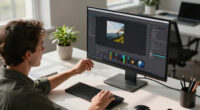
Choosing the best monitors for remote work entrepreneurs involves balancing portability, screen real estate, and connectivity. The ASUS BE24EQK stands out as the overall top pick thanks to its built-in webcam and versatile features, while the Samsung SH850 Series offers a crisp QHD display ideal for detailed work. For those prioritizing portability, options like the Xebec Tri-Screen 3 and Triple Laptop Extender excel, but they come with tradeoffs in setup complexity and durability. Many entrepreneurs face a dilemma between compact, portable solutions and larger, more feature-rich monitors. Keep reading for a detailed breakdown to help you find the best fit for your remote work setup.
Key Takeaways
- Portability varies greatly, with ultra-thin and foldable monitors offering easy travel but often sacrificing screen size or resolution.
- Connectivity options like USB-C, HDMI, and DisplayLink are essential for seamless multi-device setups, especially when working across different operating systems.
- Built-in features such as webcams and speakers can enhance remote collaboration but often come at a premium price.
- Higher resolution monitors (QHD or better) significantly improve productivity for multitasking and detailed work, justifying higher costs.
- Durability and build quality are critical for portable monitors; lightweight options may be more fragile over time but are easier to carry.



More Details on Our Top Picks
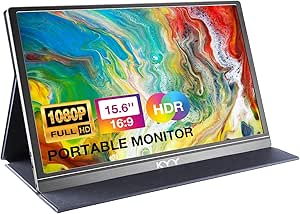
KYY Portable Monitor 15.6inch 1080P FHD USB-C, HDMI Computer Display HDR IPS Gaming Monitor w/Premium Smart Cover & Screen Protector, Speakers, for Laptop PC MAC Phone PS4 Xbox Switch
This KYY portable monitor stands out for its full HD IPS display with HDR technology, offering vivid colors and wide viewing angles that rival larger screens. Its ultra-slim, lightweight design makes it perfect for entrepreneurs on the go, easily fitting into a bag without adding bulk. Compared with larger, less portable options like the ASUS BE24EQK, it sacrifices some professional features but excels in portability and ease of setup. The dual USB-C ports and HDMI support give broad device compatibility, streamlining your workspace. However, its 60Hz refresh rate isn’t ideal for fast-paced multimedia, and built-in speakers, while convenient, lack the depth of dedicated audio systems. Overall, this pick makes the most sense for remote entrepreneurs who need a secondary display without sacrificing mobility.
Pros:- Vivid FHD IPS display with HDR technology
- Ultra-slim and lightweight design (1.7 lbs, 0.35 inches thick)
- Broad device compatibility via USB-C and HDMI
Cons:- Limited to 60Hz refresh rate, less ideal for fast multimedia
- Built-in speakers lack deep audio quality
- No adjustable height or tilt stand
Best for: Remote entrepreneurs who frequently work outside a traditional office and need a portable secondary display.
Not ideal for: Professionals requiring a high-refresh-rate monitor for gaming or video editing, as this model is limited to 60Hz.
- Display Size:15.6 Inches
- Resolution:1920 x 1080
- Display Technology:IPS LCD
- Refresh Rate:60 Hz
- Viewing Angle:178°
- Weight:1.7 lbs
- Thickness:0.35 inches
- Ports:2x USB-C, 1x HDMI, 3.5mm audio
Bottom line: Ideal for entrepreneurs needing a portable, easy-to-connect second screen while traveling or working remotely.
Xebec Tri-Screen 3 for Mac | Laptop Screen Extender with DisplayLink Adapter Included | Two 13.3 Inch Displays | Single Cable Connection | Portable Laptop Monitor for MacBook | Travel Case Included
This Xebec Tri-Screen 3 is designed specifically for MacBook users seeking triple monitor productivity in a portable package, surpassing the single-screen options like the KEFEYA S8 Pro for multi-tasking. Its lightweight (3.6 lbs) aluminum build and included travel case make it easy to carry, while the single cable connection simplifies setup. The dual 13.3-inch FHD screens support extended, mirror, and portrait modes, boosting productivity by up to 44%. Unlike smaller, less flexible extenders, the Tri-Screen 3 provides full functionality across different devices. A notable tradeoff is its size, which might be less suitable for tight travel bags. Still, for MacBook users who need multiple screens on the go, this is a powerful choice.
Pros:- Triple 13.3-inch FHD displays with 178° viewing angles
- Lightweight and durable aluminum chassis
- Supports full-screen, extended, and portrait modes
Cons:- Requires DisplayLink driver installation, which can be complex
- Size may be less portable for small bags
- Limited to Mac and certain Windows/Linux configurations
Best for: Mac entrepreneurs and remote workers who need an expandable, portable multi-screen setup for productivity or creative work.
Not ideal for: Users on Windows or Linux seeking a plug-and-play dual or triple monitor solution, as compatibility may require additional adapters.
- Display Size:13.3 Inches (x2)
- Resolution:1920 x 1080
- Contrast Ratio:2000:1
- Viewing Angle:270°
- Response Time:2 ms
- Weight:3.6 lbs
- Ports:USB-A, USB-C (power & video)
- Built-in Features:DisplayLink Adapter included
Bottom line: Great for Mac entrepreneurs needing an easy-to-carry, multi-monitor extension for enhanced productivity.
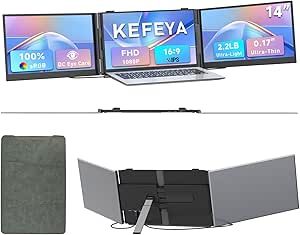
Triple Laptop Screen Extender 0.17″ Ultra-Thin, 14″ 1080P FHD Portable Monitor for Laptops 13-17.3″, Laptop Monitor Extender 2.2 LB Lightest, USB-C HDMI Plug-Play for Mac Windows PS Switch Work Travel
This KEFEYA S8 Pro offers an ultra-thin (0.17″) profile and lightweight (2.2 lbs) design, making it ideal for entrepreneurs who need a triple-screen setup without the bulk of traditional monitors. Its full HD 1080p resolution and adjustable angles improve the viewing experience, surpassing bulkier external displays like the ASUS BE24EQK for portability. The USB-C and HDMI compatibility provide broad device support, and the reverse charging support adds convenience for mobile use. However, its smaller 14-inch size may feel less spacious for detailed tasks or extensive multitasking. Nonetheless, this monitor excels in travel scenarios and for users prioritizing portability over screen size.
Pros:- Ultra-slim (0.17″) and lightweight (2.2 lbs)
- Supports triple-screen extension with adjustable angles
- Full HD 1080p resolution with IPS panel
Cons:- Smaller 14-inch display limits workspace size
- Requires extra cables for some MacBooks with M1/M2 chips
- Battery or power source needed for extended use
Best for: Travel-forward entrepreneurs and remote workers who need a lightweight, portable triple monitor setup for on-the-go productivity.
Not ideal for: Professionals who require larger screens for detailed design or editing work, as 14 inches may be limiting.
- Display Size:14 Inches
- Resolution:1920 x 1080
- Weight:2.2 lbs
- Thickness:0.17 inches
- Display Technology:IPS LCD
- Ports:USB-C, HDMI
- Response Time:1 ms
- Color Gamut:100% sRGB
Bottom line: Perfect for entrepreneurs needing a portable, triple-screen solution for travel or mobile work, despite limited screen real estate.
Laptop Screen Extender, Ultra-Thin 15.3″ FHD 1200P 16:10 Portable Monitor for Laptop, Lightweight Dual Monitor Extender Plug & Play for 14.2″-17.3″ Laptops, Compatible with Wins/Mac/Chrome/Linux
This SMISEACOW 15.3″ portable monitor extender offers a full HD 1200p resolution with a lightweight (1.99 kg, 4.4 lbs) and ultra-slim (0.18”) design, making it ideal for entrepreneurs who need a second screen on the move. Its plug-and-play compatibility with Windows, Mac, Chrome, and Linux beats many proprietary solutions, and the support for extended and mirror modes helps boost productivity by up to 200%. The aviation-grade aluminum back adds durability and heat dissipation, a step above cheaper plastic models. Its size strikes a balance between portability and workspace, though some may find the 15.3″ size a bit bulky for tight travel bags. Overall, it’s a flexible and efficient secondary monitor for varied professional settings.
Pros:- Large 15.3-inch display with 1200p resolution
- Supports extended and mirrored modes for productivity
- Aviation-grade aluminum back for durability
Cons:- Size may be less portable for small bags
- Needs external power for some functions
- Limited to 60Hz refresh rate, not ideal for fast motion tasks
Best for: Entrepreneurs and remote workers who need a reliable, versatile secondary display for travel and flexible work environments.
Not ideal for: Those who prioritize ultra-lightweight solutions or minimal size at the expense of screen real estate, as it’s slightly larger and heavier than smaller models.
- Display Size:15.3 Inches
- Resolution:1920 x 1200
- Contrast Ratio:1000:1
- Brightness:300 nits
- Viewing Angle:178°
- Weight:4.4 lbs
- Ports:USB-C, HDMI
- Display Tech:IPS LCD
Bottom line: A solid choice for entrepreneurs who want a versatile, portable dual monitor that balances size and performance.
ASUS BE24EQK 24” Business Monitor with 1080P Full HD IPS, Eye Care, DisplayPort HDMI, Frameless, Built-in Adjustable 2MP Webcam, Mic Array, Stereo Speaker, Video Conference,Black
This ASUS BE24EQK combines a 24-inch Full HD IPS display with extensive business-focused features like a built-in adjustable webcam, mic array, and stereo speakers, making it ideal for video calls and remote meetings. It surpasses basic monitors like the ASUS BE24EQK by integrating video conferencing capabilities directly into the display, saving desk space and setup time. Its frameless design provides a seamless multi-monitor setup, and the Eye Care technology reduces eye fatigue during long work sessions. However, it’s less portable and more suited for a dedicated home or office setup rather than travel. The 60Hz refresh rate and integrated features make it a strong choice for professional productivity but less so for gaming or multimedia editing.
Pros:- Full HD IPS display with wide viewing angles
- Built-in 2MP webcam with adjustable angle
- Integrated mic array and stereo speakers
Cons:- Less portable due to size and weight
- No high-refresh-rate support for gaming
- Requires desktop power source
Best for: Remote entrepreneurs who need a reliable, professional monitor with integrated video conferencing for virtual meetings.
Not ideal for: Travelers or mobile workers who require ultra-portability, as this monitor is larger and bulkier.
- Display Size:23.8 Inches
- Resolution:1920 x 1080
- Contrast Ratio:100,000,000:1
- Brightness:1027.8 lm
- Viewing Angle:178°
- Response Time:1 ms
- Ports:HDMI, DisplayPort
- Built-in Features:Webcam, Mic, Stereo Speakers
Bottom line: A strong choice for remote entrepreneurs seeking a high-quality monitor with built-in conferencing tools for professional use.
Trio 3 Pro 14.1″ Mobile Pixels Portable Laptop Monitor(2026 Version), 1400p QHD Triple Monitor with Built-in Kickstand, One USB-C Cable Setup Laptop Screen Extender(Optional Magnets), Windows/macOS
This model stands out for transforming a standard laptop into a productivity hub with dual 14.1″ 1400p QHD screens, making it ideal for entrepreneurs who need to multitask on the go. Compared to the Samsung S24H850QFN, which offers a larger, static desktop experience, the Trio 3 Pro’s portability is a game-changer, though it involves tradeoffs in screen size and resolution. Its lightweight, sleek design with a clip-on system and magnetic mount simplifies setup and packs into a bag, perfect for travel. The triple monitor capability boosts multitasking significantly, but the smaller screens may limit detailed work or extended viewing comfort for some users. Its compatibility with Windows and macOS, plus the one-cable connection, minimizes clutter, yet the reliance on USB-C or USB-A might pose limitations for older laptops. Ideal for entrepreneurs who work remotely and travel often, needing versatile, space-saving screens.
- Lightweight and portable design
- Triple monitor setup with easy magnetic attachment
- Universal compatibility and simple one-cable setup
- High resolution for crisp visuals
- Smaller screen size limits detailed tasks
- Requires USB-C or USB-A ports, which may not be available on all laptops
Verdict: This pick is perfect if you prioritize portability and multi-screen flexibility over larger display size.
Pros:- Lightweight and easy to carry in a bag
- Triple monitor capability enhances multitasking
- Simple plug-and-play setup with magnetic mounts
Cons:- Limited to 14.1″ screens, which may be small for detailed work
- Requires USB-C or USB-A ports, not universal for all laptops
Best for: Remote entrepreneurs who frequently travel and need a lightweight, portable multi-screen solution.
Not ideal for: Users who require large, high-resolution displays for detailed design or editing work at a fixed location.
- Screen Size:14.1 Inches
- Resolution:2240 x 1400 Pixels (QHD)
- Refresh Rate:60 Hz
- Display Technology:LCD
- Ports:USB-C, USB-A
- Weight:4.2 Pounds
Bottom line: A versatile portable monitor extender ideal for entrepreneurs on the move who need multiple screens without bulk.
Samsung Business SH850 Series 24 Inch QHD 2560×1440 Desktop Monitor for Business (In Black) with USB-C, HDMI, DisplayPort, 3-Year Warranty, TAA (S24H850QFN)
This monitor excels in delivering sharp, vivid visuals with its high-end PLS display, making it ideal for entrepreneurs who prioritize crisp image quality and reliable color. When compared to the Trio 3 Pro, which offers portability, the Samsung SH850 is better suited to a fixed workspace where size and resolution matter. Its 24-inch size strikes a balance between workspace and comfort, and features like bezel-less edges support seamless multi-monitor configurations—perfect for multitasking environments. The monitor’s connectivity options, including USB-C, HDMI, and DisplayPort, provide flexible setup options, although the 60Hz refresh rate may fall short for fast-paced tasks like gaming or video editing. The 3-year warranty and TAA compliance add reassurance for business use, but its bulk and fixed nature make it less portable. This pick is ideal for entrepreneurs working primarily at a dedicated desk needing high visual fidelity and multi-display capabilities.
- Vivid, high-quality display with PLS technology
- Seamless multi-monitor setup with bezel-less design
- Flexible connectivity including USB-C, HDMI, and DisplayPort
- 3-year warranty and TAA compliance
- Bulkier than portable options, less suitable for travel
- Limited to 60Hz refresh rate, not ideal for fast-motion tasks
Verdict: Best for those who work primarily from a fixed location and need crisp visuals across multiple screens.
Pros:- Sharp, vibrant display with high color accuracy
- Supports seamless multi-monitor configurations
- Reliable connectivity options including USB-C, HDMI, DisplayPort
Cons:- Fixed size and weight limit portability
- 60Hz refresh rate not suitable for fast-paced visuals
Best for: Entrepreneurs with a dedicated workspace seeking high-resolution, multi-monitor setups for productivity.
Not ideal for: Travelers or entrepreneurs needing portable screens or higher refresh rates for gaming or video editing.
- Screen Size:24 Inches
- Resolution:2560 x 1440 (QHD)
- Refresh Rate:60 Hz
- Display Technology:PLS LCD
- Connectivity:USB-C, HDMI, DisplayPort
- Warranty:3 Years
Bottom line: A high-quality, static desktop monitor perfect for entrepreneurs who prioritize clarity and multi-screen efficiency in a stationary setup.
Laptop Screen Extender, Ultra-Thin 15.3″ FHD 1200P 16:10 Portable Monitor for Laptop, Lightweight Travel Monitor Extender Plug & Play for 14.2″-17.3″ Laptops, Compatible with Wins/Mac/Android/Chrome
This portable monitor makes a compelling case for entrepreneurs who need an extra screen while maintaining mobility, with its ultra-thin design and easy plug-and-play setup. Unlike the Trio 3 Pro, which offers dual screens with larger displays, this extender focuses on minimal size and weight, making it perfect for quick setups and travel. Its 15.3-inch Full HD IPS display with 300 nits brightness offers decent image quality, though it may not match the sharpness or color fidelity of larger, dedicated monitors like the Samsung SH850. Its compatibility with Windows, Mac, Android, and Chrome, plus the ability to charge the laptop in reverse, enhances convenience. The main tradeoff involves screen size—smaller than dedicated desktop monitors—and lower resolution compared to larger screens. This pick is ideal for entrepreneurs who need a lightweight secondary display for on-the-go productivity. Best suited for mobile entrepreneurs seeking a balance between size, weight, and usability.
- Ultra-lightweight and portable design
- Plug-and-play with extensive device compatibility
- Reverse charging capability supports limited ports
- Decent Full HD IPS display with high brightness
- Smaller display size limits detailed work
- Lower resolution than larger, dedicated monitors
Verdict: A practical, lightweight secondary screen for entrepreneurs who need mobility without sacrificing too much display quality.
Pros:- Extremely lightweight and portable
- Supports a wide range of devices and operating systems
- Reverse charging feature adds convenience
Cons:- Limited screen size and lower resolution for detailed work
- Not a replacement for larger, dedicated monitors
Best for: Mobile entrepreneurs requiring an extra portable screen for travel or quick setups.
Not ideal for: Users needing large or high-resolution displays for detailed tasks or long-term stationary use.
- Screen Size:15.3 Inches
- Resolution:1920 x 1200 (FHD)
- Brightness:300 Nits
- Display Technology:IPS LCD
- Ports:USB-C, HDMI
- Weight:2.77 Pounds
Bottom line: A lightweight, versatile portable monitor extender perfect for entrepreneurs on the move who need quick, secondary screen support.
How We Picked
These monitors were selected based on a combination of performance, portability, build quality, and connectivity. I prioritized models that cater specifically to remote work entrepreneurs who need versatile solutions for travel, multitasking, and video conferencing. Each product was evaluated for ease of setup, compatibility with different devices, and value for money. The ranking reflects a balance between features and practicality, with an emphasis on real-world usability rather than just specifications.
Factors to Consider When Choosing Best Monitors For Remote Work Entrepreneurs
When choosing a monitor for remote work entrepreneurship, several factors come into play. It’s important to consider how portability aligns with your work needs, the quality of display for productivity, and the ease of connectivity across devices. Budget constraints also influence whether to prioritize features or cost savings. Understanding these elements helps prevent common pitfalls like buying a monitor that’s too fragile or lacking essential ports. Let’s explore the key considerations in more detail.Portability vs. Size
Deciding between a portable monitor and a larger desktop-style screen hinges on your travel frequency and workspace setup. Ultra-thin, lightweight options excel for frequent travelers but may compromise on resolution or durability. Larger monitors provide more screen real estate, improving multitasking, but are less convenient to carry. Think about how often you’ll need to move your monitor and balance that against your work demands.
Connectivity Options
Reliable connections are vital for smooth workflows, especially when juggling multiple devices. USB-C offers a single-cable solution for power and data, reducing clutter, but not all laptops support it. HDMI and DisplayLink adapters can expand compatibility, yet may introduce latency or setup complexity. Choosing a monitor with versatile ports can future-proof your investment and streamline your workspace.
Display Quality and Resolution
High-resolution screens like QHD or 4K significantly boost productivity by allowing more windows and detailed visuals without eye strain. IPS panels improve color accuracy and viewing angles, which is beneficial during video calls or content creation. Cheaper models often cut corners here, leading to dull colors or pixelation that hampers focus. Investing in a quality display pays off over time.
Built-in Features
Features like webcams, speakers, and adjustable stands enhance remote collaboration, making video calls more seamless. However, these extras often increase the price and can add to the monitor’s bulk. Consider whether these features are essential for your workflow or if external devices might offer better quality at a lower cost. Prioritize what truly improves your productivity.
Budget and Long-term Value
Budget constraints are common, but skimping on a monitor can lead to discomfort or the need to replace sooner. Focus on models that offer the best combination of features and durability within your price range. Sometimes, paying a bit more upfront for a reliable, versatile monitor saves money and hassle in the long run. Look for warranties and user reviews to gauge longevity.
Frequently Asked Questions
Is a portable monitor suitable for all types of remote work?
Portable monitors are excellent for entrepreneurs who frequently travel or work from multiple locations. They save space and add flexibility, but may lack the robustness or screen size needed for intensive tasks. If your work involves detailed graphics or multitasking on a large scale, a larger desktop monitor might be more appropriate. Balancing portability with screen quality is key to making the right choice.
What connectivity options should I prioritize for future-proofing?
USB-C has become the standard for its simplicity and versatility, supporting power, video, and data transfer over a single cable. However, not all devices support USB-C, so having HDMI and DisplayLink options is beneficial. A monitor with multiple ports can adapt to different setups and prevent compatibility issues as your device lineup evolves. Prioritizing these options ensures a smoother, more flexible workflow.
Are built-in webcams and speakers worth paying extra for?
For remote entrepreneurs, integrated webcams and speakers can streamline video conferencing, reducing clutter and setup time. However, built-in components often compromise on quality compared to external peripherals, which can provide better audio and video clarity. If video calls are a daily part of your routine, investing in external quality devices might be more beneficial, but built-in features add convenience for occasional use.
How important is resolution when choosing a monitor for remote work?
Higher resolutions like QHD or 4K dramatically improve multitasking, clarity, and reduce eye strain during long hours of work. They enable more windows to be open simultaneously, boosting productivity. While higher-resolution monitors tend to cost more, they often provide better long-term value, especially for detailed tasks like design or data analysis. Prioritize resolution if your work benefits from sharp visuals.
What should I consider about monitor durability for frequent travel?
Durability is critical if you plan to move your monitor often. Look for models with reinforced frames, protective covers, or rugged designs that withstand bumps and scratches. Lightweight monitors are easier to carry but may be more fragile, so balance portability with build quality. Investing in a travel case or sleeve can also extend the lifespan of portable monitors.
Conclusion
For those who prioritize overall versatility and productivity, the ASUS BE24EQK stands out as the best option, especially for video conferencing and detailed work. Entrepreneurs who value budget-friendly portability might prefer the Xebec Tri-Screen 3 or the Triple Laptop Extender, despite potential setup or durability tradeoffs. Premium users needing crisp visuals and extensive connectivity should consider the Samsung SH850 Series. Beginners or those with occasional remote needs should look for simpler, more affordable models, while frequent travelers need ultra-light, durable options. This guide aims to help each entrepreneur find the monitor that best fits their unique work style and setup.