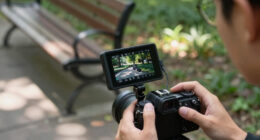
Finding the best on-camera monitors for YouTube videos involves balancing screen quality, size, usability, and budget. The NEWER F700 stands out as the best overall choice thanks to its high brightness and versatile features. For creators seeking a compact option, the FEELWORLD S55 V3 6 Inch offers excellent portability without sacrificing essential performance. Meanwhile, the FEELWORLD FW759 provides a budget-friendly solution with decent picture quality for beginners. When choosing, consider factors like screen size, resolution, and ease of use, as these impact your workflow and final video quality. Continue reading for a detailed breakdown of these options and what makes each one unique.
Key Takeaways
- The highest brightness monitors like the NEWER F700 excel in outdoor or brightly lit settings, but come at a higher price.
- Size and portability are key—smaller monitors like the FEELWORLD S55 V3 are easier to handle but may lack some advanced features.
- Budget options such as the FEELWORLD FW759 provide good value for beginners but might miss professional-grade features.
- Build quality and usability, including touch screens and user interface, significantly affect on-set efficiency.
- Price often correlates with features—investing in a more expensive monitor generally yields better color accuracy and durability.


More Details on Our Top Picks
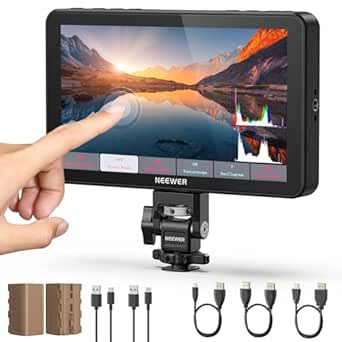
NEWER F700 7″ Camera Field Monitor, 2000nit HD 1920×1080 IPS Touch Screen with 3D LUT, 4K HDMI Loop in/Out with Peak Focus DSLR Video Assist HDR Waveform, Cold Shoe Mount, 2 NP-F750 Batteries & Cable
This NEWER F700 stands out for its impressive 2000nit brightness and detailed 1920×1080 IPS touch screen, providing clear visibility even in bright outdoor conditions—something the FEELWORLD FW759 with its 1280×800 display can’t match. Its professional features like 3D LUT uploads, HDR support, and waveform monitoring make it ideal for detailed color grading and exposure control, which are essential in professional YouTube productions. The monitor’s support for 4K HDMI loop in/out and multiple power options, including dual batteries, give it a flexible edge over more basic models. However, its weight with batteries can be cumbersome for handheld shooting, and the cooling fans, while effective, add noise that might interfere with audio recording environments. This pick makes the most sense for creators who need a high-brightness, feature-rich monitor for on-location and studio setups, accepting the extra weight for advanced functionality.
Pros:- 2000nit ultra-bright IPS touchscreen for outdoor visibility
- Supports up to 4K HDMI loop in/out and custom 3D LUT uploads
- Versatile power options including dual NP-F batteries and USB-C charging
- Built-in cooling fans for extended use without overheating
Cons:- Heavier weight with two batteries, potentially tiring for handheld use
- Fans generate noise that may affect audio environments
- Complex feature set may be overwhelming for beginners
Best for: Professional YouTubers and videographers who require high-brightness, extensive monitoring features, and adaptable power options.
Not ideal for: Casual vloggers or beginners who prefer lightweight, simple monitors without advanced controls or higher cost.
- Screen Size:7 inches
- Resolution:1920×1080 IPS
- Brightness:2000 nit
- Input/Output:4K HDMI Loop in/out
- Power:2 NP-F750 batteries & USB-C
- Features:3D LUT, HDR, waveform, false color
Bottom line: This monitor is ideal for advanced creators needing detailed, bright, and flexible on-camera monitoring, even at the expense of added weight.
ZYDIIE 4K Video Camera Camcorder UHD 64MP Vlogging Camera for YouTube 18x Digital Zoom 3″ 270° Rotation IPS Touchscreen Video Camcorder with Night Vision, Remote Control, 32GB Card, 2 Batteries
This ZYDIIE 4K camcorder offers excellent value with 4K resolution and a 64MP photo sensor, making it suitable for YouTubers starting out or doing travel vlogs. Its 18x digital zoom and 270° rotatable touchscreen provide flexible framing options, comparable to the FEELWORLD S55 V3’s 6-inch display but with a focus on recording versatility rather than professional grading. Its built-in night vision expands usability in low-light conditions, which the F700 lacks. The included remote control and 32GB SD card add convenience for solo creators. Nonetheless, its focus on simple recording means fewer advanced monitoring features like waveform or false color, and digital zoom quality degrades at maximum zoom levels. This camera makes sense for creators who prioritize high-quality video and photos without the complexity or weight of professional monitors.
Pros:- 4K UHD video and 64MP high-resolution photos
- 270° rotatable touchscreen for flexible framing
- Includes remote control and 32GB SD card
- Night vision mode for low-light shooting
Cons:- Limited professional monitoring features like waveform or false color
- Digital zoom quality drops at maximum zoom
- No external monitor support or advanced exposure controls
Best for: Beginner YouTubers, travel vloggers, and casual content creators seeking affordable 4K video and photo capabilities.
Not ideal for: Professional filmmakers or creators needing detailed waveform, focus assist, or external monitor support for precision work.
- Resolution:4K UHD
- Photo Resolution:64MP
- Zoom:18x digital
- Screen Size:3 inches
- Night Vision:Yes
- Battery:2 included
Bottom line: This camera is a solid choice for beginners wanting high-quality footage and simple operation at an affordable price.
FEELWORLD FW759 7 Inch DSLR Camera Field Monitor HD Video Assist Slim IPS 1280×800 4K HDMI 1080p with Sunshade
The FEELWORLD FW759 is a compact, lightweight monitor with a 1280×800 IPS display, making it suitable for DSLR videographers who need a portable solution. Compared with the NEWER F700, it has a lower brightness (around 400 nits) but still provides accurate color reproduction and essential professional features like peaking focus assist, false color, and image zoom—key for YouTubers who need reliable focus and exposure tools. Its slim profile and included sunshade make it perfect for outdoor shoots without breaking the bank. However, its lower resolution and brightness limit outdoor visibility, and it lacks touch functionality, which could be a drawback for users accustomed to touchscreen controls. It’s ideal for creators who want a budget monitor for casual or semi-professional work.
Pros:- Compact and lightweight design
- Affordable price point
- Supports professional features like peaking and false color
- Includes sunshade and basic accessories
Cons:- Lower brightness (around 400 nits), limiting outdoor visibility
- No touchscreen functionality
- Lower resolution compared to more expensive models
Best for: Amateur videographers and hobbyist YouTubers who need a portable, affordable monitor for indoor or shaded outdoor shoots.
Not ideal for: Professional filmmakers or outdoor creators who need high brightness and detailed HDR monitoring.
- Screen Size:7 inches
- Resolution:1280×800
- Brightness:400 nits
- Input/Output:4K HDMI in/out
- Features:Focus peaking, false color, zoom
- Weight:Approx. 1.9 lbs
Bottom line: This monitor offers good value and portability for entry-level creators or those on a tight budget, but it’s less suited for bright outdoor conditions.
FEELWORLD S55 V3 6 Inch DSLR Camera Field Monitor Bundle – FHD IPS Screen, 4K HDMI in/Out, Tilt Arm, Power Output, Battery & Carry Case Included
The FEELWORLD S55 V3 is an excellent compact monitor with a 6-inch 1920×1080 IPS display, providing sharp visuals and accurate color for smaller rigs. Its size makes it ideal for handheld and gimbal setups, offering a much lighter alternative to larger monitors like the NEWER F700. It supports 4K HDMI input/output, and its built-in features like focus assist, histogram, and false color help with precise exposure, making it suitable for YouTubers who film on the move. The bundle includes a battery, tilt arm, and carrying case—adding convenience and value. Its main drawback is the smaller screen size which might be limiting for detailed framing or critical focus checks compared to larger monitors. This model is perfect for creators prioritizing portability without sacrificing essential professional tools.
Pros:- Compact and lightweight at 6 inches
- Supports 4K HDMI in/out
- Includes battery, tilt arm, and case in bundle
- Sharp 1920×1080 IPS display
Cons:- Limited screen real estate for detailed framing
- No touch interface
- Less suitable for studio or detailed color grading
Best for: Travel vloggers, on-the-move filmmakers, and YouTubers who need a portable, all-in-one monitor bundle.
Not ideal for: High-end production crews or professionals requiring larger, more detailed screens for complex shoots.
- Screen Size:6 inches
- Resolution:1920×1080 IPS
- HDMI Support:4K in/out
- Accessories:Battery, tilt arm, case
- Weight:Approx. 1.9 lbs
- Features:Focus assist, histogram, false color
Bottom line: A highly portable, all-in-one monitoring solution perfect for creators on the go who need basic professional features.
Logitech Brio 101 Full HD 1080p Webcam for Meetings, Streaming, Desktop, Laptop, PC – Built-in Mic, Shutter, Works with Zoom, Microsoft Teams, Nintendo Switch 2’s new GameChat Mode, USB-A,-Black
The Logitech Brio 101 is a reliable, high-quality webcam with 1080p resolution and RightLight technology, making it ideal for YouTubers who focus on live streaming, virtual meetings, or remote work. Its plug-and-play USB-A connection ensures quick setup and compatibility with most platforms like Zoom, Teams, or even Nintendo Switch’s GameChat mode, which sets it apart from traditional monitors. The built-in mic and privacy shutter add convenience and security. While it does not serve as an on-camera monitor, its high-quality video and ease of use make it a practical choice for creators who need a dedicated webcam for interactive content or professional remote shoots. Its main limitation is the lack of a screen or monitoring features, so it’s not suitable for detailed camera framing or exposure adjustments.
Pros:- 1080p Full HD resolution
- Supports GameChat Mode on Switch
- Plug-and-play USB-A connection
- Built-in privacy shutter and mic
Cons:- No monitor or display functions
- Limited to webcam use, not for on-camera monitoring
- No advanced video control features
Best for: Content creators who primarily produce live streams, remote interviews, or virtual meetings needing a dependable HD webcam.
Not ideal for: Filmmakers or YouTubers requiring external monitors or professional exposure controls.
- Resolution:1080p Full HD
- Connectivity:USB-A
- Features:RightLight, privacy shutter, built-in mic
- Compatibility:Zoom, Teams, Switch GameChat
- Weight:Approx. 0.26 lbs
- Color:Black
Bottom line: An excellent webcam for streaming and virtual interactions, but not suited for on-camera monitoring or professional filming.
FEELWORLD S55 V3 6 inch Camera DSLR Field Monitor with F550 Battery 2200mAh and Case, Small Full HD 1920×1080 IPS LUT Video Peaking Focus Assist with 4K HDMI 8.4V DC Input Output Include Tilt Arm
This FEELWORLD S55 V3 stands out for its sharp 1920×1080 resolution and a compact 6-inch size, making it ideal for lightweight camera setups and gimbals. Unlike larger monitors like the FEELWORLD FW759, it excels in portability without sacrificing essential features like LUT loading, focus peaking, and waveform monitoring, which are critical for accurate exposure and focus. The tilt arm with 360° rotation offers flexible framing, especially on smaller rigs, but the smaller screen can be a drawback for those who prefer larger displays for precise color grading or detailed review. Its HDMI support for 4K input ensures compatibility with most DSLR and mirrorless cameras, providing real-time feedback. However, limited in-screen real estate may challenge detailed editing or focus pulls for some users. Overall, this monitor is perfect for creators needing a lightweight, feature-rich option for mobile shooting environments.
Pros:- Compact size ideal for lightweight and mobile setups
- Full HD 1920×1080 IPS screen with accurate colors
- Supports loading custom LUTs for real-time look preview
- Flexible 360° tilt arm for versatile framing
Cons:- Small screen size may be less suitable for detailed review
- Limited screen real estate for complex on-set monitoring
Best for: Videographers and content creators working with lightweight cameras and gimbals who prioritize portability and essential features.
Not ideal for: Professional filmmakers requiring larger, more detailed monitors for intricate color grading or precise framing on set.
- Screen Size:6 inches
- Resolution:1920×1080
- Video Input:4K HDMI
- Power:F550 Battery
- Focus Assist:Peaking, LUTs, false color
- Input Output:HDMI In/Out
Bottom line: This monitor is best suited for YouTubers and mobile filmmakers who need a portable yet capable on-camera display.
FEELWORLD FW759 7 Inch DSLR Camera Field Monitor with F550 2200mAh Battery and Bag 400nit HD Video Assist Slim IPS 1280×800 4K HDMI 1080p
The FEELWORLD FW759 offers a larger 7-inch display with 1280×800 resolution, making it a strong choice for creators who want more screen real estate without sacrificing portability. Compared to the FEELWORLD S55 V3, it provides better visibility and easier framing, especially in outdoor or bright conditions thanks to its 400-nit brightness. Its support for 4K HDMI input and advanced features like peaking, image freeze, flip, and zoom enhance the shooting process, making it ideal for on-location shoots. The slim 17mm profile and lightweight design, combined with the included F550 battery, make it suitable for use with stabilizers and gimbals. Still, the lower resolution may be less ideal for detailed color grading or critical focus pulls, which are better suited to higher-res monitors. Overall, it balances portability and usability well for YouTubers and mobile shooters.
Pros:- Larger 7-inch display for easier framing
- 400-nit brightness for outdoor use
- Supports 4K HDMI input with advanced assist features
- Slim, lightweight design with included battery
Cons:- Lower resolution compared to more professional monitors
- Still limited for detailed post-production grading
Best for: Content creators who need a larger, portable monitor with advanced features for on-the-go filming.
Not ideal for: Professionals requiring ultra-high-resolution screens for detailed color correction or intricate post-production work.
- Screen Size:7 inches
- Resolution:1280×800
- Brightness:400 nits
- Video Input:4K HDMI
- Battery:F550 2200mAh
- Features:Peaking, flip, zoom, image freeze
Bottom line: This monitor is ideal for YouTubers and mobile filmmakers who want a bigger screen with essential assist features without adding bulk.
RUWBY Full HD 1080P Webcam with Built-in Dual Mics, Wide-Angle Lens, Privacy Cover, Tripod Stand, Autofocus Computer Camera
The RUWBY 1080P Webcam is a reliable, plug-and-play option for YouTubers focused on quality streaming, gaming, or online teaching. Its full HD 1080p resolution delivers sharp images, comparable to the more specialized monitors but with less control over focus and exposure. The wide-angle lens and autofocus help capture more of your environment, making it perfect for live streams or meetings. Built-in dual microphones with noise reduction ensure clear audio, a crucial feature for content creators relying on voice clarity. The included tripod and privacy cover add convenience and privacy protection. While it isn’t suitable as a dedicated on-camera monitor for filming, its ease of use and good image quality make it ideal for content creators who prioritize quick setup and seamless integration with desktops or laptops. It’s a great value for online creators who don’t need professional-grade monitors.
Pros:- Sharp 1080p video quality
- Wide-angle lens for broader framing
- Built-in noise-canceling dual mics
- Easy plug-and-play setup
Cons:- Limited control over exposure and focus
- Not suitable for detailed on-camera filming
Best for: YouTubers and remote content creators who need a high-quality webcam for streaming and video conferencing.
Not ideal for: Filmmakers seeking professional on-field monitors or detailed focus control during shooting.
- Resolution:1080p
- Frame Rate:30 fps
- Lens:Wide-angle
- Microphones:Dual noise-reducing
- Connectivity:USB
- Features:Autofocus, privacy cover, tripod
Bottom line: This webcam is perfect for YouTubers and online educators who want a simple, high-quality camera for streaming and meetings.

How We Picked
These products were selected based on a combination of performance, usability, build quality, and value for YouTube creators. Priority was given to monitors offering clear, accurate displays, easy operation, and compatibility with common cameras and setups. We also considered size options suitable for portable shooting and features like HDMI input, peaking, and LUT support, which are crucial for professional-looking videos. Products were ranked by how well they balance these factors against their price, ensuring both beginners and advanced users find suitable options. Our evaluation aimed to identify monitors that truly enhance the content creation process without unnecessary complexity or cost.
Factors to Consider When Choosing Best On-camera Monitors For YouTube Video
Choosing the right on-camera monitor for YouTube involves understanding several key factors that influence your filming quality and workflow. Each creator’s needs vary based on shooting environment, camera compatibility, and budget. Making the wrong choice can lead to frustration, poor image quality, or unnecessary expenses. Here are the main considerations to help you select the best monitor tailored to your specific needs.Screen Size and Resolution
Screen size impacts portability and visibility—larger monitors like 7-inch models provide more detailed views, which are helpful for focusing and framing. However, they can be bulkier and less convenient for on-the-go shooting. Resolution is equally vital; higher resolutions like 1920×1080 or 4K ensure sharper images, making focus and exposure adjustments easier. Balancing size and resolution depends on your shooting style and whether you prioritize mobility or detail.
Brightness and Outdoor Visibility
If you often film outdoors or in bright conditions, brightness becomes a critical factor. Monitors with at least 1000 nits enable clear viewing in sunlight, reducing the need for shade or reflectors. Cheaper models with lower brightness may cause you to strain your eyes or miss critical focus details. Consider your typical shooting environment when evaluating brightness specs to avoid disappointment on location.
Connectivity and Compatibility
Most on-camera monitors connect via HDMI, but check that your camera’s outputs match the monitor’s inputs. Some models support HDMI loop-through, which allows you to connect multiple devices easily. Compatibility with LUTs and waveform tools can significantly improve your color grading and exposure control, especially for YouTube content aiming for professional quality. Ensure the monitor’s input/output options align with your camera and editing workflow.
Ease of Use and Features
User-friendly interfaces, touchscreens, and intuitive menus save time during shoots. Features like peaking, false color, and LUT support streamline the filming process, especially for solo creators. While advanced features add value, they can also complicate operation for beginners. Prioritize models that strike a balance between functionality and simplicity, depending on your experience level.
Build Quality and Power Options
Durability matters, especially if you shoot outdoors or travel frequently. Metal frames and sturdy stands are preferable. Battery life is another consideration—models with longer-lasting batteries or compatibility with common power sources reduce downtime. Some monitors include dual batteries or built-in power options, which can be game-changers during long shoots or on location.
Frequently Asked Questions
Do I need a 4K monitor for YouTube videos?
While a 4K monitor offers sharper images and future-proofs your setup, it isn’t strictly necessary for YouTube content. Many creators find 1080p monitors sufficient for framing and focus, especially if their cameras shoot in HD. The key is clarity and color accuracy; higher resolution monitors are beneficial if you do detailed color grading or work with 4K footage regularly. Balance your budget against these needs to choose the right resolution.
Can I use a regular computer monitor as an on-camera monitor?
In many cases, yes—if it has an HDMI input and is portable enough to carry around. However, dedicated on-camera monitors often include features like peaking, false color, and LUT support that standard computer monitors lack. They are also designed to be lightweight and battery-powered, making them more practical for on-the-go shooting. Consider whether the added features and portability justify the investment based on your filming style.
How important is touch screen functionality on a monitor?
Touch screens can greatly speed up workflow by allowing quick menu access and focus adjustments, especially during solo shoots. They reduce the need to navigate complex menus through buttons, which can be cumbersome in dynamic environments. However, touch screens can add to the cost and sometimes compromise durability. Evaluate how often you’ll benefit from quick touch controls versus traditional buttons before choosing a model with this feature.
Is it worth investing in a higher-brightness monitor for indoor use?
For indoor shooting, brightness is less critical since lighting conditions are controlled. A monitor with 400-700 nits will typically suffice for framing and focus. However, if you plan to shoot in large, brightly lit studios or need to see details clearly in daylight through windows, higher brightness adds value. Consider your shooting environment to determine if the extra expense for high brightness is justified.
Should I prioritize battery life or image quality?
Both are important, but your focus should depend on your shooting style. Longer battery life ensures uninterrupted shoots, especially outdoors or during long sessions. Image quality, including color accuracy and resolution, directly affects your final video. If you primarily shoot short clips or indoors, prioritize image quality. Conversely, if you often shoot on location or travel, a monitor with extended battery life may be more beneficial.
Conclusion
For YouTubers seeking an all-around reliable monitor, the NEWER F700 offers the best balance of brightness, features, and durability, making it ideal for most creators. Beginners or those on a tighter budget will appreciate the FEELWORLD FW759 for its affordability and decent performance. Content creators who demand top-tier quality and professional features should consider investing in premium models like the FEELWORLD S55 V3. Compact shooters or vloggers will find the smaller FEELWORLD S55 V3 6 Inch the most practical. Ultimately, your choice depends on your filming environment, experience level, and budget—these picks cover all bases accordingly.