Finding the best color laser printer for a small business involves balancing print quality, cost, speed, and ease of use. The Brother HL-L3220CDW stands out as the best overall choice thanks to its fast output and wireless features, ideal for busy home offices. For those prioritizing low operating costs, the Brother HL-L8430CDW offers affordable printing with reliable wireless connectivity. Meanwhile, the HP Color LaserJet Pro 3201dw excels in office environments with duplex printing and robust networking. This selection highlights options that cater to different priorities, but tradeoffs often include higher upfront costs or maintenance expenses. Keep reading to see how each model compares in detail and find the best fit for your small business needs.
Key Takeaways
- The top models balance print speed, cost per page, and connectivity, with the Brother HL-L3220CDW leading as the best overall pick.
- Cost-efficient printers like the Brother HL-L8430CDW excel in reducing ongoing expenses but may lack some advanced features.
- All-in-one capabilities are essential for small offices needing scanning, copying, and fax, making models like Brother MFC-L8930CDW stand out.
- Compact design and wireless features are common among the best options, but often come at a premium price.
- Choosing the right printer depends heavily on whether speed, cost, or multifunctionality is your top priority.


More Details on Our Top Picks
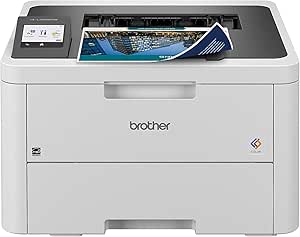
Brother Color Laser Printer with Wireless Printing Fast 19 PPM Output, Duplex Feature, Mobile Device Compatible, 250-Sheet Paper Tray for Professional Home Office Printing (HL-L3220CDW)
This Brother model stands out for its combination of speed, high-capacity paper handling, and mobile compatibility, making it ideal for busy home offices. Compared to the Brother HL-L8430CDW, it offers a more compact design and easier setup for smaller spaces, though it sacrifices some of the ultra-high-volume features. Its crisp 2400 x 600 dpi resolution and automatic duplex printing deliver professional-quality documents without sacrificing efficiency. The 250-sheet tray minimizes interruptions, and the wireless connectivity supports printing from multiple devices with robust security. While it is user-friendly, the lack of advanced security features found on larger office models means it’s better suited for small teams or individual entrepreneurs rather than highly sensitive environments. Overall, this model balances performance and affordability, making it the best pick for small businesses that need reliable, fast color printing at home.
Pros:- Fast print speeds of 19 ppm for color and black & white
- Large 250-sheet paper tray reduces refills
- Seamless mobile and cloud printing capabilities
- Automatic duplex printing saves paper
Cons:- Limited high-volume duty cycle compared to larger office printers
- Basic security features may not satisfy sensitive data environments
Best for: Small business owners working from home or small teams needing dependable, high-quality color output with minimal fuss.
Not ideal for: Larger offices with high-volume printing needs or requiring advanced security features, as it lacks the capacity for extensive duty cycles and enterprise-level protections.
- Print Speed:19 ppm
- Maximum Resolution:2400 x 600 dpi
- Paper Capacity:250 sheets
- Connectivity:Wireless, USB
- Duplex Printing:Automatic
- Item Weight:24.7 Pounds
Bottom line: This printer offers a perfect balance for small, security-conscious businesses that need reliable, professional color printing without enterprise-level features.
Brother HL-L8430CDW Business Color Laser Printer with Low-Cost Printing and Wireless Networking
This Brother model excels in supporting demanding small business environments with high print volumes, thanks to its 33 ppm speed and high-yield toner options, including the 7,500-page black toner. Compared with the HL-L3220CDW, it offers a larger paper capacity expandable to 1,340 sheets, making it suitable for businesses with heavy daily output. Its built-in security, cloud integration, and NFC badge authentication add layers of protection, ideal for sensitive documents. The downside is its larger footprint and higher initial cost, which may not suit very small or home-based setups. The included high-yield toner reduces costs over time, but managing the larger machine and toner supplies requires space and planning. This printer is best for small businesses that prioritize volume, cost efficiency, and security over compact size.
Pros:- High-speed printing at 33 ppm for color and black & white
- Expandable paper capacity up to 1,340 sheets
- Built-in security features and NFC badge authentication
- Economical high-yield toner cartridges included
Cons:- Larger physical footprint requiring more space
- Higher initial purchase price compared to entry-level models
Best for: Small business teams with high monthly printing demands and need for secure document handling.
Not ideal for: Solo entrepreneurs or very small offices with limited space and lower printing volume, due to its size and higher upfront investment.
- Print Speed:33 ppm
- Maximum Print Resolution:600 x 600 dpi
- Paper Capacity:Up to 1,340 sheets (expandable)
- Connectivity:Wireless, Ethernet
- Security Features:NFC, advanced network security
- Toner Yield:Black: 7,500 pages, Color: 6,500 pages
Bottom line: This printer is ideal for small offices that need dependable high-volume output with strong security features and cost savings on toner.
HP Color Laserjet Pro 3201dw Wireless Color Laser Printer, Office Printer, Duplex, Best for Office (499Q9F)
This HP model is tailored for small office environments that require vibrant, high-quality color printing with reliable performance. With a speed of 26 ppm, it supports fast turnaround of reports, presentations, and marketing materials. Its 600 x 600 dpi resolution and the TerraJet toner technology ensure vivid colors and sharp text, comparable to the Brother HL-L3220CDW but with more color fidelity. The auto duplex feature and 250-sheet tray enhance efficiency, while its wireless and Ethernet options facilitate flexible workspace integration. However, its limited duty cycle and the reported issues with toner compatibility and troubleshooting can be problematic for busy offices. Compared to the Brother MFC-L3720CDW, it offers better color quality but less multifunctionality. This printer is best for small teams prioritizing color quality over heavy-duty or multifunction capabilities.
Pros:- Vivid color output with 600 x 600 dpi resolution
- Fast print speed of 26 ppm
- Auto duplex printing and large 250-sheet tray
- Supports wireless and Ethernet connectivity
Cons:- Moderate duty cycle may limit heavy daily use
- Some user reports of toner compatibility and troubleshooting issues
Best for: Small teams producing colorful marketing or presentation materials with moderate volume needs.
Not ideal for: Offices with high-volume printing or requiring extensive multifunction features, as it primarily focuses on color printing quality.
- Print Speed:26 ppm
- Maximum Resolution:600 x 600 dpi
- Paper Capacity:250 sheets
- Connectivity:Wireless, Ethernet
- Duplex Printing:Auto
- Color Toner:TerraJet technology
Bottom line: This printer offers excellent color vibrancy for small teams needing quality over volume, but it may require careful toner management and troubleshooting.
Brother MFC-L8930CDW Color Laser All-in-One Printer
This Brother all-in-one combines fast color and black printing (up to 33 ppm) with scanning, copying, and fax, making it well-suited for small offices that need versatility. Its 104 ipm scan speed, 2-tray capacity, and 600 x 600 dpi resolution support high productivity. Compared with the Brother MFC-L3720CDW, it offers a broader feature set including fax functions and advanced security, suitable for sensitive environments. The device’s robust build and security features like NFC authentication and triple-layer security make it ideal for small businesses with confidential documents. However, its larger size and higher cost may not fit in very tight spaces or for those with limited budgets. Overall, it’s a comprehensive, secure, and fast multifunction printer for small teams needing all-in-one capabilities.
Pros:- Fast print and scan speeds supporting high productivity
- All-in-one functionality including fax and copying
- Enhanced security with NFC and triple-layer protection
- High-capacity toner yields reduce running costs
Cons:- Larger footprint may be challenging in small spaces
- Higher upfront investment compared to simpler models
Best for: Small business teams requiring multifunctionality with high security for sensitive documents.
Not ideal for: Solo users or very small offices where only basic printing is needed, due to higher cost and larger footprint.
- Print Speed:33 ppm
- Scan Speed:104 ipm
- Maximum Resolution:600 x 600 dpi
- Paper Capacity:250 sheets
- Security Features:NFC, triple-layer security
- Connectivity:Wi-Fi, Ethernet
Bottom line: This all-in-one offers small offices comprehensive security and speed, best suited for security-focused teams with multifunction needs.
Brother MFC-L3720CDW Wireless Color Laser Printer with Scanner, Copier and Fax | Auto Duplex and 250-Sheet Capacity | Includes Refresh Subscription Trial(1). Amazon Dash Replenishment Ready
This Brother model delivers a solid balance of speed, multifunctionality, and affordability, with 19 ppm for color and black & white and a 50-sheet auto document feeder. Its 250-sheet tray and duplex printing support daily office tasks efficiently, making it a versatile choice. Compared to the Brother MFC-L8930CDW, it offers fewer advanced security features but is more compact and budget-friendly. Its 600 x 600 dpi resolution ensures decent print quality for most business documents. The 3.5″ color touchscreen and support for cloud services streamline workflow. However, it lacks the high-volume capacity and security features of larger models, making it less suitable for highly sensitive or heavy-volume environments. This model is best for small offices needing reliable multifunction printing at an affordable price point.
Pros:- Reliable print speeds of 19 ppm
- Auto duplex printing and 250-sheet tray
- Color touchscreen with cloud integration
- Includes toner subscription trial
Cons:- Limited duty cycle may not support heavy daily use
- Fewer security features than larger enterprise models
Best for: Small offices or startups seeking an inexpensive multifunction color laser printer with decent volume capacity.
Not ideal for: Offices with high security requirements or very high daily print volume, as it has modest duty cycle and security features.
- Print Speed:19 ppm
- Maximum Resolution:600 x 600 dpi
- Paper Capacity:250 sheets
- Connectivity:Wireless, USB
- Duplex Printing:Auto
- Functions:Print, scan, copy, fax
Bottom line: This printer offers dependable multifunction performance for small offices on a budget, but with some limitations on security and volume capacity.
HP Color LaserJet Pro MFP 3301sdw Wireless All-in-One Color Laser Printer, Office Printer, Scanner, Copier, ADF, Duplex, Best-for-Office (499Q3F)
This HP model earns its place as the top choice for small office environments due to its balanced combination of print quality, reliability, and feature set. It handles high-volume tasks smoothly, with a print speed of up to 26 ppm and a 250-sheet input tray that minimizes refill interruptions. The color output is vivid and professional, making it suitable for reports, marketing materials, and everyday documents. Auto duplex printing and an automatic document feeder (ADF) boost productivity, especially when managing large multi-page jobs. Compared with the Brother HL-L3280CDW, which offers slightly faster speeds (up to 27 ppm) and a more compact footprint, the HP’s reputation for consistent performance and more robust security features make it a better fit for offices prioritizing reliability. However, toner costs can add up, and the initial cartridges are not long-lasting.
This printer is best suited for small teams needing dependable, high-quality color printing and multifunctionality in a single device.
Those seeking a more budget-friendly or compact option should consider the Brother HL-L3280CDW, which offers similar print speeds but may lack some of HP’s advanced security features.
Pros:- Vivid, professional-quality color output
- Reliable performance with consistent results
- Includes automatic duplex and document feeder for efficiency
- Secure wireless and Ethernet connectivity
Cons:- Toner cartridges are relatively expensive and may require frequent replacements
- Initial toner yield is moderate, leading to higher ongoing costs
- Firmware updates may occasionally cause connectivity hiccups
Best for: Small office teams that require reliable, high-quality color printing combined with scanning and copying capabilities.
Not ideal for: Very tight spaces or budget-conscious users who prioritize lower ongoing toner costs and minimal maintenance.
- Print Speed Black/Color:up to 26 ppm
- Input Tray Capacity:250 sheets
- Maximum Print Resolution:1200 x 1200 dpi
- Connectivity:Wi-Fi, Ethernet
- Automatic Duplex:Yes
- Weight:37.7 pounds
Bottom line: This model is ideal for small offices needing dependable, high-quality color multifunction printing with strong security features.
Brother HL-L3280CDW Wireless Compact Digital Color Printer with Laser Quality Output, Duplex, Mobile Printing & Ethernet | Includes 2 Month Refresh Subscription Trial¹,Works with Alexa
This Brother model makes a compelling choice for small businesses or home offices new to color laser printing, thanks to its straightforward setup and user-friendly features. It produces laser-quality color output at up to 27 ppm, comparable to HP’s 3301sdw, but its compact size makes it easier to fit into smaller workspaces. The built-in Wi-Fi and Ethernet ensure flexible connectivity options, while the 2.7-inch touchscreen simplifies operation and printing from cloud services like Google Drive and Dropbox. Unlike the HP model, which offers a full multifunction setup, the Brother focuses solely on printing, making it a simpler, more affordable option for users who don’t need scanning or copying. The included 2-month subscription trial adds value for those testing its capabilities. However, it lacks an automatic document feeder, which can slow down multi-page scanning or copying tasks.
This printer suits individuals or small teams just starting with color laser printing, especially when ease of use and space-saving design are priorities.
For offices that frequently scan or copy multi-page documents, the HP 3301sdw may be more suitable despite its larger size and higher cost.
Pros:- Laser-quality color output at a competitive speed
- Compact size fits smaller workspaces
- Easy-to-use touchscreen and cloud printing support
- Wireless and Ethernet connectivity for flexible setup
Cons:- Lacks an automatic document feeder, slowing down multi-page tasks
- No scanning or copying features, limiting multifunctionality
- Toner replacement can be frequent if printing high volumes
Best for: Small business owners or home office users new to color laser printing who value simplicity and space efficiency.
Not ideal for: Offices needing multifunction capabilities like scanning or copying large multi-page documents regularly.
- Print Speed:up to 27 ppm
- Connectivity:Wi-Fi, Ethernet
- Maximum Print Resolution:600 x 600 dpi
- Display:2.7-inch touchscreen
- Automatic Duplex:Yes
- Weight:about 40 pounds
Bottom line: This Brother model is perfect for small offices or individuals seeking straightforward, space-saving color printing with minimal fuss.
How We Picked
These printers were selected based on their performance, print quality, usability, and value specifically for small business environments. Priority was given to models that offer reliable color output, fast print speeds, and minimal maintenance costs. We also considered connectivity options, including wireless and mobile device compatibility, since small businesses often require flexible setups. The ranking reflects a balance between initial investment and long-term operational costs, ensuring each option suits different types of small business needs—from startups to more established offices.
Factors to Consider When Choosing Best Color Laser Printers For Small Businesses
When choosing the best color laser printer for your small business, it’s important to evaluate several key factors that influence both performance and overall value. Beyond features, understanding how these elements affect your day-to-day printing can prevent costly mistakes and ensure you select a device that grows with your business.
Print Speed and Volume
For small businesses with frequent printing needs, a printer’s speed—measured in pages per minute—can significantly impact workflow. Higher speeds reduce wait times and increase productivity, especially in busy environments. Additionally, consider the paper capacity and whether the printer can handle your typical workload without frequent refilling, which can disrupt daily operations.
Cost of Ownership
Initial purchase price is just one part of the equation. Ongoing costs, including toner replacement and maintenance, often determine the true value of a printer. Some models feature high-yield toner cartridges that reduce per-page costs, making them more economical over time. Avoid printers with expensive consumables that might outweigh initial savings.
Connectivity and Compatibility
Wireless connectivity and mobile device support are essentials for small businesses aiming for flexible, clutter-free setups. Check if the printer supports your existing network, mobile printing apps, or cloud services. Ensuring compatibility with your devices prevents frustration and streamlines your workflow.
Multifunction Capabilities
A device that can print, scan, copy, and fax can save space and money, especially in small offices. Consider your specific needs—if you rarely fax, a simpler printer might suffice. However, if multifunctionality is needed, prioritize models that perform reliably across all functions without sacrificing print quality or speed.
Size and Design
Space constraints are common in small businesses, so a compact, lightweight printer can be a valuable asset. Look for models that fit your workspace without sacrificing performance. Also, consider ease of setup and whether the device’s design simplifies maintenance and troubleshooting.
Frequently Asked Questions
How much should I expect to pay for a reliable color laser printer for my small business?
Prices for dependable color laser printers suitable for small businesses typically range from around $300 to $800. Cheaper models may save money upfront but often come with higher toner costs and slower speeds, which can add up over time. Investing in a slightly higher-priced model with better toner yields and faster output can provide better long-term value, especially if you print frequently or in large volumes.
What is the typical cost of replacement toner cartridges for these printers?
Replacement toner cartridges for small business color laser printers usually cost between $50 and $150 each, depending on the model and yield. High-yield cartridges, which last longer, tend to be more cost-effective over time, reducing the frequency and total expense of replacements. It’s important to consider toner costs alongside the initial purchase price to gauge overall affordability.
Can these printers handle high-volume printing without frequent jams or maintenance issues?
Most of the printers in this roundup are designed for moderate to high-volume use, with paper trays that hold several hundred sheets and durable components. However, regular maintenance, such as cleaning and proper paper handling, remains essential to prevent jams. For very high-volume needs, investing in a model with larger trays or higher duty cycles ensures smoother operation and less downtime.
Are these printers compatible with popular office software and mobile devices?
Yes, all the models in this selection support common wireless protocols and mobile printing standards, including Apple AirPrint, Google Cloud Print, and proprietary apps. Compatibility with office software like Microsoft Office or Google Workspace is also standard, facilitating seamless printing from multiple devices. Confirming specific compatibility before purchase can prevent connectivity issues later.
What should I consider if I want a color laser printer that grows with my business?
Look for printers with scalable features such as expandable paper trays, high-yield toner options, and multifunction capabilities. Choosing a model with robust network support and good reliability ensures it can handle increased workloads over time. Investing in a device with versatile connectivity options and durable components can reduce the need for frequent replacements, supporting your growth without constant upgrades.
Conclusion
For small business owners seeking the best overall performance and versatility, the Brother HL-L3220CDW stands out as a solid choice. If reducing ongoing costs is your priority, the Brother HL-L8430CDW offers excellent value. The HP Color LaserJet Pro 3201dw is ideal for busy office environments with its multifunction features and network support. Beginners or those with space constraints should consider compact options like the Brother HL-L3280CDW. Ultimately, your choice depends on whether you prioritize speed, cost efficiency, multifunctionality, or a smaller footprint, and these options cover all those bases effectively.