Choosing the right USB fingerprint scanners can eliminate the friction of typing passwords while bolstering security against phishing attacks. The DigitalPersona URU4500 stands out as the best overall pick due to its enterprise-grade reliability and superior sensor accuracy, making it ideal for high-volume environments. For users needing a compact, portable solution, the Kensington VeriMark Gen2 offers a sleek design that barely protrudes from the USB port, reducing the risk of physical damage. The primary tradeoff in this category lies between sensor durability and form factor; smaller keys are easier to lose or break, while larger readers offer better ergonomics. Continue reading to see how these fifteen options compare in speed, compatibility, and value.

Get smart everyday buys delivered free with Prime
- Fast, free delivery on millions of items
- Prime Video, Amazon Music and more included
- Member-only deals all year
Key Takeaways
- Enterprise-grade sensors like the DigitalPersona URU4500 offer significantly higher false rejection rates than consumer-grade alternatives, justifying the higher cost for business use.
- Most budget-friendly USB fingerprint scanners lack FIDO2 certification, limiting their utility for passwordless web authentication despite working well for Windows Hello.
- Form factor matters more than raw speed for many users; compact keys like the VeriMark IT 2.0 are preferred for laptops but can be fragile on desktop towers.
- Driver compatibility is a hidden variable; several generic scanners listed here require specific chipset drivers that may not be available for older Windows builds.
- RGB lighting indicators, found on models like the Kensington Upgraded VeriMark, provide immediate visual feedback for authentication status, reducing user confusion.
| DigitalPersona URU4500 USB Fingerprint Reader |  | Best for Varied Fingerprint Conditions | Scanner type: Optical | Connection: USB 2.0 Full-speed | Resolution: 512 dpi | VIEW ON AMAZON | See Our Full Breakdown |
| USB Fingerprint Reader for Windows Hello (Windows 10/11) |  | Best for Simple Windows Hello Setup | Compatibility: Windows 10/11 PCs with Windows Hello | Connection: USB | Cable length: 4 ft | VIEW ON AMAZON | See Our Full Breakdown |
| Kensington VeriMark Desktop USB Fingerprint Reader |  | Best for FIDO and Windows Hello Support | Model: K62330WW | Connection: USB | Cable length: 3.9 ft (1.2 m) | VIEW ON AMAZON | See Our Full Breakdown |
| USB Fingerprint Reader for Windows 10/11/12 with RGB Light and 4.9FT Extension Cable |  | Best for Multi-User Windows Desks | Compatibility: Windows 10/11/12 | Connection: USB 2.0/3.0 | Cable length: 4.9 feet (1.5 meters) | VIEW ON AMAZON | See Our Full Breakdown |
| Kensington Upgraded VeriMark Desktop 2.0 USB Fingerprint Reader – USB-C/A, Windows Hello with ESS, Windows 11, FIDO U2F/FIDO2, TAA Compliant (K64741WW) |  | Best for Modern USB-C and Compliance Needs | Model: K64741WW | USB compatibility: USB-C, USB-A | Windows security: Windows Hello with Enhanced Sign-in Security (ESS) | VIEW ON AMAZON | See Our Full Breakdown |
| ineo USB Fingerprint Reader for Windows Hello |  | Best for Simple Windows Setup | Compatibility: Windows 10 and 11; not compatible with Mac | Connection: USB | Fingerprint capacity: Up to 10 fingerprints | VIEW ON AMAZON | See Our Full Breakdown |
| VeriMark IT 2.0 USB-A Fingerprint Key – Windows Hello & Windows Hello for Business, 360° Fingerprint Reader, Password-Free Login |  | Best for Business Security | Interface: USB-A | Dimensions: 0.39 x 0.39 x 0.39 inches | Weight: 1.16 ounces | VIEW ON AMAZON | See Our Full Breakdown |
| JIAN BOLAND USB Fingerprint Reader for Windows 10/11 |  | Best for Flexible Desk Placement | Connectivity: USB Type-A | Operating system: Windows 10 and 11, 32-bit and 64-bit | Fingerprint capacity: Up to 10 fingerprints | VIEW ON AMAZON | See Our Full Breakdown |
| Kensington VeriMark Gen2 USB-A Fingerprint Key Reader |  | Best for Passkeys and Password Managers | Model: K64704WW | Connection: USB-A | Operating system compatibility: Windows 10 and Windows 11 | VIEW ON AMAZON | See Our Full Breakdown |
| Kensington VeriMark Gen1 USB-A Fingerprint Key Reader |  | Best for Legacy Windows and FIDO U2F | Model: K67977WW | Connection: USB-A; USB 2.0, 3.0, and 3.1 | Compatibility: Windows 7, 8, and 10; not compatible with macOS or ChromeOS | VIEW ON AMAZON | See Our Full Breakdown |
| USB-A Fingerprint Reader for Windows 10/11 – Finger Scanner for PC |  | Best for Shared PCs | Connection: USB-A | Compatibility: Windows 10/11 | Supported users: Up to 10 IDs | VIEW ON AMAZON | See Our Full Breakdown |
| TEC TE-FPA2 Mini USB Fingerprint Reader for Windows | 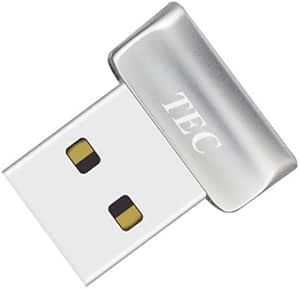 | Best for Compact Setups | Scanner type: Fingerprint | Connection: USB | Resolution: 600 dpi | VIEW ON AMAZON | See Our Full Breakdown |
| USB Fingerprint Reader for Windows 10/11 – Windows Hello Scanner, Plug & Play (No Mac/Linux) |  | Best for Local Biometric Security | Compatibility: Windows 10/11; Windows Hello only | Supported fingerprints: Up to 10 | Security design: Match-in-sensor; biometric data stored locally | VIEW ON AMAZON | See Our Full Breakdown |
| Arcane USB Fingerprint Reader for Windows Hello, 0.05s 360° Sensor (AKFSD-07) |  | Best for Fast, Direct Sign-In | Brand: Arcane | Series: AKFSD-07 | Model number: AKFSD-07 | VIEW ON AMAZON | See Our Full Breakdown |
| ineո USB Fingerprint Reader for Windows 10/11 |  | Best for Flexible Desktop Placement | Compatibility: Windows 10/11; not for Mac | Authentication: Windows Hello fingerprint recognition | Additional function: One-touch computer lock | VIEW ON AMAZON | See Our Full Breakdown |
| usb fingerprint scanner | Compatibility | Connection |
|---|---|---|
| DigitalPersona URU4500 USB Fin | Windows 10, Windows 11, macOS, Linux | USB 2.0 Full-speed |
| USB Fingerprint Reader for Win | Windows 10/11 PCs with Windows Hello | USB |
| Kensington VeriMark Desktop US | Windows Hello; Windows ARM-based computers not supported | USB |
| USB Fingerprint Reader for Win | Windows 10/11/12 | USB 2.0/3.0 |
| Kensington Upgraded VeriMark D | — | — |
| ineo USB Fingerprint Reader fo | Windows 10 and 11; not compatible with Mac | USB |
| VeriMark IT 2.0 USB-A Fingerpr | Windows Hello and Windows Hello for Business; Windows 11 required for ESS compliance | — |
| JIAN BOLAND USB Fingerprint Re | — | — |
| Kensington VeriMark Gen2 USB-A | — | USB-A |
| Kensington VeriMark Gen1 USB-A | Windows 7, 8, and 10; not compatible with macOS or ChromeOS | USB-A; USB 2.0, 3.0, and 3.1 |
| USB-A Fingerprint Reader for W | Windows 10/11 | USB-A |
| TEC TE-FPA2 Mini USB Fingerpri | — | USB |
| USB Fingerprint Reader for Win | Windows 10/11; Windows Hello only | — |
| Arcane USB Fingerprint Reader | Windows 10/11 with Windows Hello | — |
| ineո USB Fingerprint Reader fo | Windows 10/11; not for Mac | USB |
More Details on Our Top Picks
DigitalPersona URU4500 USB Fingerprint Reader
The DigitalPersona URU4500 stands apart for its 512 dpi optical sensor and metal casing, making it a considered pick for users whose fingerprints may be dry, moist, or rough. Its stated ability to reject latent prints and read fingerprints regardless of rotation adds flexibility beyond the straightforward Windows Hello focus of the USB Fingerprint Reader for Windows Hello. The tradeoff is setup: this reader requires compatible fingerprint authentication software, so it is less convenient for someone seeking a simple plug-and-play login device. Its listed Windows, macOS, and Linux compatibility is broader than several Windows-only options here, but actual use still depends on suitable software for the operating system. I’d choose it for adaptable capture, not for the easiest out-of-box Windows sign-in.
Pros:- Metal casing helps keep the reader steady on a desk
- Designed to read dry, moist, or rough fingerprints
- 512 dpi optical sensor captures fingerprint detail
- Listed compatibility includes Windows, macOS, and Linux
Cons:- Requires compatible fingerprint authentication software
- USB 2.0 connection is less modern than the USB-C/USB-A options on the Kensington VeriMark Desktop 2.0
- One-year warranty is specified
Best for: Users who need a sturdy optical reader for varied fingerprint conditions and can install compatible authentication software
Not ideal for: Windows users who want a plug-and-play Windows Hello login without sourcing separate authentication software
- Scanner type:Optical
- Connection:USB 2.0 Full-speed
- Resolution:512 dpi
- Color depth:8 bpp (256 gray levels)
- Optical sensor technology:CMOS
- Dimensions:2.55 x 1.42 x 0.65 in
- Compatibility:Windows 10, Windows 11, macOS, Linux
- Warranty:1 year
Our verdict“Choose the URU4500 for its durable build and tolerance of varied fingerprint conditions if you are prepared to supply compatible authentication software.”
USB Fingerprint Reader for Windows Hello (Windows 10/11)
For a Windows 10 or 11 owner who wants fingerprint sign-in without installing extra software, this reader keeps the setup proposition simple: connect it by USB and use Windows Hello. The product says verification happens in the sensor and fingerprint data is stored locally, which gives privacy-minded buyers a clear distinction from the URU4500, whose use depends on separate authentication software. A four-foot cable also gives more placement flexibility than a tiny directly attached reader. Its narrow compatibility is the main drawback: it is not presented as a Mac or Linux option, and it requires a compatible Windows PC. Compared with the Kensington VeriMark Desktop, it offers a less standards-focused feature set, but may suit buyers who mainly want uncomplicated Windows login.
Pros:- Designed for one-touch Windows Hello login
- No extra software required for setup
- Fingerprint verification is processed in the sensor, with data stored locally
- Four-foot cable allows flexible placement
Cons:- Requires a compatible Windows 10 or 11 PC
- No Mac or Linux compatibility is listed
- Does not list FIDO U2F or FIDO2 support
Best for: Windows 10 or 11 PC owners who want a straightforward Windows Hello fingerprint login and local sensor processing
Not ideal for: Mac or Linux users, and buyers seeking stated FIDO U2F or FIDO2 support
- Compatibility:Windows 10/11 PCs with Windows Hello
- Connection:USB
- Cable length:4 ft
- Fingerprint processing:Processed in the sensor
- Fingerprint storage:Stored locally on the device
- Software setup:No extra software required
- Item weight:2.39 ounces
Our verdict“Pick this reader for uncomplicated Windows Hello sign-in, but choose a broader-standards model such as the Kensington VeriMark Desktop if you need FIDO support.”
Kensington VeriMark Desktop USB Fingerprint Reader
The Kensington VeriMark Desktop earns its place for buyers who want one desktop reader to cover Windows Hello alongside FIDO U2F and FIDO2 WebAuthn. Its encrypted Match-in-Sensor processing, anti-spoofing, and 360-degree readability offer a more security-standard-focused package than the basic Windows Hello reader in this roundup. The 3.9-foot cable is useful when a desktop tower sits out of reach, though the reader’s listed size makes it less discreet than the tiny USB Fingerprint Reader with RGB lighting. There are limits: Windows ARM-based computers are not supported, and the product information also says it requires batteries, an unusual point to verify before choosing a wired reader. I’d favor it for standards support, not for the simplest or smallest setup.
Pros:- Supports Windows Hello, FIDO U2F, and FIDO2 WebAuthn
- Encrypted Match-in-Sensor processing with anti-spoofing
- 360-degree fingerprint readability
- 3.9-foot cable supports flexible desktop placement
Cons:- Not compatible with Windows ARM-based computers
- Product information says batteries are required
- Larger listed dimensions are less discreet than the compact RGB reader
Best for: Desktop PC users who need Windows Hello plus FIDO U2F or FIDO2 WebAuthn authentication
Not ideal for: Windows ARM computer owners or buyers who want the smallest, simplest reader without battery-related caveats
- Model:K62330WW
- Connection:USB
- Cable length:3.9 ft (1.2 m)
- Authentication standards:FIDO U2F, FIDO2 WebAuthn
- Compatibility:Windows Hello; Windows ARM-based computers not supported
- False rejection rate:2%
- False acceptance rate:0.001%
- Weight:2.01 oz
Our verdict“Choose the VeriMark Desktop when FIDO standards and Windows Hello matter more than compact size or ARM compatibility.”
USB Fingerprint Reader for Windows 10/11/12 with RGB Light and 4.9FT Extension Cable
This compact reader is the most visibly desktop-oriented option here: it combines RGB lighting, a 4.9-foot extension cable, and storage for up to 10 fingerprints. That capacity makes it a stronger fit for a shared Windows workstation than the USB Fingerprint Reader for Windows Hello, which does not list multi-user storage. The listing also specifies AES256 encryption and FIDO U2F/FIDO2 support, giving it a broader security feature set than a basic login-only device. Its boundaries are clear, though: it is for Windows 10 or newer, with no Mac or Linux support listed. The lighting and long lead may appeal to a shared or customized desk, but buyers who prefer a restrained setup may find those extras less useful than Kensington’s more standards-established desktop offering.
Pros:- Stores up to 10 fingerprints for multiple users
- 4.9-foot cable offers flexible placement
- Lists AES256 encryption and FIDO U2F/FIDO2 support
- Compact body with RGB lighting
Cons:- Not compatible with Mac or Linux systems
- Requires Windows 10 or newer
- RGB lighting may be unnecessary for buyers seeking a low-profile office device
Best for: Households or small teams sharing a Windows 10-or-newer workstation and needing multiple stored fingerprints
Not ideal for: Mac or Linux users, or buyers who prefer a plain, unlit reader for a single-user setup
- Compatibility:Windows 10/11/12
- Connection:USB 2.0/3.0
- Cable length:4.9 feet (1.5 meters)
- Fingerprint storage:Up to 10 fingerprints
- Encryption:AES256
- Certification:FIDO U2F/FIDO2
- Dimensions:0.39 x 0.39 x 0.39 inches
- Weight:0.705 ounces
Our verdict“Choose this model for a shared Windows desk where multi-fingerprint storage and cable reach matter more than cross-platform use.”
Kensington Upgraded VeriMark Desktop 2.0 USB Fingerprint Reader – USB-C/A, Windows Hello with ESS, Windows 11, FIDO U2F/FIDO2, TAA Compliant (K64741WW)
The Kensington VeriMark Desktop 2.0 is the clearest fit here for buyers who need current connection choices and a defined security-compliance feature set. Its USB-C and USB-A compatibility avoids making the reader dependent on a single port type, while native Windows Hello integration with Enhanced Sign-in Security gives it a more specific Windows security focus than the simpler plug-and-play reader. On-device biometric storage supports the privacy case, and FIDO U2F/FIDO2 plus TAA compliance may matter in managed deployments. Compared with the earlier Kensington VeriMark Desktop, the supplied details emphasize ESS, dual connector compatibility, and TAA compliance rather than listing cable length or biometric error rates. It remains a wired device, so it is not for anyone seeking wireless placement.
Pros:- Supports both USB-C and USB-A connections
- Native Windows Hello integration with Enhanced Sign-in Security
- On-device fingerprint storage supports local biometric handling
- Lists FIDO U2F, FIDO2, SDCP, and TAA compliance
Cons:- Wired USB connection only, with no wireless or Bluetooth option
- Compatibility details beyond Windows Hello and Windows 11 are not specified
- Cable length and biometric error rates are not listed
Best for: Windows desktop users or IT buyers who need USB-C/USB-A flexibility, ESS, and listed FIDO and TAA compliance
Not ideal for: Buyers who need wireless or Bluetooth connectivity, or those seeking published cable-length and error-rate specifications
- Model:K64741WW
- USB compatibility:USB-C, USB-A
- Windows security:Windows Hello with Enhanced Sign-in Security (ESS)
- Security standards:ESS, SDCP, FIDO U2F, FIDO2, TAA compliant
- Fingerprint storage:Biometric data stored on the device
- Dimensions:0.59 x 1.14 x 1.14 inches
- Weight:2.11 ounces
Our verdict“Choose the VeriMark Desktop 2.0 for a wired Windows setup that needs flexible ports and listed security compliance, not wireless convenience.”
ineo USB Fingerprint Reader for Windows Hello
I’d pick the ineo USB Fingerprint Reader for a Windows 10 or 11 user who wants a small, direct route to Windows Hello sign-in. On genuine Windows systems, setup is plug-and-play, and its metal body is compact enough to move between compatible computers. It stores up to 10 fingerprints and lists authentication under 0.5 seconds, making it a practical shared-device option for a small household or team.
Compared with the JIAN BOLAND USB Fingerprint Reader, ineo skips the included extension cable, so it takes up less room but offers less flexibility when a laptop’s USB port is awkwardly placed. Its key limitation is platform support: Mac users are out, and non-genuine Windows installations may need manual driver updates. Choose it for uncomplicated Windows Hello use, not cross-platform biometric access.
Pros:- Plug-and-play setup with Windows Hello on genuine Windows systems
- Stores up to 10 fingerprints for multiple users
- Compact metal construction weighs 0.317 ounces
- Listed authentication time is under 0.5 seconds
Cons:- Does not support Mac
- Non-genuine Windows systems may require manual driver updates
- No extension cable is included for repositioning the reader
Best for: Windows 10 or 11 laptop owners who want a compact reader for Windows Hello and need profiles for several users.
Not ideal for: Mac users and people running non-genuine Windows installations who want setup without possible manual driver updates.
- Compatibility:Windows 10 and 11; not compatible with Mac
- Connection:USB
- Fingerprint capacity:Up to 10 fingerprints
- Authentication speed:Under 0.5 seconds
- False acceptance rate:0.001%
- False rejection rate:0.1%
- Item weight:0.317 ounces
- Color:Silver
Our verdict“Choose the ineo if you want a compact, straightforward Windows Hello reader and do not need Mac support or extra cable reach.”
VeriMark IT 2.0 USB-A Fingerprint Key – Windows Hello & Windows Hello for Business, 360° Fingerprint Reader, Password-Free Login
The VeriMark IT 2.0 is the most security-focused choice in this group. Its match-in-sensor technology keeps biometric matching on the device, while Microsoft’s SDCP and ESS certifications make it a stronger fit for managed Windows environments than the simpler ineo reader. Native Windows Hello integration also supports password-free access to Windows accounts and Microsoft 365 services.
The 360° sensor is useful when users plug in or touch the key at different angles, and the removable cap protects the connector during travel or shared use. That focus comes with conditions: ESS compliance requires Windows 11 and driver installation, so it is less immediate than the plug-and-play JIAN BOLAND. Its USB-A connector can also call for an adapter on newer laptops. I’d choose it for business security requirements, not the simplest home setup.
Pros:- Match-in-sensor technology keeps biometric data isolated on the device
- Supports Windows Hello and Windows Hello for Business
- 360° sensor reads fingerprints from different angles
- Rugged zinc-alloy body has a removable protective cap
Cons:- Driver installation is required
- Windows 11 is required for ESS compliance
- USB-A may require an adapter with newer laptops
Best for: Windows 11 business users and IT teams seeking a compact biometric key with on-device matching and Windows Hello for Business support.
Not ideal for: People who need driver-free setup, use a USB-C-only laptop without an adapter, or want a reader for Mac.
- Interface:USB-A
- Dimensions:0.39 x 0.39 x 0.39 inches
- Weight:1.16 ounces
- Model number:K64740WW
- Security features:Match-in-sensor technology; Microsoft SDCP and ESS certifications
- Compatibility:Windows Hello and Windows Hello for Business; Windows 11 required for ESS compliance
- Warranty:2-year limited
Our verdict“Choose the VeriMark IT 2.0 for managed Windows security and on-device biometric matching, provided its driver and Windows 11 requirements suit your setup.”
JIAN BOLAND USB Fingerprint Reader for Windows 10/11
The JIAN BOLAND USB Fingerprint Reader makes the most sense when the computer’s USB port is not where you want to reach. Its included 5-foot braided extension cable lets you place the sensor on a desk or nearer to hand, a practical difference from the cable-free ineo reader. The aluminum-alloy sensor housing and capacity for 10 fingerprints add useful durability and multi-user flexibility.
For genuine Windows 10 and 11 systems, setup is described as driver-free, with authentication listed under 0.5 seconds. Those details put it close to ineo for basic Windows Hello use, but JIAN BOLAND is the better fit for awkward port placement. The tradeoff is strict platform coverage: it does not support Mac or Linux, and driver-free setup is limited to genuine Windows systems. I’d skip it if portability without a loose cable matters more than desk reach.
Pros:- Includes a 5-foot braided USB extension cable
- Stores up to 10 fingerprints
- Aluminum-alloy sensor housing
- Supports Windows Hello on Windows 10 and 11
Cons:- Does not support Mac or Linux
- Driver-free setup is specified only for genuine Windows systems
- Extension cable adds an extra item to manage when traveling
Best for: Windows 10 or 11 desktop and laptop users who want the sensor positioned away from a hard-to-reach USB-A port.
Not ideal for: Mac or Linux users, and frequent travelers who prefer a compact reader without an extension cable to carry.
- Connectivity:USB Type-A
- Operating system:Windows 10 and 11, 32-bit and 64-bit
- Fingerprint capacity:Up to 10 fingerprints
- Authentication time:Under 0.5 seconds
- False acceptance rate:0.001%
- False rejection rate:0.1%
- Cable length:5 feet
- Linux and Mac support:Not supported
Our verdict“Pick JIAN BOLAND over the smaller ineo when cable reach and flexible sensor placement matter more than a bare-minimum portable setup.”
Kensington VeriMark Gen2 USB-A Fingerprint Key Reader
The Kensington VeriMark Gen2 stands out for buyers who want a fingerprint reader to do more than unlock Windows. Alongside Windows Hello and Windows Hello for Business, it supports CTAP2 passkeys and compatible password managers, giving it broader account-authentication uses than the Windows-focused ineo and JIAN BOLAND readers. Its 360° readability and anti-spoofing technology also suit users who want added protection without carefully aligning every touch.
Biometric data is secured in the sensor, and the key supports up to 10 fingerprints. The tradeoff is a narrow platform lane: it is not compatible with macOS or ChromeOS, and its USB-A connector may need an adapter on newer devices. The listed false rejection rate is 2%, so buyers comparing the published figures should note that the ineo and JIAN BOLAND list lower rates. I’d choose this Kensington for its passkey features, not for broad compatibility.
Pros:- Supports Windows Hello and Windows Hello for Business
- CTAP2 support extends use to passkeys and compatible password managers
- 360° fingerprint readability with anti-spoofing technology
- Fingerprint data is secured in the sensor
Cons:- Not compatible with macOS or ChromeOS
- USB-A may require an adapter for newer laptops
- Listed false rejection rate is 2%, higher than the rates listed for ineo and JIAN BOLAND
Best for: Windows users who want one USB fingerprint key for Windows Hello plus CTAP2 passkeys or compatible password managers.
Not ideal for: Mac or ChromeOS users, and buyers who prioritize the lowest listed false rejection rate over passkey support.
- Model:K64704WW
- Connection:USB-A
- Operating system compatibility:Windows 10 and Windows 11
- Fingerprint capacity:Up to 10 fingerprints
- False rejection rate:2%
- False acceptance rate:0.001%
- Protocol:CTAP2
- Weight:0.8 ounces
Our verdict“Choose the VeriMark Gen2 if CTAP2 passkeys and password-manager support matter alongside Windows Hello, but check platform and USB-A compatibility first.”
Kensington VeriMark Gen1 USB-A Fingerprint Key Reader
The Kensington VeriMark Gen1 earns its place for buyers whose needs include older Windows systems or FIDO U2F two-factor authentication. It supports Windows 7, 8, and 10, giving it wider legacy Windows coverage than the VeriMark Gen2, which is listed for Windows 10 and 11. For supported cloud accounts, U2F adds a use beyond the Windows Hello sign-in shared with the ineo and JIAN BOLAND readers.
Its compact key-ring-friendly form and 256-bit AES and TLS encryption make it easy to carry while protecting biometric data, with anti-spoofing technology also included. The tradeoff is an older compatibility profile: macOS and ChromeOS are unsupported, USB-C use needs an adapter, and Windows 10 may require a driver download. Its listed false rejection rate is 3%, so I’d favor the Gen2 for newer Windows setups and passkeys, but pick Gen1 for legacy support and U2F.
Pros:- Supports Windows 7, 8, and 10
- Provides FIDO U2F two-factor authentication for supported cloud accounts
- Uses 256-bit AES and TLS encryption with anti-spoofing protection
- Compact design can attach to a key ring
Cons:- Not compatible with macOS or ChromeOS
- USB-C use requires a separate adapter
- Windows 10 may require downloading the latest driver
Best for: Users on Windows 7, 8, or 10 who want a portable fingerprint key for Windows Hello and FIDO U2F on supported cloud accounts.
Not ideal for: Mac or ChromeOS users, USB-C-only laptop owners without an adapter, and Windows 11 users seeking the newer VeriMark Gen2 feature set.
- Model:K67977WW
- Connection:USB-A; USB 2.0, 3.0, and 3.1
- Compatibility:Windows 7, 8, and 10; not compatible with macOS or ChromeOS
- Fingerprint capacity:Up to 10 fingerprints
- False rejection rate:3%
- False acceptance rate:0.002%
- Encryption:256-bit AES and TLS
- Certification:FIDO U2F
Our verdict“Choose the VeriMark Gen1 for legacy Windows coverage and FIDO U2F, but opt for the Gen2 if you need Windows 11 or CTAP2 passkey support.”
USB-A Fingerprint Reader for Windows 10/11 – Finger Scanner for PC
For a household or small office sharing one Windows PC, this reader’s support for up to 10 user profiles gives it a practical advantage over the TEC TE-FPA2, which lists capacity per account rather than shared-user profiles. Its claimed 0.05-second response and 360-degree detection are aimed at quick logins without careful finger positioning, while the included 1.5-meter extension cable lets you place the sensor within easy reach of a desktop. Plug-and-play setup keeps installation simple, but the Windows 10/11 restriction rules out Mac and Linux systems. The USB-A connector may also need an adapter on newer laptops. This is a focused sign-in accessory, not a replacement for other login options, so I’d choose it when several people need biometric access to the same compatible PC.
Pros:- Supports up to 10 user profiles for shared-PC use
- 360-degree detection reduces the need to position a finger precisely
- Includes a 1.5-meter extension cable for flexible placement
- Plug-and-play setup requires no additional drivers
Cons:- Works only with Windows 10/11
- USB-A connection may require an adapter with newer laptops
- Fingerprint authentication is the only listed login method
Best for: Families or small teams sharing a Windows 10/11 PC who want separate fingerprint profiles and a sensor they can position on a desk.
Not ideal for: Mac or Linux users, people with USB-C-only laptops who do not want an adapter, and buyers who need a non-biometric sign-in method.
- Connection:USB-A
- Compatibility:Windows 10/11
- Supported users:Up to 10 IDs
- Response time:0.05 seconds
- False rejection rate:1.92%
- False acceptance rate:0.002%
- Extension cable length:1.5 meters (4.9 ft)
- Item weight:2.29 ounces
Our verdict“Choose this for a shared Windows 10/11 computer where multiple people need quick fingerprint sign-in and a longer cable is useful.”
TEC TE-FPA2 Mini USB Fingerprint Reader for Windows
The TEC TE-FPA2 is the lineup’s clearest choice when small size matters more than a desktop extension cable: at 17 × 20.6 × 12 mm and 5 g, it is far smaller and lighter than the full-size USB-A reader with a 1.5-meter cable. It supports Windows Hello and can also be used for fingerprint-based file and folder encryption, giving it a broader stated role than the Windows Hello-only reader from Product 13. Recognition takes about 1–2 seconds, so it does not make the same speed claim as the Arcane AKFSD-07’s 0.05-second response. Its 600 dpi sensor and 360-degree recognition suit everyday sign-in, but the listed minimum is Windows 10 and ARM-based chipsets are excluded. I’d pick it for a compatible Windows machine where a tiny footprint is the priority.
Pros:- Very compact 17 × 20.6 × 12 mm body weighing 5 g
- Supports Windows Hello sign-in
- Can support fingerprint-based file and folder encryption
- 360-degree recognition accepts fingerprints from different angles
Cons:- Not compatible with ARM-based chipsets
- Windows 10 is the listed minimum system requirement
- About 1–2-second authentication is slower than the Arcane AKFSD-07’s claimed 0.05 seconds
Best for: Windows 10 users who want a very small USB reader for Hello sign-in and fingerprint-based file or folder encryption.
Not ideal for: People with ARM-based computers, users seeking listed Windows 11 support, or buyers who want a cable for positioning the sensor away from the port.
- Scanner type:Fingerprint
- Connection:USB
- Resolution:600 dpi
- Light source:LED
- Dimensions:17 × 20.6 × 12 mm
- Weight:5 g
- Fingerprint capacity:Up to 10 fingerprints per account
- Authentication time:About 1–2 seconds
- Compatibility limitation:Not compatible with ARM-based chipsets
Our verdict“Pick the TEC TE-FPA2 if you want a tiny Windows 10 reader with file-encryption support and your computer uses a compatible chipset.”
USB Fingerprint Reader for Windows 10/11 – Windows Hello Scanner, Plug & Play (No Mac/Linux)
This reader earns a distinct place for buyers who prioritize local handling of fingerprint data: its match-in-sensor design keeps biometric data stored locally, according to the product details. That is a more specific security feature than the speed-focused claims on the Arcane AKFSD-07, which instead highlights 0.05-second authentication. It is built solely for Windows Hello on Windows 10/11, supports up to ten fingerprints, and connects without extra drivers or software. The 4 ft extension cable and angled sensor are useful on a desktop, though the ineո reader offers a slightly longer 5 ft cable. The narrow operating-system support is a firm limitation, and Windows Hello must be enabled on the PC. I’d choose this for a compatible computer when local biometric storage matters more than broad platform support or extra cable reach.
Pros:- Match-in-sensor design keeps fingerprint data stored locally
- Supports up to 10 fingerprints
- Plug-and-play operation requires no additional software
- Angled sensor and included 4 ft extension cable suit desktop placement
Cons:- Works only with Windows 10/11 and Windows Hello
- Requires Windows Hello to be enabled on the PC
- Its 4 ft cable is shorter than the 5 ft cable listed for the ineո reader
Best for: Windows 10/11 desktop users who want Windows Hello sign-in, local fingerprint-data storage, and an angled sensor for convenient placement.
Not ideal for: Mac or Linux users, anyone whose PC cannot use Windows Hello, and buyers who need more than a 4 ft cable.
- Compatibility:Windows 10/11; Windows Hello only
- Supported fingerprints:Up to 10
- Security design:Match-in-sensor; biometric data stored locally
- Setup:Plug and play; no additional drivers or software
- Extension cable length:4 ft
- Sensor design:Angled
- Item weight:2.08 ounces
- Warranty:Manufacturer warranty
Our verdict“Choose this Windows Hello-only reader if local fingerprint-data storage and an angled desktop sensor matter more to you than longer cable reach.”
Arcane USB Fingerprint Reader for Windows Hello, 0.05s 360° Sensor (AKFSD-07)
The Arcane AKFSD-07 is the speed-led pick here, with a claimed 0.05-second authentication time and a 360-degree sensor that accepts a finger from any angle. That gives it a clearer speed advantage on paper over the TEC TE-FPA2, which lists a 1–2-second match time, while both support Windows fingerprint sign-in. It also keeps the hardware exceptionally light at 0.317 ounces and supports up to ten profiles. Plug-and-play setup avoids a separate software installation, but the provided details do not list an extension cable, so it may be less convenient than Product 13 or the ineո reader for positioning a desktop sensor. Compatibility is limited to Windows 10/11, and ten fingerprints may be restrictive for a larger group. I’d select it for a compact, speed-focused Windows Hello setup rather than broad compatibility or elaborate placement options.
Pros:- Claims 0.05-second authentication
- 360-degree sensor reads fingerprints from any angle
- Very light at 0.317 ounces
- Supports up to 10 fingerprint profiles with plug-and-play setup
Cons:- Limited to Windows 10/11
- Ten-profile capacity may not suit larger shared-PC groups
- No extension cable is listed, unlike Product 13 and the ineո reader
Best for: Windows 10/11 users who prioritize a very light reader and the listed 0.05-second response claim for Windows Hello sign-in.
Not ideal for: Mac, Linux, or older Windows users, larger groups needing more than ten profiles, and desktop users who require a supplied extension cable.
- Brand:Arcane
- Series:AKFSD-07
- Model number:AKFSD-07
- Compatibility:Windows 10/11 with Windows Hello
- Authentication time:0.05 seconds
- Sensor recognition:360-degree
- Fingerprint capacity:Up to 10 profiles
- Weight:0.317 ounces
- Dimensions:0.83 × 0.67 × 0.47 inches
Our verdict“Choose the Arcane if you want a lightweight Windows 10/11 reader with a claimed 0.05-second match and do not need a listed extension cable.”
ineո USB Fingerprint Reader for Windows 10/11
The ineո reader is the strongest fit in this batch for a desktop where the USB port is inconveniently placed: its 5-foot cable is longer than the 4 ft lead listed for Product 13 and the Arcane AKFSD-07, for which no extension cable is specified. It supports Windows Hello login and one-touch computer locking, adding a quick lock action alongside sign-in. The optical sensor and plug-and-play setup keep the feature set straightforward, while its compact design avoids the bulk of a separate desktop peripheral. Unlike the TEC TE-FPA2, it is not listed for file or folder encryption, and its compatibility is limited to Windows 10/11 rather than Mac. The product data also gives no authentication-time or fingerprint-capacity figure, so buyers seeking a stated speed benchmark or profile limit may prefer another option.
Pros:- 5-foot cable allows flexible sensor placement
- Supports Windows Hello fingerprint login
- Includes one-touch computer locking
- Plug-and-play setup with a compact optical sensor
Cons:- Not compatible with Mac
- Requires Windows 10 or 11
- No authentication-time or fingerprint-capacity figure is provided
Best for: Windows 10/11 desktop users who want a longer cable for sensor placement plus Windows Hello sign-in and one-touch locking.
Not ideal for: Mac users, people on operating systems other than Windows 10/11, or buyers who need listed authentication speed and fingerprint-capacity figures.
- Compatibility:Windows 10/11; not for Mac
- Authentication:Windows Hello fingerprint recognition
- Additional function:One-touch computer lock
- Cable length:5 ft
- Connection:USB
- Sensor type:Optical
- Item weight:3.2 ounces
- Package dimensions:4.45 × 3.62 × 1.22 inches
Our verdict“Choose the ineո reader if a 5-foot cable and one-touch locking are more useful to your Windows 10/11 desktop setup than published speed or capacity figures.”

How We Picked
I evaluated these devices based on sensor technology, authentication speed, and build quality. While raw milliseconds matter, I prioritized consistency—how reliably the sensor reads wet or dry fingers over time. Build quality was assessed by looking at connector durability and casing materials, as USB ports are prone to physical stress. I also weighed software compatibility, specifically looking for native Windows Hello support versus those requiring third-party drivers that might bloat the system.
The ranking logic favors devices that balance security standards with user convenience. Products with FIDO2 and FIDO U2F support were ranked higher than those limited to basic Windows Hello, as they offer broader future-proofing. Value was determined not just by price, but by the ratio of security certifications and durability features per dollar spent.
| usb fingerprint scanner | Connection |
|---|---|
| DigitalPersona URU4500 USB Fin | USB 2.0 Full-speed |
| USB Fingerprint Reader for Win | USB |
| Kensington VeriMark Desktop US | USB |
| USB Fingerprint Reader for Win | USB 2.0/3.0 |
| Kensington Upgraded VeriMark D | — |
| ineo USB Fingerprint Reader fo | USB |
| VeriMark IT 2.0 USB-A Fingerpr | — |
| JIAN BOLAND USB Fingerprint Re | — |
| Kensington VeriMark Gen2 USB-A | USB-A |
| Kensington VeriMark Gen1 USB-A | USB-A; USB 2.0, 3.0, and 3.1 |
| USB-A Fingerprint Reader for W | USB-A |
| TEC TE-FPA2 Mini USB Fingerpri | USB |
| USB Fingerprint Reader for Win | — |
| Arcane USB Fingerprint Reader | — |
| ineո USB Fingerprint Reader fo | USB |
Factors to Consider When Choosing Usb Fingerprint Scanners
Selecting a fingerprint reader involves more than just picking the cheapest option that fits a USB port. Security protocols, physical form factors, and software ecosystems play major roles in the long-term satisfaction of the device.
Sensor Technology and Accuracy
Most modern USB fingerprint scanners use capacitive sensing, but the quality of the capacitive layer varies widely. Capacitive sensors measure electrical signals from your skin ridges, offering better spoof resistance than older optical readers. However, cheaper units often struggle with dry or wet fingers, leading to frustrating re-entry attempts. Premium models employ multi-spectral imaging or advanced algorithmic processing to handle these edge cases. If you work in humid environments or have naturally dry skin, investing in a sensor with higher dynamic range is worth the extra cost. Avoid optical readers unless you specifically need them for industrial applications, as they are bulkier and less secure for personal authentication.
Windows Hello and FIDO2 Compatibility
Not all fingerprint readers are created equal regarding authentication standards. Windows Hello is the native biometric framework for Microsoft OS, but support for FIDO2 and FIDO U2F standards expands usability to web-based passwordless login. Many budget scanners only support Windows Hello, meaning they cannot be used for secure login to websites or cloud services that rely on hardware security keys. If you use a password manager or enterprise SSO, check if the device explicitly lists FIDO2 support. This feature transforms the device from a simple login tool into a universal security key, adding significant value beyond basic OS access.
Form Factor and Port Safety
The physical design determines how likely you are to keep the device plugged in. Compact keys like the VeriMark IT 2.0 sit flush against the laptop, minimizing accidental bumps and port wear. However, they are easier to misplace when unplugged. Desktop readers offer better ergonomics for stationary setups but occupy more space and may block adjacent USB ports on crowded hubs. Consider where you will use the device most. If you move between a desktop and a laptop, a compact key is preferable for portability. If you stay at one desk, a larger reader with a cable extension provides a more comfortable scanning angle and reduces strain on the USB connector.
Driver Support and OS Updates
A common pitfall with generic USB fingerprint scanners is driver abandonment. Proprietary drivers from lesser-known brands may break after major Windows updates, rendering the device useless. Established brands like Kensington and DigitalPersona maintain long-term driver support and provide updates for new OS versions. Before buying, verify that the manufacturer has a history of supporting current Windows builds. Some devices rely on generic Windows drivers, which are more stable but may lack advanced features like liveness detection. Always check the manufacturer’s support page for recent driver releases to ensure your investment remains functional throughout the device’s lifecycle.
Security Certifications and Liveness Detection
Basic fingerprint readers can sometimes be fooled by high-resolution photos or silicone molds. Liveness detection capabilities analyze subcutaneous blood flow or skin conductivity to ensure a real finger is present. Look for devices with CC EAL5+ or similar security certifications if you handle sensitive data. Consumer-grade readers often lack these advanced anti-spoofing measures, making them suitable for home use but risky for financial or corporate data. If security is a priority, prioritize devices that explicitly mention anti-spoofing technology or FIPS certification. This distinction separates toy-like gadgets from genuine security tools.
Frequently Asked Questions
Do USB fingerprint scanners work with Mac or Linux?
The majority of USB fingerprint scanners listed here are designed specifically for Windows Hello and do not function natively on macOS or Linux. While some open-source drivers exist for specific hardware IDs, they are often unstable and lack official support. If you use a Mac, you are better off relying on the built-in Touch ID or purchasing a scanner explicitly marketed for macOS, which is rare in the USB dongle category. For Linux users, compatibility is even more limited, requiring manual configuration of PAM modules that may break with system updates. Always verify the operating system compatibility on the product box before purchasing.
Can I use the same fingerprint on multiple computers?
No, biometric data is stored locally on the device or within the specific computer’s secure enclave, not on the scanner itself. When you set up a fingerprint on a new PC, you must re-enroll your finger because the encryption keys are unique to that machine. This is a security feature that prevents a stolen scanner from being used to access other devices. If you move between multiple computers frequently, you will need to register your fingerprint on each one individually. Some enterprise solutions allow for centralized enrollment, but this requires specific server-side management tools not available to typical consumers.
Why does my fingerprint scanner fail to read my finger?
Fingerprints can become unreadable due to dry skin, cuts, or excessive oil, which interferes with the capacitive or optical sensing mechanism. Cleaning both the scanner surface and your finger with a dry cloth often resolves the issue. If the problem persists, try re-enrolling the same finger, as the algorithm may have optimized for a specific angle or pressure that you no longer use naturally. Environmental factors like extreme cold can also reduce skin conductivity. For users with consistently difficult fingerprints, registering multiple fingers or using a backup PIN is the most practical workaround.
Are USB fingerprint scanners secure against hackers?
USB fingerprint scanners are generally more secure than passwords because biometric data is encrypted and never leaves the device in raw form. However, they are not infallible; sophisticated attackers can potentially clone fingerprints from high-resolution images left on surfaces. Devices with FIDO2 support offer stronger protection against phishing because the authentication is tied to the specific website domain. Basic Windows Hello readers are safe for local login but less effective against remote web attacks. To maximize security, choose a scanner with liveness detection and keep your operating system patched against driver-level exploits.
Do I need a USB 3.0 port for these scanners?
Most USB fingerprint scanners operate perfectly fine on USB 2.0 ports because they transmit very little data. The authentication process involves sending a small encrypted hash, not a high-bandwidth video stream, so USB 3.0 speeds are unnecessary. However, using a USB 3.0 port is beneficial if you have limited ports and are daisy-chaining other devices, as it often provides more stable power delivery. Compatibility is backward compatible, so a scanner designed for USB 3.0 will work in a 2.0 port, though it may not be recognized if the port is damaged or underpowered. Check your PC’s port type if you experience intermittent connection issues.
Conclusion
For most users, the DigitalPersona URU4500 remains the best overall choice due to its unmatched reliability and enterprise security standards. If you need a portable, low-profile option for laptop use, the Kensington VeriMark Gen2 offers the best balance of durability and convenience. Budget-conscious buyers should look at the JIAN BOLAND model, though they must accept lower build quality and limited security certifications. For those requiring strict compliance and FIDO2 support, the Kensington Upgraded VeriMark Desktop 2.0 is the ideal premium pick. Choose based on whether you prioritize portability, security depth, or cost-efficiency.